| PascalABC.NET | PureScript | Visual Studio Code | ||||
|---|---|---|---|---|---|---|
Related Products
|
||||||
PascalABC.NET:
About
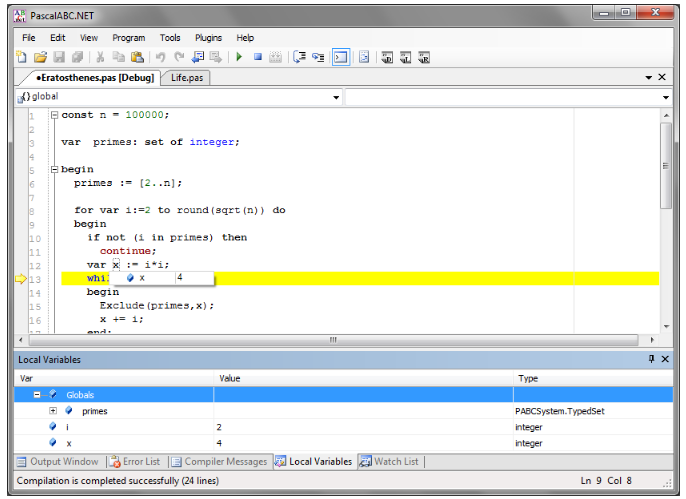
The new generation Pascal programming language combines the simplicity of classic Pascal, a great number of modern extensions, and the broad capabilities of Microsoft .NET Framework. Free, simple, and powerful IDE. Built-in form designer for rapid development of Windows desktop applications. Download the latest version of PascalABC.NET with a build-in form designer. Several extensions of the Pascal language, including the foreach operator, in-block variable definitions, auto type deduction in variable definitions, simplified syntax of units, method implementations inside classes and records, a new operator for object construction, anonymous classes, auto-classes, BigIntegers, etc. The most modern features of programming languages like n-dimensional dynamic arrays, generics, interfaces, operator overloading, exceptions, garbage collection, and lambda expressions. IDE with integrated debugger, IntelliSense system, code templates, and code auto-formatting.
|
PureScript:
About
PureScript is a strongly typed, purely functional programming language that compiles JavaScript. It enables developers to build robust web applications, web servers, and mobile apps using functional programming techniques. PureScript offers features such as algebraic data types, pattern matching, row polymorphism, extensible records, higher-kinded types, type classes with functional dependencies, and higher-rank polymorphism. The language emphasizes strong static typing and pure functions, ensuring code reliability and maintainability. Developers can compile PureScript code into readable JavaScript, facilitating seamless integration with existing JavaScript codebases. The ecosystem includes an extensive collection of libraries, excellent tooling, and editor support with instant rebuilds. An active community provides numerous learning resources, including the PureScript book, which offers practical projects for beginners.
|
Visual Studio Code:
About
Visual Studio Code (VS Code) is Microsoft’s open-source AI code editor designed to make coding faster, smarter, and more collaborative. It supports thousands of extensions and nearly every programming language, offering developers a lightweight yet powerful environment for writing, testing, and debugging code. With AI-powered features like GitHub Copilot, Next Edit Suggestions, and Agent Mode, VS Code helps you code with precision, automate complex tasks, and streamline development workflows. It integrates seamlessly with cloud services, remote repositories, and tools like Git, Docker, and Azure. The editor is fully customizable, allowing you to personalize your layout, color themes, and keyboard shortcuts. Whether coding locally or in the browser, VS Code delivers a complete development experience for individuals and teams alike.
|
||||
PascalABC.NET:
Platforms Supported
Windows
Supported
Mac
Not Supported
Linux
Supported
Cloud
Not Supported
On-Premises
Not Supported
iPhone
Not Supported
iPad
Not Supported
Android
Not Supported
Chromebook
Not Supported
|
PureScript:
Platforms Supported
Windows
Supported
Mac
Supported
Linux
Supported
Cloud
Not Supported
On-Premises
Not Supported
iPhone
Not Supported
iPad
Not Supported
Android
Not Supported
Chromebook
Not Supported
|
Visual Studio Code:
Platforms Supported
Windows
Supported
Mac
Supported
Linux
Supported
Cloud
Supported
On-Premises
Not Supported
iPhone
Not Supported
iPad
Not Supported
Android
Not Supported
Chromebook
Not Supported
|
||||
PascalABC.NET:
Audience
Companies and individuals in search of a solution to develop Windows desktop applications
|
PureScript:
Audience
Developers interested in a solution to build reliable and maintainable applications
|
Visual Studio Code:
Audience
Developers, data scientists, and engineering teams seeking a customizable, AI-powered code editor that enhances productivity, supports all major languages, and integrates seamlessly with cloud and collaboration tools
|
||||
PascalABC.NET:
Support
Phone Support
Not Supported
24/7 Live Support
Not Supported
Online
Supported
|
PureScript:
Support
Phone Support
Not Supported
24/7 Live Support
Not Supported
Online
Supported
|
Visual Studio Code:
Support
Phone Support
Not Supported
24/7 Live Support
Not Supported
Online
Supported
|
||||
PascalABC.NET:
API
Offers API
Not Supported
|
PureScript:
API
Offers API
Not Supported
|
Visual Studio Code:
API
Offers API
Supported
|
||||
PascalABC.NET:
Screenshots and Videos |
PureScript:
Screenshots and Videos |
Visual Studio Code:
Screenshots and Videos |
||||
PascalABC.NET:
Pricing
Free
Free Version
Supported
Free Trial
Not Supported
|
PureScript:
Pricing
No information available.
Free Version
Not Supported
Free Trial
Not Supported
|
Visual Studio Code:
Pricing
Free
Free Version
Supported
Free Trial
Not Supported
|
||||
PascalABC.NET:
Reviews/
|
PureScript:
Reviews/
|
Visual Studio Code:
Reviews/
|
||||
Visual Studio Code:
Pros & Cons from Real UsersPros
Cons
|
||||||
PascalABC.NET:
Training
Documentation
Supported
Webinars
Not Supported
Live Online
Not Supported
In Person
Not Supported
|
PureScript:
Training
Documentation
Supported
Webinars
Not Supported
Live Online
Not Supported
In Person
Not Supported
|
Visual Studio Code:
Training
Documentation
Supported
Webinars
Not Supported
Live Online
Not Supported
In Person
Not Supported
|
||||
PascalABC.NET:
Company InformationPascalABC.NET
pascalabc.net/en/
|
PureScript:
Company InformationPureScript
Founded: 2017
United States
www.purescript.org
|
Visual Studio Code:
Company InformationMicrosoft
Founded: 1975
United States
code.visualstudio.com
|
||||
PascalABC.NET:
Alternatives |
PureScript:
Alternatives |
Visual Studio Code:
Alternatives |
||||
|
PascalABC.NET:
|
PureScript:
|
Visual Studio Code:
|
||||
|
PascalABC.NET:
|
PureScript: |
Visual Studio Code:
|
||||
| PascalABC.NET: | PureScript: |
Visual Studio Code:
|
||||
|
PascalABC.NET:
|
PureScript: |
Visual Studio Code:
|
||||
PascalABC.NET:
Categories |
PureScript:
Categories |
Visual Studio Code:
Categories |
||||
Visual Studio Code:
Software Documentation Features
Access Roles / User Permissions
Supported
Automatic Documentation Generation
Supported
Collaboration Tools
Supported
Docs Web Hosting
Supported
Feedback Capture
Supported
Markdown Support
Supported
Multiple Formats Support
Supported
Multiple Versions Support
Supported
reStructured Text Support
Supported
Version Control
Supported
Webhooks
Supported
WYSIWIG Editor
Not Supported
Source Code Management Features
Access Controls/Permissions
Not Supported
Bug Tracking
Supported
Build Automation
Supported
Change Management
Supported
Code Review
Supported
Collaboration
Not Supported
Continuous Integration
Not Supported
Repository Management
Not Supported
Version Control
Not Supported
Text Editors Features
API
Supported
Auto-Complete
Supported
Code Folding
Supported
Column Editing
Supported
Customizable Themes
Supported
Debugging
Supported
Formatting / Table Editing
Supported
Keyboard Shortcuts
Supported
Multi-Monitor Editing
Supported
Syntax Highlighting
Supported
WYSIWYG
Supported
|
||||||
PascalABC.NET:
Integrations
Amazon CodeWhisperer
Not Supported
BlackBit VOID
Not Supported
BrowserQL
Not Supported
Claude Code
Not Supported
CodeAssist
Not Supported
CodeGeeX
Not Supported
Contentstack Canoe
Not Supported
GPT-5-Codex-Mini
Not Supported
GetGenerative.ai
Not Supported
GitHub Copilot
Not Supported
|
PureScript:
Integrations
Amazon CodeWhisperer
Not Supported
BlackBit VOID
Not Supported
BrowserQL
Not Supported
Claude Code
Not Supported
CodeAssist
Not Supported
CodeGeeX
Not Supported
Contentstack Canoe
Not Supported
GPT-5-Codex-Mini
Not Supported
GetGenerative.ai
Not Supported
GitHub Copilot
Not Supported
|
Visual Studio Code:
Integrations
Amazon CodeWhisperer
Supported
BlackBit VOID
Supported
BrowserQL
Supported
Claude Code
Supported
CodeAssist
Supported
CodeGeeX
Supported
Contentstack Canoe
Supported
GPT-5-Codex-Mini
Supported
GetGenerative.ai
Supported
GitHub Copilot
Supported
|
||||
|
PascalABC.NET:
|
PureScript:
|
Visual Studio Code:
|