Notezilla

Notezilla

Conceptworld Corporation
Outline

Outline

Gorillized Corporation
+
+

Related Products

  • DataImpulse
    31 Ratings
    Visit Website
  • Fathom
    7,732 Ratings
    Visit Website
  • Construction Daily Reports
    22 Ratings
    Visit Website
  • Google Workspace
    68,997 Ratings
    Visit Website
  • CompanyCam
    5,584 Ratings
    Visit Website
  • Nasdaq Metrio
    14 Ratings
    Visit Website
  • WEX Field Service Management
    67 Ratings
    Visit Website
  • Mentornity
    99 Ratings
    Visit Website
  • Portfolio Manager
    3 Ratings
    Visit Website
  • WebCatalog Desktop
    1 Rating
    Visit Website

About

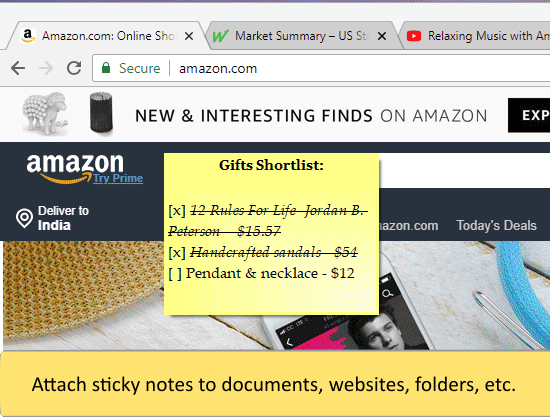
Notezilla is a sticky notes app for Windows & Phones designed to keep you well-equipped & well-organized. It lets you take quick notes on sticky notes (that look like 3M Post-It® Notes), right on your Windows desktop & gives you the best sticky notes experience. With the optional cloud synchronization feature, you can sync sticky notes between computers, access them from any smartphone using our free apps for iPhone/iPad, Android, etc or send sticky notes to any contact across the globe. Notezilla is a professionally designed, simple & elegant sticky notes software. Over the last 15 years, it has gained an excellent reputation (read customer reviews) from all over the world.

About

Outline is the ultimate productivity-boosting note-taking app for your Mac, iPad and iPhone. It allows you to effortlessly capture, organize, and sync your notes across devices. With 100% compatibility with OneNote, you can import and export seamlessly. Annotate PDFs, add images, and stay organized with folders and tags. Whether you prefer cloud storage or local storage, Outline offers flexible options. Upgrade your note-taking skills and gain full control over your digital workspace with this powerful app!

Platforms Supported

Windows
Mac
Linux
Cloud
On-Premises
iPhone
iPad
Android
Chromebook

Platforms Supported

Windows
Mac
Linux
Cloud
On-Premises
iPhone
iPad
Android
Chromebook

Audience

Anyone who wants to use sticky notes

Audience

Designed for professionals, students, and productivity enthusiasts. Sync, organize, and unlock your full potential with Outline

Support

Phone Support
24/7 Live Support
Online

Support

Phone Support
24/7 Live Support
Online

API

Offers API

API

Offers API

Screenshots and Videos

Screenshots and Videos

No images available

Pricing

$29.95/year/user
Free Version
Free Trial

Pricing

$4.99
Free Version
Free Trial

Reviews/Ratings

Overall 4.6 / 5
ease 4.6 / 5
features 4.6 / 5
design 4.4 / 5
support 4.6 / 5

Reviews/Ratings

Overall 5.0 / 5
ease 5.0 / 5
features 4.5 / 5
design 4.8 / 5
support 5.0 / 5

Pros & Cons from Real Users

Pros

  • Easy to use - intuitive. Highly Customizable and Lightweight. Sync between devices. Available across platforms and online as well. Frequent updates. Good support.
  • You can use it as notes or convert a series of items into a checklist to use for task management. Each sticky note can be assigned to a specific folder and have tags added. It feels very similar to Evernote in some regards, albeit significantly trimmed down in functionality. Notes can be starred for later and you can assign due dates with reminders to each note.
  • Create multiple notes Add reminders to notes Formatting options Sync across devices Also Available on mobile devices
  • #1- It's also available on mobile platforms. #1- Very convenient to add notes, the sticky notes are very attractive and catch your attention every time you open desktop. #3- Note reminder option is there, in case you missed it.
  • Notezilla is a very intuitive sticky notes app. It gives me each on-time reminder alarm. You can sync your notes between any devices. Notezilla app is available on cross platforms. Backup notes is also available.

Cons

  • No free personal version (only 30 day trial) - although there is a lifetime validity license at decent price.
  • The app looks unfinished. I know it's supposed to look like Post-it sticky notes, but that's no reason for there to be so much padding missing. If you use the checklist feature, there's practically no padding whatsoever between the checkbox and the edge of the sticky note. For notes that are checklists, the titles have a [x] in them to distinguish them from the others, but this looks awful and is pointless since every note shows a preview of the first line and you will see a [] in the first line of any note that has a checklist anyway. That itself also looks bad. Why not use a symbol like a checkmark or something? Titles have nearly no padding from the top of the notes either. While it's meant to look like a Post-it note, the illusion is entirely lost with the checklists and their highlighted boxes and the symbol on the other side of each line to let you know you can move the list items up and down. I'm really confused as to what they were going for, which makes it look even more like the app is unpolished and unfinished.
  • Expensive - the pricing is too high for such a basic utility
  • #1- We had a very positive overall experience with it.
  • Notezilla is a very intuitive app, I never had any bad experience.

Pros & Cons from Real Users

Pros

  • Organized Structure: Enables easy organization of notes by subject, topic, and detail. Multi-Platform Accessibility: Seamless access across devices for on-the-go studying. Rich Formatting for Visual Learning: Supports visual learners with diverse formatting options.
  • After buying a Macbook, I was looking for an alternative to my previous Windows app, and Outline managed to solve that problem. Yes, now I can combine work on two devices at once. On one hand, I make changes in Outline and on the other hand, I can edit my data in OneNote. I synchronize via OneDrive and also create local books in the app, which is nice too.
  • 1. Simple Organization 2. Anywhere Access 3. Text Enhancements 4. Efficient Search 5. Local Storage by default
  • Sleek interface, versatile organization through intuitive folders and pages, and seamless sync make Outline a standout choice. The app's powerful features, including dynamic to-do lists and highlighting capabilities, ensure an enhanced note-taking experience. Share Extensions make teamwork a breeze.

Cons

  • Subscription Model: Some advanced features locked behind a subscription. Initial Learning Curve: Adapting to hierarchical structure takes a bit of time.
  • I am deficient in the dark theme, and the fact that there is no way to draw small graphs or charts in the app.
  • 1. Subscription 2. Collaboration Features 3. Calendar
  • Occasional syncing delays can be a minor inconvenience.

Training

Documentation
Webinars
Live Online
In Person

Training

Documentation
Webinars
Live Online
In Person

Company Information

Conceptworld Corporation
Founded: 2000
India
www.conceptworld.com

Company Information

Gorillized Corporation
Founded: 2010
United States
www.outline.app

Alternatives

ShixxNOTE

ShixxNOTE

Mavel

Alternatives

Notability

Notability

Ginger Labs

Categories

Categories

Integrations

No info available.

Integrations

No info available.
Claim Notezilla and update features and information
Claim Outline and update features and information