ScratchboardGammadyne
|
||||||
Related Products
|
||||||
About
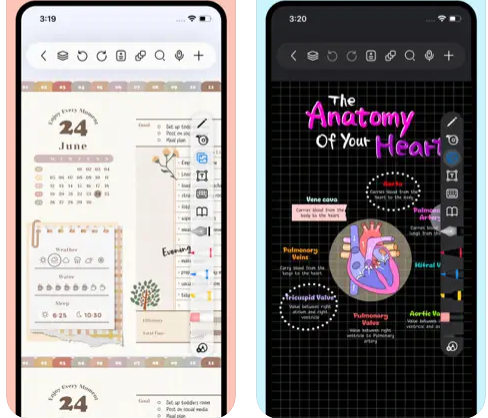
Freenotes offers a digital note-taking experience that blends the feel of writing on paper with powerful AI enhancements. You get realistic pen strokes that mimic lifelike handwriting as you sketch or take notes, along with tools like handwriting-to-text conversion, stickers, and various brush styles. Your notes sync via iCloud and multi-cloud backups. Freenotes supports PDF annotation, letting you mark up, highlight, and translate text directly in your documents; you can also insert hyperlinks to other pages or external web content. It enables picture-in-picture video mode and split-screen support so you can take notes while watching course videos or lectures. With its built-in AI assistant, you can take a screenshot or upload a document and receive instant answers or content summaries. To stay organized, notes can be grouped into folders, and a quick search lets you locate what you need fast.
|
About
Scratchboard is a Windows desktop organizer for storing and retrieving frequently used information. It arranges text in a hierarchical tree, allowing users to keep related details in separate branches and quickly locate them with search and bookmarks. Users can copy a branch’s text to the clipboard with a double-click, which can help when entering recurring information into forms or other applications. Editing tools include search and replace, macros, and spell checking. Scratchboard also supports encryption and password protection for stored information, along with interface skins. It can be used to organize reference notes, account details, software keys, contact information, and reusable text in one structured workspace. A free trial is available, and the product is offered as a paid Windows application.
|
|||||
Platforms Supported
Windows
Not Supported
Mac
Supported
Linux
Not Supported
Cloud
Not Supported
On-Premises
Not Supported
iPhone
Supported
iPad
Supported
Android
Not Supported
Chromebook
Not Supported
|
Platforms Supported
Windows
Supported
Mac
Not Supported
Linux
Not Supported
Cloud
Not Supported
On-Premises
Not Supported
iPhone
Not Supported
iPad
Not Supported
Android
Not Supported
Chromebook
Not Supported
|
|||||
Audience
Students and learners requiring a tool that captures handwriting, annotates PDFs, provides AI-powered summaries, and supports video and exam-style workflows
|
Audience
Individuals who organize reference information such as account details, contacts, links, software keys, and reusable text, including people who repeatedly enter information into forms.
|
|||||
Support
Phone Support
Not Supported
24/7 Live Support
Not Supported
Online
Supported
|
Support
Phone Support
Supported
24/7 Live Support
Not Supported
Online
Supported
|
|||||
API
Offers API
Not Supported
|
API
Offers API
Not Supported
|
|||||
Screenshots and Videos |
Screenshots and Videos |
|||||
Pricing
Free
Free Version
Supported
Free Trial
Not Supported
|
Pricing
$25
A Scratchboard license costs $25. The free trial lasts 45 days; some minor features are disabled during the trial.
Free Version
Not Supported
Free Trial
Supported
|
|||||
Reviews/
|
Reviews/
|
|||||
Training
Documentation
Supported
Webinars
Not Supported
Live Online
Not Supported
In Person
Not Supported
|
Training
Documentation
Not Supported
Webinars
Not Supported
Live Online
Not Supported
In Person
Not Supported
|
|||||
Company InformationFreenotes
China
apps.apple.com/us/app/freenotes-ai-notes-taking/id6464237904
|
Company InformationGammadyne
Founded: 1998
United States
www.gammadyne.com/sb.htm
|
|||||
Alternatives |
Alternatives |
|||||
|
|
|
|||||
|
|
||||||
|
|
||||||
Categories |
Categories |
|||||
Note-Taking Features
Categories / Organization
Supported
Clip From Web
Not Supported
Document Scanning
Not Supported
Formatting / Markdown
Not Supported
Handwriting
Not Supported
Hyperlinking
Supported
Image Insertion
Not Supported
List/Checklist Creation
Not Supported
Printing
Supported
Search
Supported
Sharing / Collaboration
Not Supported
Syncing
Not Supported
Templates
Not Supported
Voice Notes
Not Supported
|
||||||
Integrations
iCloud
Not Supported
|
||||||
|
|
|