NoteasticNoteastic OG
|
||||||
Related Products
|
||||||
About
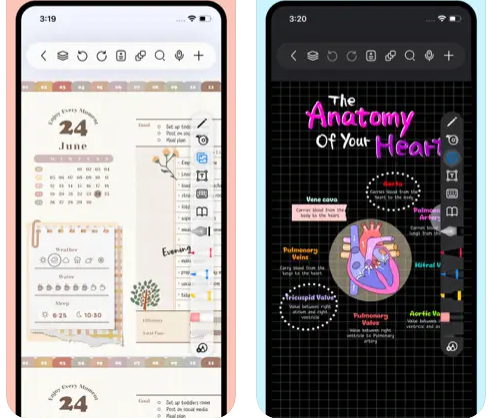
Freenotes offers a digital note-taking experience that blends the feel of writing on paper with powerful AI enhancements. You get realistic pen strokes that mimic lifelike handwriting as you sketch or take notes, along with tools like handwriting-to-text conversion, stickers, and various brush styles. Your notes sync via iCloud and multi-cloud backups. Freenotes supports PDF annotation, letting you mark up, highlight, and translate text directly in your documents; you can also insert hyperlinks to other pages or external web content. It enables picture-in-picture video mode and split-screen support so you can take notes while watching course videos or lectures. With its built-in AI assistant, you can take a screenshot or upload a document and receive instant answers or content summaries. To stay organized, notes can be grouped into folders, and a quick search lets you locate what you need fast.
|
About
Noteastic delivers the digital handwriting experience Windows users deserve. Engineered natively for the platform, it combines responsive pen input with an intuitive interface that doesn't get in your way.
Whether you're annotating research papers, capturing lecture notes, or sketching project ideas, Noteastic provides the tools you need without the bloat you don't. The app prioritizes performance — smooth inking, instant tool response, and efficient system resource usage set it apart from browser-based alternatives.
PDF workflows are seamless. Import documents, annotate with precision tools, and export marked-up versions to share with colleagues or classmates. The organizational library keeps your notebooks structured and accessible.
Key Features:
- Responsive pen, highlighter, and shape tools
- PDF import and annotation capabilities
- Notebook library with flexible organization
- Multiple paper styles and background options
- Native Windows performance (not a web app)
|
|||||
Platforms Supported
Windows
Not Supported
Mac
Supported
Linux
Not Supported
Cloud
Not Supported
On-Premises
Not Supported
iPhone
Supported
iPad
Supported
Android
Not Supported
Chromebook
Not Supported
|
Platforms Supported
Windows
Supported
Mac
Not Supported
Linux
Not Supported
Cloud
Not Supported
On-Premises
Not Supported
iPhone
Not Supported
iPad
Not Supported
Android
Not Supported
Chromebook
Not Supported
|
|||||
Audience
Students and learners requiring a tool that captures handwriting, annotates PDFs, provides AI-powered summaries, and supports video and exam-style workflows
|
Audience
Education sector
|
|||||
Support
Phone Support
Not Supported
24/7 Live Support
Not Supported
Online
Supported
|
Support
Phone Support
Not Supported
24/7 Live Support
Not Supported
Online
Supported
|
|||||
API
Offers API
Not Supported
|
API
Offers API
Not Supported
|
|||||
Screenshots and Videos |
Screenshots and Videos |
|||||
Pricing
Free
Free Version
Supported
Free Trial
Not Supported
|
Pricing
$0
Free Version
Supported
Free Trial
Not Supported
|
|||||
Reviews/
|
Reviews/
|
|||||
Pros & Cons from Real UsersPros
Cons
|
||||||
Training
Documentation
Supported
Webinars
Not Supported
Live Online
Not Supported
In Person
Not Supported
|
Training
Documentation
Not Supported
Webinars
Not Supported
Live Online
Supported
In Person
Not Supported
|
|||||
Company InformationFreenotes
China
apps.apple.com/us/app/freenotes-ai-notes-taking/id6464237904
|
Company InformationNoteastic OG
Founded: 2025
Austria
noteastic.app
|
|||||
Alternatives |
Alternatives |
|||||
|
|
||||||
|
|
||||||
Categories |
Categories |
|||||
Integrations
iCloud
Not Supported
|
||||||
|
|
|