Microsoft OneNote

Microsoft OneNote

Microsoft
4.8 out of 5 stars
Freenotes Microsoft OneNote

Related Products

  • Google Workspace
    4.6 out of 5 stars 69,294 Ratings
    Visit Website for Google Workspace
  • Construction Daily Reports
    4.3 out of 5 stars 22 Ratings
    Visit Website for Construction Daily Reports
  • CompanyCam
    4.7 out of 5 stars 5,588 Ratings
    Visit Website for CompanyCam
  • Fathom
    5.0 out of 5 stars 7,880 Ratings
    Visit Website for Fathom
  • Muzaic
    5.0 out of 5 stars 2 Ratings
    Visit Website for Muzaic
  • AestheticsPro
    4.5 out of 5 stars 745 Ratings
    Visit Website for AestheticsPro
  • Nasdaq Metrio
    4.5 out of 5 stars 14 Ratings
    Visit Website for Nasdaq Metrio
  • Portfolio Manager
    5.0 out of 5 stars 3 Ratings
    Visit Website for Portfolio Manager
  • ClickLearn
    4.4 out of 5 stars 67 Ratings
    Visit Website for ClickLearn
  • Docmosis
    4.9 out of 5 stars 51 Ratings
    Visit Website for Docmosis
Freenotes:

About

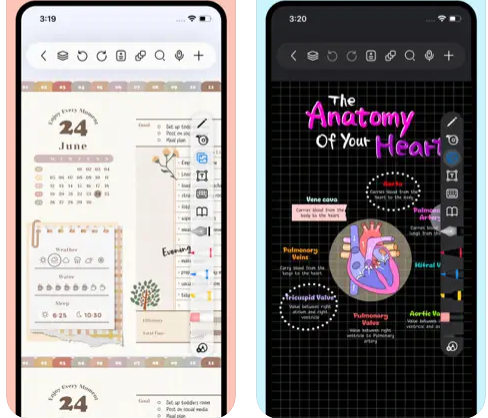
Freenotes offers a digital note-taking experience that blends the feel of writing on paper with powerful AI enhancements. You get realistic pen strokes that mimic lifelike handwriting as you sketch or take notes, along with tools like handwriting-to-text conversion, stickers, and various brush styles. Your notes sync via iCloud and multi-cloud backups. Freenotes supports PDF annotation, letting you mark up, highlight, and translate text directly in your documents; you can also insert hyperlinks to other pages or external web content. It enables picture-in-picture video mode and split-screen support so you can take notes while watching course videos or lectures. With its built-in AI assistant, you can take a screenshot or upload a document and receive instant answers or content summaries. To stay organized, notes can be grouped into folders, and a quick search lets you locate what you need fast.
Microsoft OneNote:

About

Microsoft OneNote is your all-in-one digital notebook for capturing ideas, organizing thoughts, and collaborating seamlessly. With Copilot in OneNote, you can draft plans, generate ideas, and structure your notes using simple natural-language prompts. Sketch, annotate, and highlight freely using digital ink that feels as natural as pen on paper. Share notebooks in real time to brainstorm, plan, or learn together with teammates, classmates, or family. Built-in voice transcription ensures you never miss key details from meetings or lectures. Whether at home, school, or work, OneNote helps you stay organized and creative across all your devices.
Freenotes:

Platforms Supported

Windows Not Supported
Mac Supported
Linux Not Supported
Cloud Not Supported
On-Premises Not Supported
iPhone Supported
iPad Supported
Android Not Supported
Chromebook Not Supported
Microsoft OneNote:

Platforms Supported

Windows Supported
Mac Supported
Linux Not Supported
Cloud Supported
On-Premises Not Supported
iPhone Supported
iPad Supported
Android Supported
Chromebook Not Supported
Freenotes:

Audience

Students and learners requiring a tool that captures handwriting, annotates PDFs, provides AI-powered summaries, and supports video and exam-style workflows
Microsoft OneNote:

Audience

Students, professionals, educators, and teams who need a smart, collaborative, and AI-powered notebook to capture ideas, organize projects, and enhance productivity across multiple devices
Freenotes:

Support

Phone Support Not Supported
24/7 Live Support Not Supported
Online Supported
Microsoft OneNote:

Support

Phone Support Not Supported
24/7 Live Support Not Supported
Online Supported
Freenotes:

API

Offers API Not Supported
Microsoft OneNote:

API

Offers API Not Supported
Freenotes:

Screenshots and Videos

Microsoft OneNote:

Screenshots and Videos

Freenotes:

Pricing

Free
Free Version Supported
Free Trial Not Supported
Microsoft OneNote:

Pricing

Free
Free Version Supported
Free Trial Supported
Freenotes:

Reviews/Ratings

Overall 0.0 / 5
ease 0.0 / 5
features 0.0 / 5
design 0.0 / 5
support 0.0 / 5

This software hasn't been reviewed yet. Be the first to provide a review:

Review this Software
Microsoft OneNote:

Reviews/Ratings

Overall 4.8 / 5
ease 4.8 / 5
features 4.7 / 5
design 4.8 / 5
support 4.6 / 5
Microsoft OneNote:

Pros & Cons from Real Users

Pros

  • This is an amazing tool in keeping notes and documents at your fingertips! Easy to use, easy to add sections & pages, love this tool to keep notes and stay organized!
  • - It is an easy-to-use tool that helps tremendously in organizing notes. - It has useful tools that fulfill the requirements for both personal and professional use. - Different sections can be created to organize and separate the notes. - The user interface of the application is fluid to use because of the animation and looks pleasing to the eyes. - It autosaves the notes, which is lifesaver features in times when the system shuts down abruptly.
  • I can sync my notes on my PC and access them on my phone very quickly and easily. Creating notes with images and links is fun and works well. Best of all it syncs to OneDrive to access all your PC files on your phone.
  • Syncs between devices. Works great with keyboards, styluses, and finger inputs. Many drawing options. Can add images, audio, documents.
  • Our organization is using OneNote to manage employee documents in a secure and organized manner. It is beneficial for saving the data and images on a secured office 365 cloud. We can create a customize graphical dashboard to manage and analyze the activities. We can save the data by adding multiple specific tabs with their titles. We can share the data/files across the organization. - Great application for documentation - Customizable graphical dashboard to analyze the progress/records. - Data saving and sharing feature. - Searching capability is incredible. - We can create the slides for representation - Friendly user interface and easy to use. - Open-source application - Cross-platform and highly secured Office 365 tool - Mobile version

Cons

  • No cons that I can think of honestly. I love this tool!
  • - It limits the user in terms of integration, as it does not support third-party integration with many applications other than Microsoft's applications.
  • Sometimes syncing can be slow and there are not enough sharing options like other note-taking apps.
  • File size can get large. There is a bug (?) on android where typing with a keyboard does not allow you to use ctrl+b, ctrl+i, ctrl+u, ctrl+arrow left or right and other common shortcuts. I can't fathom why!!
  • Nothing to dislike with OneNote. Everything is working fine for me. I love this product.
Freenotes:

Training

Documentation Supported
Webinars Not Supported
Live Online Not Supported
In Person Not Supported
Microsoft OneNote:

Training

Documentation Supported
Webinars Not Supported
Live Online Not Supported
In Person Not Supported
Freenotes:

Company Information

Freenotes
China
apps.apple.com/us/app/freenotes-ai-notes-taking/id6464237904
Microsoft OneNote:

Company Information

Microsoft
Founded: 1975
United States
www.onenote.com
Freenotes:

Alternatives

Goodnotes

Goodnotes

4.5 out of 5 stars
Microsoft OneNote:

Alternatives

Dropbox

Dropbox

4.5 out of 5 stars
Freenotes:
Kilonotes

Kilonotes

Hefei Stack Top Information Technology
Microsoft OneNote:
Notion

Notion

Notion Labs
4.7 out of 5 stars
Freenotes:
Microsoft OneNote:
Apple Notes

Apple Notes

Apple
4.1 out of 5 stars
Freenotes:
Microsoft OneNote:
Outline

Outline

Gorillized Corporation
5.0 out of 5 stars
Freenotes:
Notability

Notability

Ginger Labs
4.8 out of 5 stars
Microsoft OneNote:
Noteastic

Noteastic

Noteastic OG
5.0 out of 5 stars
Freenotes:

Categories

Note-Taking Supported
Microsoft OneNote:

Categories

Corporate Wiki Supported
Lesson Planning Supported
Note-Taking Supported
Productivity Supported
Freenotes:

Integrations

Accops HySecure Not Supported
AlphaSense Not Supported
Cyfe Not Supported
Desktop.com Not Supported
FastStone Capture Not Supported
File Repair Not Supported
GB Network Solutions Not Supported
Igloo Not Supported
Legal Files Not Supported
Microsoft 365 Not Supported
Microsoft 365 Copilot Not Supported
Microsoft 365 Copilot Analyst Not Supported
Microsoft Loop Not Supported
My ConneX Not Supported
Nango Not Supported
Refold Not Supported
Storyals Not Supported
Unabyss Not Supported
WinJur Not Supported
iCloud Supported
Microsoft OneNote:

Integrations

Accops HySecure Supported
AlphaSense Supported
Cyfe Supported
Desktop.com Supported
FastStone Capture Supported
File Repair Supported
GB Network Solutions Supported
Igloo Supported
Legal Files Supported
Microsoft 365 Supported
Microsoft 365 Copilot Supported
Microsoft 365 Copilot Analyst Supported
Microsoft Loop Supported
My ConneX Supported
Nango Supported
Refold Supported
Storyals Supported
Unabyss Supported
WinJur Supported
iCloud Not Supported
Freenotes:
Claim Freenotes and update features and information
Microsoft OneNote:
Claim Microsoft OneNote and update features and information