HideNStick NotesCode A Program Studio
|
||||||
| Freenotes | HideNStick Notes | |||||
|---|---|---|---|---|---|---|
Related Products
|
||||||
Freenotes:
About
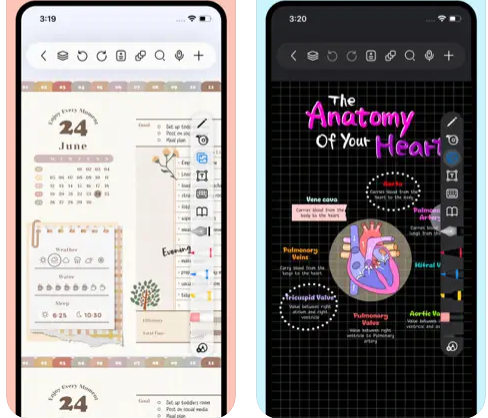
Freenotes offers a digital note-taking experience that blends the feel of writing on paper with powerful AI enhancements. You get realistic pen strokes that mimic lifelike handwriting as you sketch or take notes, along with tools like handwriting-to-text conversion, stickers, and various brush styles. Your notes sync via iCloud and multi-cloud backups. Freenotes supports PDF annotation, letting you mark up, highlight, and translate text directly in your documents; you can also insert hyperlinks to other pages or external web content. It enables picture-in-picture video mode and split-screen support so you can take notes while watching course videos or lectures. With its built-in AI assistant, you can take a screenshot or upload a document and receive instant answers or content summaries. To stay organized, notes can be grouped into folders, and a quick search lets you locate what you need fast.
|
HideNStick Notes:
About
HideNStick Notes is a Windows sticky-notes application that keeps notes in a slim rail along the edge of the screen and opens it with a double edge gesture or keyboard shortcut. Users can create up to six notes with unlimited tabs, type into notes that tuck away when dismissed, and pin notes above other apps, resize them or show them full-screen. The app supports rich-text formatting, checklists, code blocks, colors, pasted images, and search across notes and tabs. A quick-capture shortcut can save selected text from other applications. Notes are stored locally on the PC, with automatic backup and restore, and the app works offline without an account. HideNStick Notes is designed for Windows 10 version 1809 or later and Windows 11, for people who want quick reminders, reference material, and lightweight task notes without leaving separate note windows on the desktop.
|
|||||
Freenotes:
Platforms Supported
Windows
Not Supported
Mac
Supported
Linux
Not Supported
Cloud
Not Supported
On-Premises
Not Supported
iPhone
Supported
iPad
Supported
Android
Not Supported
Chromebook
Not Supported
|
HideNStick Notes:
Platforms Supported
Windows
Supported
Mac
Not Supported
Linux
Not Supported
Cloud
Not Supported
On-Premises
Not Supported
iPhone
Not Supported
iPad
Not Supported
Android
Not Supported
Chromebook
Not Supported
|
|||||
Freenotes:
Audience
Students and learners requiring a tool that captures handwriting, annotates PDFs, provides AI-powered summaries, and supports video and exam-style workflows
|
HideNStick Notes:
Audience
Windows users who want a cleaner, more organized desktop. Ideal for professionals, students, developers, and anyone who uses sticky notes for reminders or quick notes but wants to keep their workspace clutter-free.
|
|||||
Freenotes:
Support
Phone Support
Not Supported
24/7 Live Support
Not Supported
Online
Supported
|
HideNStick Notes:
Support
Phone Support
Not Supported
24/7 Live Support
Not Supported
Online
Supported
|
|||||
Freenotes:
API
Offers API
Not Supported
|
HideNStick Notes:
API
Offers API
Not Supported
|
|||||
Freenotes:
Screenshots and Videos |
HideNStick Notes:
Screenshots and Videos |
|||||
Freenotes:
Pricing
Free
Free Version
Supported
Free Trial
Not Supported
|
HideNStick Notes:
Pricing
$3.99 one-time
A 15-day full-feature trial is free. The promotional price is $3.99 one-time through December 5, 2026; the regular price is $4.99 one-time. No subscription is required.
Free Version
Not Supported
Free Trial
Supported
|
|||||
Freenotes:
Reviews/
|
HideNStick Notes:
Reviews/
|
|||||
Freenotes:
Training
Documentation
Supported
Webinars
Not Supported
Live Online
Not Supported
In Person
Not Supported
|
HideNStick Notes:
Training
Documentation
Not Supported
Webinars
Not Supported
Live Online
Not Supported
In Person
Not Supported
|
|||||
Freenotes:
Company InformationFreenotes
China
apps.apple.com/us/app/freenotes-ai-notes-taking/id6464237904
|
HideNStick Notes:
Company InformationCode A Program Studio
India
hidenstick.codeaprogram.dev
|
|||||
Freenotes:
Alternatives |
HideNStick Notes:
AlternativesNo Alternatives
|
|||||
|
Freenotes:
|
||||||
| Freenotes: | ||||||
| Freenotes: | ||||||
|
Freenotes:
|
HideNStick Notes: | |||||
Freenotes:
Categories |
HideNStick Notes:
Categories |
|||||
| Freenotes: |
HideNStick Notes:
Integrations
iCloud
Not Supported
|
|||||
|
Freenotes:
|
HideNStick Notes:
|