FancyZonesMicrosoft
|
||||||
Related Products
|
||||||
About
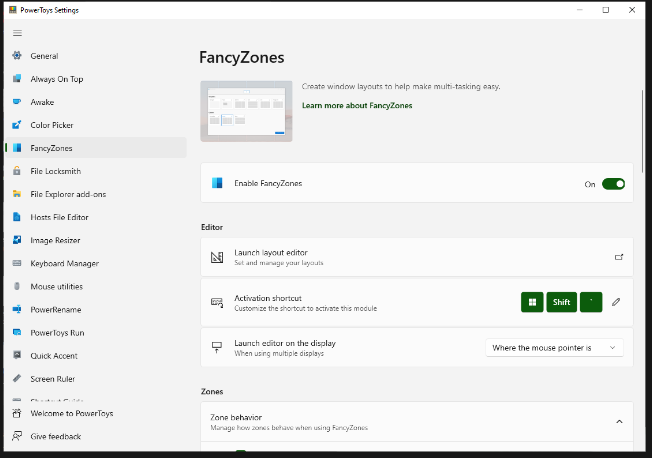
FancyZones is a window manager utility for arranging and snapping windows into efficient layouts to improve the speed of your workflow and restore layouts quickly. FancyZones allows you to define a set of zone locations to be used as targets for Windows on your desktop. When you drag a window into a zone or enter the associated keyboard shortcut, the window is resized and repositioned to fill that zone. You can also trigger zone selection mode by clicking the non-primary mouse button if the "Use non-primary mouse button to toggle zone activation" setting is enabled. If two zones are adjacent, a window can be snapped to the sum of their area (rounded to the minimum rectangle that contains both). When the mouse cursor is near the common edge of two zones, both zones are activated simultaneously, allowing you to drop the window into both zones. You can drag the window until one zone is activated, then press and hold the control key while dragging the window to select multiple zones.
|
About
nudge is the AI task scheduler that plans your week so you do not have to. Drop your Markdown tasks and nudge places them in your calendar, optimized for your work patterns, deep work zones, and deadlines. It is built to remove the “thinking tax” of deciding what to work on next, dragging tasks into calendar slots, rebuilding schedules when things change, or spending hours configuring another productivity system. Tasks are ordered by deadline and priority, then placed in 30-minute slots that respect deep-work zones, fixed events, sleep, meals, buffers, max work streaks, and pre-bedtime time you want to keep clear. Users can set working hours, deep-work zones, lunch, fixed events, weekday and weekend routines, and Nudge adapts the schedule around them every week. The Kanban view keeps status simple with three columns, Not started, In progress, and Done, using the same tasks as the calendar so users can choose whether to view work by what is active or when it is scheduled.
|
|||||
Platforms Supported
Windows
Supported
Mac
Not Supported
Linux
Not Supported
Cloud
Not Supported
On-Premises
Not Supported
iPhone
Not Supported
iPad
Not Supported
Android
Not Supported
Chromebook
Not Supported
|
Platforms Supported
Windows
Not Supported
Mac
Not Supported
Linux
Not Supported
Cloud
Supported
On-Premises
Not Supported
iPhone
Not Supported
iPad
Not Supported
Android
Not Supported
Chromebook
Not Supported
|
|||||
Audience
Anyone searching for a solution to optimize their workflow by improving control over windows and layouts
|
Audience
Solo knowledge workers, students, and indie builders who need AI to turn Markdown task lists into realistic weekly schedules
|
|||||
Support
Phone Support
Supported
24/7 Live Support
Not Supported
Online
Supported
|
Support
Phone Support
Not Supported
24/7 Live Support
Not Supported
Online
Supported
|
|||||
API
Offers API
Not Supported
|
API
Offers API
Not Supported
|
|||||
Screenshots and Videos |
Screenshots and Videos |
|||||
Pricing
Free
Free Version
Supported
Free Trial
Not Supported
|
Pricing
$5 per month
Free Version
Not Supported
Free Trial
Supported
|
|||||
Reviews/
|
Reviews/
|
|||||
Training
Documentation
Supported
Webinars
Supported
Live Online
Not Supported
In Person
Supported
|
Training
Documentation
Supported
Webinars
Not Supported
Live Online
Supported
In Person
Not Supported
|
|||||
Company InformationMicrosoft
United States
learn.microsoft.com/en-us/windows/powertoys/fancyzones
|
Company Informationnudge
United States
nudgetaskai.com
|
|||||
Alternatives |
Alternatives |
|||||
|
|
|
|||||
|
|
||||||
|
|
||||||
Categories |
Categories |
|||||
Integrations
Markdown
Not Supported
Supabase
Not Supported
|
||||||
|
|
|