ExpoExpo.dev
|
RadonSoftware Mansion
|
|||||
Related Products
|
||||||
About
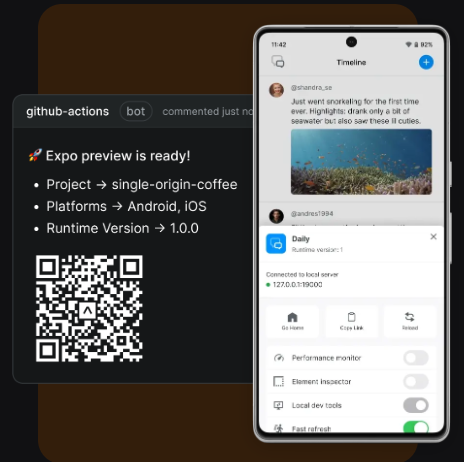
Expo is an open source platform that enables developers to create universal native apps using React. It offers a comprehensive ecosystem of tools and services designed to streamline the development, review, and deployment processes. With Expo, developers can initialize new projects or integrate existing React Native projects, utilizing features like file-based routing and TypeScript support to build stack and modal screens with minimal boilerplate. It provides fast refresh capabilities, allowing real-time updates on devices through the Expo Go app. Developers have the flexibility to use any library, SDK, or write custom native code, ensuring no limitations in accessing device APIs. Expo facilitates team collaboration by enabling role-based access, QR code generation for feature previews, and integration with GitHub for streamlined pull request reviews.
|
About
Radon is a Visual Studio Code and Cursor extension that turns a code editor into a complete IDE for React Native and Expo apps. It helps developers build better apps faster by bringing previews, debugging, navigation, logs, network inspection, component inspection, device controls, and AI assistance directly into the editor. Radon runs the iOS Simulator and Android emulator inside the Visual Studio Code or Cursor project, so developers can see the app close to the codebase instead of constantly switching windows. It's built-in previews make it possible to develop components in isolation, while the element inspector lets users click an element in the preview and jump directly to the file where the React Native component is defined. The debugger supports React Native breakpoints inside Visual Studio Code with no extra setup, automatically stopping at runtime exceptions and showing the exact line of code where they happened.
|
|||||
Platforms Supported
Windows
Supported
Mac
Supported
Linux
Supported
Cloud
Supported
On-Premises
Not Supported
iPhone
Supported
iPad
Supported
Android
Supported
Chromebook
Not Supported
|
Platforms Supported
Windows
Supported
Mac
Supported
Linux
Supported
Cloud
Not Supported
On-Premises
Not Supported
iPhone
Not Supported
iPad
Not Supported
Android
Not Supported
Chromebook
Not Supported
|
|||||
Audience
App developers searching for a solution to build, test, and deploy React-based applications efficiently
|
Audience
React Native and Expo developers seeking an integrated IDE experience for previewing, debugging, inspecting, and optimizing mobile applications
|
|||||
Support
Phone Support
Not Supported
24/7 Live Support
Not Supported
Online
Supported
|
Support
Phone Support
Not Supported
24/7 Live Support
Not Supported
Online
Supported
|
|||||
API
Offers API
Supported
|
API
Offers API
Not Supported
|
|||||
Screenshots and Videos |
Screenshots and Videos |
|||||
Pricing
$99 per month
Free Version
Supported
Free Trial
Not Supported
|
Pricing
$21 per month
Free Version
Supported
Free Trial
Supported
|
|||||
Reviews/
|
Reviews/
|
|||||
Pros & Cons from Real UsersPros
Cons
|
||||||
Training
Documentation
Supported
Webinars
Not Supported
Live Online
Not Supported
In Person
Not Supported
|
Training
Documentation
Supported
Webinars
Not Supported
Live Online
Not Supported
In Person
Not Supported
|
|||||
Company InformationExpo.dev
United States
expo.dev/
|
Company InformationSoftware Mansion
Founded: 2012
Poland
radon.swmansion.com
|
|||||
Alternatives |
Alternatives |
|||||
|
|
||||||
|
|
|
|||||
Categories |
Categories |
|||||
Integrations
CatDoes
Supported
Cursor
Not Supported
Expo
Not Supported
GitHub
Supported
JavaScript
Supported
OnSpace AI
Supported
Radon
Supported
React Native
Not Supported
TypeScript
Supported
Visual Studio Code
Not Supported
|
Integrations
CatDoes
Not Supported
Cursor
Supported
Expo
Supported
GitHub
Not Supported
JavaScript
Not Supported
OnSpace AI
Not Supported
Radon
Not Supported
React Native
Supported
TypeScript
Not Supported
Visual Studio Code
Supported
|
|||||
|
|
|