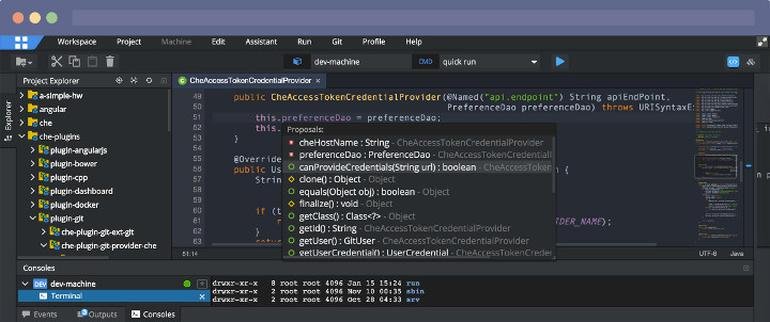
Eclipse IDE

Eclipse IDE

Eclipse Foundation
4.5 out of 5 stars
Geany

Geany

5.0 out of 5 stars
Eclipse IDE Geany

Related Products

  • Parasoft
    4.6 out of 5 stars 152 Ratings
    Visit Website for Parasoft
  • DbVisualizer
    4.8 out of 5 stars 593 Ratings
    Visit Website for DbVisualizer
  • TinyPNG
    4.7 out of 5 stars 73 Ratings
    Visit Website for TinyPNG
  • Google Cloud Run
    4.5 out of 5 stars 352 Ratings
    Visit Website for Google Cloud Run
  • Retool
    4.6 out of 5 stars 608 Ratings
    Visit Website for Retool
  • Okyline
    5.0 out of 5 stars 2 Ratings
    Visit Website for Okyline
  • Source Defense
    5.0 out of 5 stars 7 Ratings
    Visit Website for Source Defense
  • NodeMaven
    4.8 out of 5 stars 1,094 Ratings
    Visit Website for NodeMaven
  • Anaconda
    4.4 out of 5 stars 626 Ratings
    Visit Website for Anaconda
  • Boostero
    4.2 out of 5 stars 65 Ratings
    Visit Website for Boostero
Eclipse IDE:

About

Eclipse IDE The Leading Open Platform for Professional Developers used in computer programming. Better Than Ever. The Eclipse IDE delivers what you need to rapidly innovate. Easier IDE configuration The Eclipse IDE Installer 2020-09 and several packages now include a Java Runtime Environment (JRE). Improved theming and styling. Improved Windows dark theme and GTK light theme. Moving to bleeding edge. Eclipse IDE now needs Java 11 as a minimum version to run on, but you can compile any version as usual. New experimental features. Support for aarch64. Linux support landed this version. Node.js is now embedded For all our LSP-based toolings, Node.js is now embedded to make things work out of the box Free and open source Free and open source; released under the terms of the Eclipse Public License 2.0. Powered by Participation. A vast ecosystem of plugins from an active community
Geany:

About

Geany is a powerful, stable and lightweight programmer's text editor that provides tons of useful features without bogging down your workflow. It runs on Linux, Windows and MacOS is translated into over 40 languages, and has built-in support for more than 50 programming languages. One the primary reasons for Geany's existence is that there is a need for a decent, GUI, lightweight, cross-platform, flexible and powerful IDE/editor. Many editors meet one or more of these requirements but fall short on others. Using the GPL v2 license, Geany assures that not only can you customize and hack it, but that everyone benefits from changes the community makes. Many parts of Geany are heavily customizable like color themes (Geany Themes) or adding new filetypes. Furthermore, Geany provides many settings to let you adjust it to your needs and preferences. Many supported filetypes including popular programming languages like C, Java, PHP, HTML, JavaScript, etc.
Eclipse IDE:

Platforms Supported

Windows Not Supported
Mac Not Supported
Linux Not Supported
Cloud Supported
On-Premises Not Supported
iPhone Not Supported
iPad Not Supported
Android Not Supported
Chromebook Not Supported
Geany:

Platforms Supported

Windows Supported
Mac Supported
Linux Supported
Cloud Not Supported
On-Premises Not Supported
iPhone Not Supported
iPad Not Supported
Android Not Supported
Chromebook Not Supported
Eclipse IDE:

Audience

Professional developers looking for an integrated development environment (IDE) used in computer programming
Geany:

Audience

Developers searching for a programmer's text editor designed to optimize their workflow
Eclipse IDE:

Support

Phone Support Not Supported
24/7 Live Support Not Supported
Online Supported
Geany:

Support

Phone Support Not Supported
24/7 Live Support Not Supported
Online Supported
Eclipse IDE:

API

Offers API Not Supported
Geany:

API

Offers API Supported
Eclipse IDE:

Screenshots and Videos

Geany:

Screenshots and Videos

Eclipse IDE:

Pricing

No information available.
Free Version Not Supported
Free Trial Not Supported
Geany:

Pricing

No information available.
Free Version Not Supported
Free Trial Not Supported
Eclipse IDE:

Reviews/Ratings

Overall 4.5 / 5
ease 4.5 / 5
features 4.9 / 5
design 4.3 / 5
support 4.6 / 5
Geany:

Reviews/Ratings

Overall 5.0 / 5
ease 4.0 / 5
features 4.0 / 5
design 4.0 / 5
support 3.0 / 5
Eclipse IDE:

Pros & Cons from Real Users

Pros

  • 1. It is a solid and robust IDE for software development. 2. It has language support for almost all the programming languages like C, C++, Java, Python and JavaScript. 3. The community version is free to use for personal use. 4. It has a lot of room for extension support and integrations.
  • The Eclipse IDE is a fairly simple IDE that has many features and plugins, making it a great option for both professional and amateur programmers. I have used multiple IDEs over the years, and I personally think that for the price of ZERO dollars, it’s a fabulous option. The ability to have so many different languages makes it very flexible for those programmers who don’t just program a single language. The user base if very large, so it is easy to get help learning the software.
  • 1. Open source programming editor tool. 2. It worked for multiple programming languages (like, PHP, Java, Python, .Net) and operating system. 3. Simple layout, no complex options are provided. 4. Easily integrate with Maven. 5. Advanced debugging options 6. Good project management. 7. Easily integration of the Version Control System, GIT. 8. Boot up time is short compared to other IDE. 9. Features extension by plugins 10. Simple, which makes development fast. 11. Error notification feature is awesome and very helpful. 12. Integration with Jenkins.
  • 1. I learnt whole Java using Eclipse IDE, it was very easy for me to use it, 2. You get code suggestions as you type the code, making it easier to do coding, 3. Compilation errors are shown instantly when you write the code, like it always tells you if any variable can hold null value or if any unused import or variable is present or if any variable has not been initialized, 4. You can easily integrate SonarLint, JUnit, Cobertura etc.,
  • It is open-source with support for a lot of plugins that help you expand the scope of the IDE. It provides a single window to build your application - coding with auto completion, debugging, and even testing and deploying. I like that we can integrate Eclipse with third-party apps like GitHub, which is quite helpful. Plus, it's free!

Cons

  • 1. The user interface of the application is a bit outdated. 2. It consumes a lot of RAM while running.
  • There are some clunky things with the software. Back when I was taking a college course, my group and I had finished a piece of code and it was working on everyone’s machine but mine. (Even tho we all had the same version of eclipse, and had simply pulled the code down from GitHub). We even tried to just copy and paste but it didn’t work. I eventually had to go clear some cache in the system folders and reinstall the software before it would work.
  • According to my real life experience, there is nothing to dislike. Everything looks good.
  • If it includes Artificial Intelligence also like IntelliJ IDEA , then it will be a complete package.
  • It takes up a lot of CPU usage to run making it slow. Sometimes it also crashes while working, which can be annoying. The UI isn't beginner-friendly either, and the software support is limited.
Geany:

Pros & Cons from Real Users

Pros

  • Block editing, macros, plugins, highly configurable. once you explore all the capabilities, you may change your editing habits. It's for free!

Cons

  • Takes a while, to learn all the features, but it's worth it. Actually, I do not miss any editing features for my daily work.
Eclipse IDE:

Training

Documentation Supported
Webinars Not Supported
Live Online Not Supported
In Person Not Supported
Geany:

Training

Documentation Supported
Webinars Not Supported
Live Online Not Supported
In Person Not Supported
Eclipse IDE:

Company Information

Eclipse Foundation
Canada
www.eclipse.org/eclipseide/
Geany:

Company Information

Geany
Founded: 2021
www.geany.org
Eclipse IDE:

Alternatives

Android Studio

Android Studio

4.6 out of 5 stars
Geany:

Alternatives

Eclipse IDE:
Apache NetBeans

Apache NetBeans

Apache Software Foundation
4.5 out of 5 stars
Geany:
Kate

Kate

KDE
5.0 out of 5 stars
Eclipse IDE:
CLion

CLion

JetBrains
Geany:
Visual Studio Code

Visual Studio Code

Microsoft
4.8 out of 5 stars
Eclipse IDE:
Eclipse Theia

Eclipse Theia

Eclipse Foundation
Geany:
Apache NetBeans

Apache NetBeans

Apache Software Foundation
4.5 out of 5 stars
Eclipse IDE:
MyEclipse

MyEclipse

Genuitec
Geany:
Caret

Caret

5.0 out of 5 stars
Eclipse IDE:

Categories

Code Editors Supported
IDE Supported
Geany:

Categories

Code Editors Supported
HTML Editors Supported
IDE Supported
JSON Editors Supported
Text Editors Supported
Eclipse IDE:

Application Development Features

Access Controls/Permissions Not Supported
Code Assistance Not Supported
Code Refactoring Not Supported
Collaboration Tools Supported
Compatibility Testing Not Supported
Data Modeling Not Supported
Debugging Not Supported
Deployment Management Not Supported
Graphical User Interface Not Supported
Mobile Development Not Supported
No-Code Not Supported
Reporting/Analytics Not Supported
Software Development Supported
Source Control Not Supported
Testing Management Not Supported
Version Control Not Supported
Web App Development Supported
Eclipse IDE:

Integrations

C Supported
C++ Supported
CSS Supported
HTML Supported
Java Supported
JavaScript Supported
PHP Supported
Racket Supported
Capital Embedded AR Classic Supported
CodeSonar Supported
Erlang Not Supported
EvoSuite Supported
JProfiler Supported
RKTracer Supported
Rocket COBOL Supported
Rocket Enterprise Suite Supported
Rust Not Supported
SecurityBridge Supported
Snyk Supported
SoftSpell Supported
Geany:

Integrations

C Supported
C++ Supported
CSS Supported
HTML Supported
Java Supported
JavaScript Supported
PHP Supported
Racket Supported
Capital Embedded AR Classic Not Supported
CodeSonar Not Supported
Erlang Supported
EvoSuite Not Supported
JProfiler Not Supported
RKTracer Not Supported
Rocket COBOL Not Supported
Rocket Enterprise Suite Not Supported
Rust Supported
SecurityBridge Not Supported
Snyk Not Supported
SoftSpell Not Supported
Eclipse IDE:
Claim Eclipse IDE and update features and information
Geany:
Claim Geany and update features and information