Related Products
|
||||||
About
Crade is a native AI screen assistant for Mac and Windows that sees what is on your screen and helps you get things done. It is designed for everyday situations such as spreadsheets, writing help, forms, code errors, documents, data analysis, translation, and research. Instead of requiring setup or plugins, Crade works in three simple steps: download the app, sign in with Google or email, and ask anything about the content already visible on the screen. The assistant understands code, charts, errors, articles, foreign-language documents, Excel formulas, and other on-screen information, then gives users a real answer based on the context of what they are working on. Crade can help interpret error messages, explain documents, assist with writing, analyze data, answer questions about articles, and support practical work without forcing users to copy and paste everything into a separate chat.
|
About
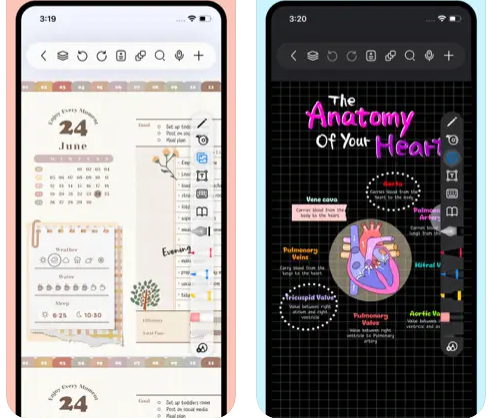
Freenotes offers a digital note-taking experience that blends the feel of writing on paper with powerful AI enhancements. You get realistic pen strokes that mimic lifelike handwriting as you sketch or take notes, along with tools like handwriting-to-text conversion, stickers, and various brush styles. Your notes sync via iCloud and multi-cloud backups. Freenotes supports PDF annotation, letting you mark up, highlight, and translate text directly in your documents; you can also insert hyperlinks to other pages or external web content. It enables picture-in-picture video mode and split-screen support so you can take notes while watching course videos or lectures. With its built-in AI assistant, you can take a screenshot or upload a document and receive instant answers or content summaries. To stay organized, notes can be grouped into folders, and a quick search lets you locate what you need fast.
|
|||||
Platforms Supported
Windows
Mac
Linux
Cloud
On-Premises
iPhone
iPad
Android
Chromebook
|
Platforms Supported
Windows
Mac
Linux
Cloud
On-Premises
iPhone
iPad
Android
Chromebook
|
|||||
Audience
Students, professionals, and everyday computer users who need a screen-aware AI assistant to explain, analyze, translate, and troubleshoot what they are working on
|
Audience
Students and learners requiring a tool that captures handwriting, annotates PDFs, provides AI-powered summaries, and supports video and exam-style workflows
|
|||||
Support
Phone Support
24/7 Live Support
Online
|
Support
Phone Support
24/7 Live Support
Online
|
|||||
API
Offers API
|
API
Offers API
|
|||||
Screenshots and Videos |
Screenshots and Videos |
|||||
Pricing
$7.99 per month
Free Version
Free Trial
|
Pricing
Free
Free Version
Free Trial
|
|||||
Reviews/
|
Reviews/
|
|||||
Training
Documentation
Webinars
Live Online
In Person
|
Training
Documentation
Webinars
Live Online
In Person
|
|||||
Company InformationCrade
United States
www.crade.ai/
|
Company InformationFreenotes
China
apps.apple.com/us/app/freenotes-ai-notes-taking/id6464237904
|
|||||
Alternatives |
Alternatives |
|||||
|
|
||||||
Categories |
Categories |
|||||
|
|
|