Nimble CommanderMichael Kazakov
|
||||||
Related Products
|
||||||
About
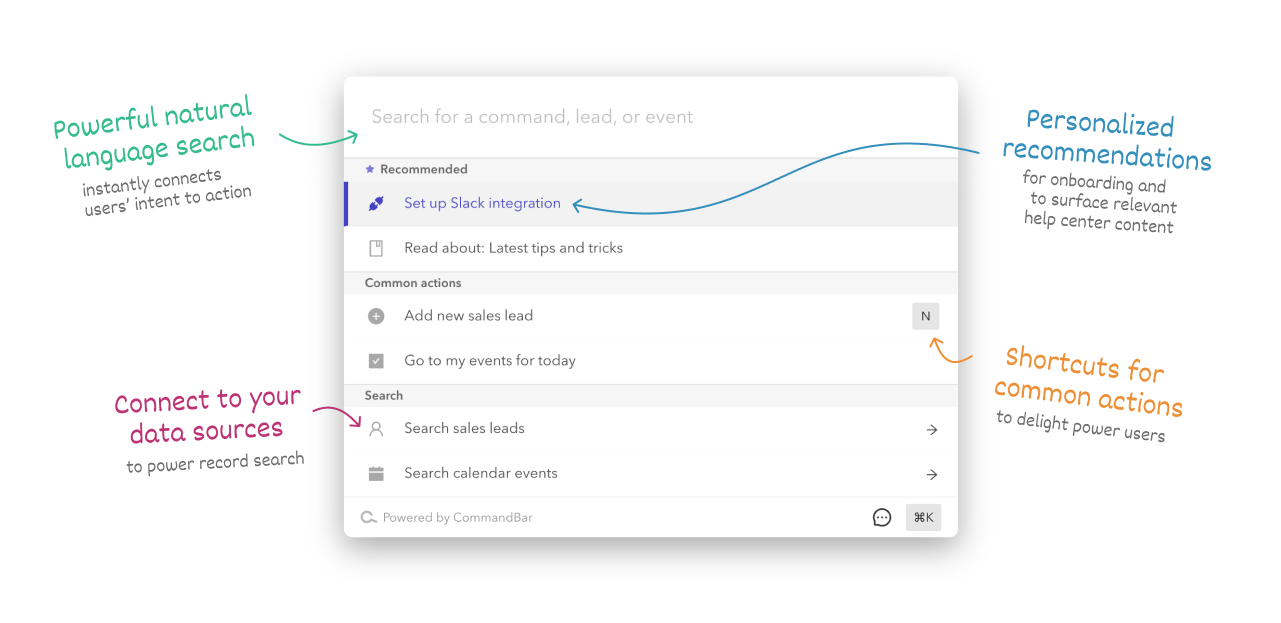
CommandBar will make your app easier to learn, so new users will convert better and require less onboarding. And once they become regular users, they'll have an easier time finding features and using your app, generating fewer support requests. Power users will love CommandBar, since it'll let them speed through common workflows. A cmd+k interface puts all your app's functionality into a single, searchable UI. Copy a code snippet, set up commands with our low-code Editor, then deploy. The Editor makes it really fast to prototype and ship, so you can easily add a new command without needing to find an engineer to build it for you. CommandBar is optimized for every major desktop browser, operating system, and web technology. CommandBar is optimized for performance: every interaction feels instantaneous. It'll give your users that new-computer-everything-feels-faster feeling.
|
About
Dual-pane file manager with classic design. Familiar Mac swiftness, charged for power users. Software developers, system administrators, and IT professionals and enthusiasts. Nimble Commander is built with efficiency in mind to ensure the minimum consumption of system resources. Written mostly in C++, it provides blazing performance and instantaneous user interface response. For instance, handling dozens of windows and tabs is no big deal. Following the strong traditions of orthodox dual-panel file managers, Nimble Commander provides quick keyboard access to file management operations. To save you time, there are keyboard shortcuts for more than a hundred actions. Nimble Commander is designed to be flexible and comfortable for a vast range of uses. Colors, sizes, fonts, presentation types, filename trimming, quick search behavior, external tools, terminal emulator position, hotkeys layout, you can customize all of that.
|
|||||
Platforms Supported
Windows
Mac
Linux
Cloud
On-Premises
iPhone
iPad
Android
Chromebook
|
Platforms Supported
Windows
Mac
Linux
Cloud
On-Premises
iPhone
iPad
Android
Chromebook
|
|||||
Audience
UX solution for developers wanting to keep their app's UI simple and clean
|
Audience
Developers, system administrators, and IT professionals
|
|||||
Support
Phone Support
24/7 Live Support
Online
|
Support
Phone Support
24/7 Live Support
Online
|
|||||
API
Offers API
|
API
Offers API
|
|||||
Screenshots and Videos |
Screenshots and Videos |
|||||
Pricing
$149 per month
Free Version
Free Trial
|
Pricing
$29.99 one-time payment
Free Version
Free Trial
|
|||||
Reviews/
|
Reviews/
|
|||||
Training
Documentation
Webinars
Live Online
In Person
|
Training
Documentation
Webinars
Live Online
In Person
|
|||||
Company InformationCommandBar
United States
www.commandbar.com
|
Company InformationMichael Kazakov
United States
magnumbytes.com
|
|||||
Alternatives |
Alternatives |
|||||
|
|
||||||
|
|
||||||
|
|
||||||
|
|
||||||
Categories |
Categories |
|||||
Integrations
Dropbox
|
||||||
|
|
|