Kimi Code CLIMoonshot AI
|
||||||
Related Products
|
||||||
About
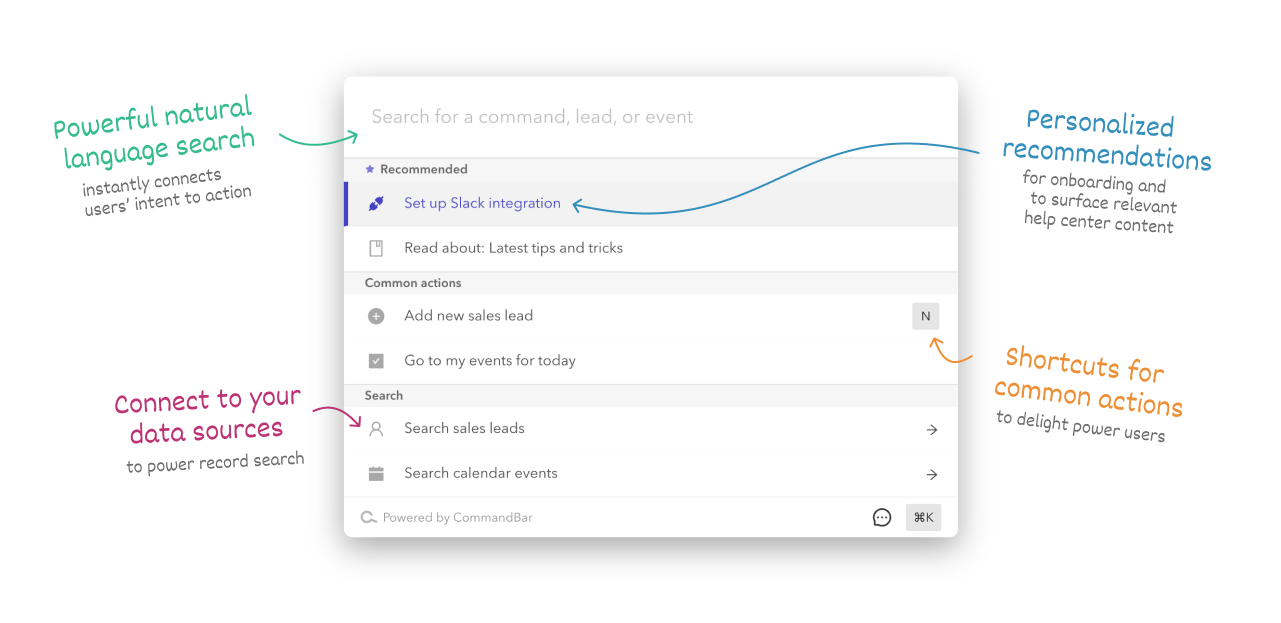
CommandBar will make your app easier to learn, so new users will convert better and require less onboarding. And once they become regular users, they'll have an easier time finding features and using your app, generating fewer support requests. Power users will love CommandBar, since it'll let them speed through common workflows. A cmd+k interface puts all your app's functionality into a single, searchable UI. Copy a code snippet, set up commands with our low-code Editor, then deploy. The Editor makes it really fast to prototype and ship, so you can easily add a new command without needing to find an engineer to build it for you. CommandBar is optimized for every major desktop browser, operating system, and web technology. CommandBar is optimized for performance: every interaction feels instantaneous. It'll give your users that new-computer-everything-feels-faster feeling.
|
About
Kimi Code CLI is an AI-powered command-line agent that runs in the terminal to assist developers with software development and terminal operations by reading and editing code, executing shell commands, searching and fetching web pages, autonomously planning and adjusting actions during execution, and providing a shell-like interactive experience where users can describe their needs in natural language or switch to direct command mode; it supports integrations with IDEs and local agent clients via the Agent Client Protocol for enriched workflows and simplifies tasks such as writing and modifying code, fixing bugs, refactoring, exploring unfamiliar projects, answering architecture questions, and automating batch tasks or build and test scripts. Installation is handled via a script that installs the necessary tool manager and then the Kimi CLI package, after which users verify with a version command and configure an API source.
|
|||||
Platforms Supported
Windows
Mac
Linux
Cloud
On-Premises
iPhone
iPad
Android
Chromebook
|
Platforms Supported
Windows
Mac
Linux
Cloud
On-Premises
iPhone
iPad
Android
Chromebook
|
|||||
Audience
UX solution for developers wanting to keep their app's UI simple and clean
|
Audience
Developers and technical teams who want an AI-powered command-line assistant to help automate coding tasks, navigate and modify codebases, and execute terminal operations
|
|||||
Support
Phone Support
24/7 Live Support
Online
|
Support
Phone Support
24/7 Live Support
Online
|
|||||
API
Offers API
|
API
Offers API
|
|||||
Screenshots and Videos |
Screenshots and Videos |
|||||
Pricing
$149 per month
Free Version
Free Trial
|
Pricing
Free
Free Version
Free Trial
|
|||||
Reviews/
|
Reviews/
|
|||||
Training
Documentation
Webinars
Live Online
In Person
|
Training
Documentation
Webinars
Live Online
In Person
|
|||||
Company InformationCommandBar
United States
www.commandbar.com
|
Company InformationMoonshot AI
United States
moonshotai.github.io/kimi-cli/en/guides/getting-started.html
|
|||||
Alternatives |
Alternatives |
|||||
|
|
||||||
|
|
||||||
|
|
|
|||||
Categories |
Categories |
|||||
Integrations
Kimi Code
Python
|
||||||
|
|
|