| CoffeeScript | PascalABC.NET | Roo Code | ||||
|---|---|---|---|---|---|---|
Related Products
|
||||||
CoffeeScript:
About
Underneath that awkward Java-esque patina, JavaScript has always had a gorgeous heart. CoffeeScript is an attempt to expose the good parts of JavaScript in a simple way. The golden rule of CoffeeScript is: “It’s just JavaScript.” The code compiles one-to-one into the equivalent JS, and there is no interpretation at runtime. You can use any existing JavaScript library seamlessly from CoffeeScript (and vice-versa). The compiled output is readable, pretty printed, and tends to run as fast or faster than the equivalent handwritten JavaScript. Most modern JavaScript features that CoffeeScript supports can run natively in Node 7.6+, meaning that Node can run CoffeeScript’s output without any further processing required. This list may be incomplete, and excludes versions of Node that support newer features behind flags; please refer to node.green for full details. You can run the tests in your browser to see what your browser supports.
|
PascalABC.NET:
About
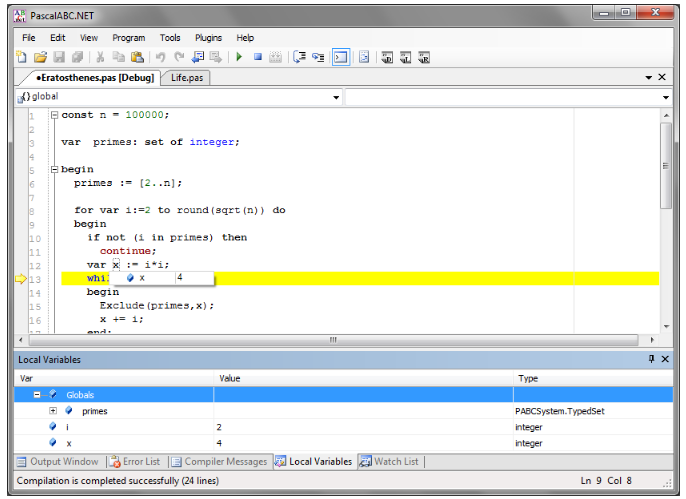
The new generation Pascal programming language combines the simplicity of classic Pascal, a great number of modern extensions, and the broad capabilities of Microsoft .NET Framework. Free, simple, and powerful IDE. Built-in form designer for rapid development of Windows desktop applications. Download the latest version of PascalABC.NET with a build-in form designer. Several extensions of the Pascal language, including the foreach operator, in-block variable definitions, auto type deduction in variable definitions, simplified syntax of units, method implementations inside classes and records, a new operator for object construction, anonymous classes, auto-classes, BigIntegers, etc. The most modern features of programming languages like n-dimensional dynamic arrays, generics, interfaces, operator overloading, exceptions, garbage collection, and lambda expressions. IDE with integrated debugger, IntelliSense system, code templates, and code auto-formatting.
|
Roo Code:
About
Roo Code is an AI-powered software engineering platform designed to help developers build, debug, and ship code faster. It works directly inside your IDE through a VS Code extension or autonomously in the cloud using AI agents. Roo Code supports multiple AI models and providers, giving developers full flexibility and control. Role-based modes keep AI focused on specific tasks like coding, debugging, testing, or planning. The platform is open source, secure, and transparent by design. Developers can configure workflows to match their exact preferences. Roo Code fits seamlessly into modern development environments for both individuals and teams.
|
||||
CoffeeScript:
Platforms Supported
Windows
Supported
Mac
Supported
Linux
Supported
Cloud
Not Supported
On-Premises
Not Supported
iPhone
Not Supported
iPad
Not Supported
Android
Not Supported
Chromebook
Not Supported
|
PascalABC.NET:
Platforms Supported
Windows
Supported
Mac
Not Supported
Linux
Supported
Cloud
Not Supported
On-Premises
Not Supported
iPhone
Not Supported
iPad
Not Supported
Android
Not Supported
Chromebook
Not Supported
|
Roo Code:
Platforms Supported
Windows
Supported
Mac
Supported
Linux
Supported
Cloud
Not Supported
On-Premises
Not Supported
iPhone
Not Supported
iPad
Not Supported
Android
Not Supported
Chromebook
Not Supported
|
||||
CoffeeScript:
Audience
Developers searching for a a little language solution that compiles into JavaScript
|
PascalABC.NET:
Audience
Companies and individuals in search of a solution to develop Windows desktop applications
|
Roo Code:
Audience
Roo Code is ideal for developers, engineering teams, and tech-driven organizations seeking a flexible, secure, and AI-powered way to accelerate software development across individual and team workflows
|
||||
CoffeeScript:
Support
Phone Support
Not Supported
24/7 Live Support
Not Supported
Online
Supported
|
PascalABC.NET:
Support
Phone Support
Not Supported
24/7 Live Support
Not Supported
Online
Supported
|
Roo Code:
Support
Phone Support
Not Supported
24/7 Live Support
Not Supported
Online
Supported
|
||||
CoffeeScript:
API
Offers API
Not Supported
|
PascalABC.NET:
API
Offers API
Not Supported
|
Roo Code:
API
Offers API
Supported
|
||||
CoffeeScript:
Screenshots and Videos |
PascalABC.NET:
Screenshots and Videos |
Roo Code:
Screenshots and Videos |
||||
CoffeeScript:
Pricing
Free
Free Version
Supported
Free Trial
Not Supported
|
PascalABC.NET:
Pricing
Free
Free Version
Supported
Free Trial
Not Supported
|
Roo Code:
Pricing
Free
Free Version
Supported
Free Trial
Not Supported
|
||||
CoffeeScript:
Reviews/
|
PascalABC.NET:
Reviews/
|
Roo Code:
Reviews/
|
||||
Roo Code:
Pros & Cons from Real UsersPros
Cons
|
||||||
CoffeeScript:
Training
Documentation
Supported
Webinars
Not Supported
Live Online
Not Supported
In Person
Not Supported
|
PascalABC.NET:
Training
Documentation
Supported
Webinars
Not Supported
Live Online
Not Supported
In Person
Not Supported
|
Roo Code:
Training
Documentation
Supported
Webinars
Not Supported
Live Online
Not Supported
In Person
Not Supported
|
||||
CoffeeScript:
Company InformationCoffeeScript
coffeescript.org
|
PascalABC.NET:
Company InformationPascalABC.NET
pascalabc.net/en/
|
Roo Code:
Company InformationRoo Code
Founded: 2025
United States
roocode.com
|
||||
CoffeeScript:
Alternatives |
PascalABC.NET:
Alternatives |
Roo Code:
Alternatives |
||||
| CoffeeScript: |
PascalABC.NET:
|
Roo Code:
|
||||
| CoffeeScript: |
PascalABC.NET:
|
Roo Code:
|
||||
|
CoffeeScript:
|
PascalABC.NET: |
Roo Code:
|
||||
|
CoffeeScript:
|
PascalABC.NET:
|
Roo Code:
|
||||
CoffeeScript:
Categories |
PascalABC.NET:
Categories |
Roo Code:
Categories |
||||
CoffeeScript:
Integrations
Dash
Supported
Eclipse PHP
Supported
Espresso
Supported
GLM-4.7
Not Supported
Geany
Supported
JavaScript
Supported
Kitani
Not Supported
Laguna M.1
Not Supported
Laguna S 2.1
Not Supported
Laguna XS.2
Not Supported
|
PascalABC.NET:
Integrations
Dash
Not Supported
Eclipse PHP
Not Supported
Espresso
Not Supported
GLM-4.7
Not Supported
Geany
Not Supported
JavaScript
Not Supported
Kitani
Not Supported
Laguna M.1
Not Supported
Laguna S 2.1
Not Supported
Laguna XS.2
Not Supported
|
Roo Code:
Integrations
Dash
Not Supported
Eclipse PHP
Not Supported
Espresso
Not Supported
GLM-4.7
Supported
Geany
Not Supported
JavaScript
Not Supported
Kitani
Supported
Laguna M.1
Supported
Laguna S 2.1
Supported
Laguna XS.2
Supported
|
||||
|
CoffeeScript:
|
PascalABC.NET:
|
Roo Code:
|