| CodeLite | Eclipse IDE | JavaScript | ||||
|---|---|---|---|---|---|---|
Related Products
|
||||||
CodeLite:
About
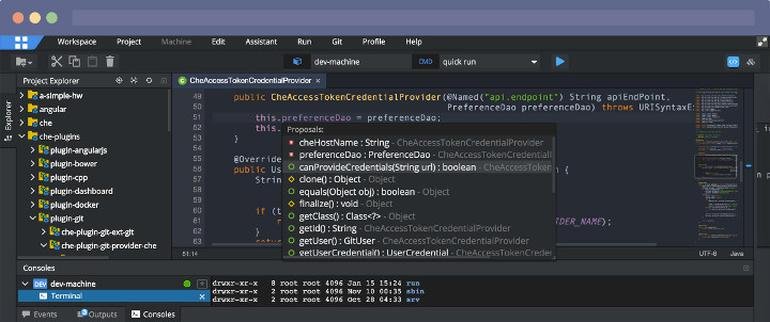
CodeLite is a free, open-source, cross-platform Integrated Development Environment (IDE) designed primarily for C, C++, PHP, and JavaScript development. It offers a lightweight and highly customizable environment with support for multiple compilers, including GCC, Clang, and Microsoft Visual C++. CodeLite features an intuitive code editor with syntax highlighting, auto-completion, and code refactoring capabilities. It also includes an integrated debugger with support for GDB, making it easy to set breakpoints, inspect variables, and trace call stacks. Additionally, CodeLite supports Node.js and TypeScript development, making it a versatile choice for both desktop and web-based applications. Its flexibility, cross-platform compatibility (Windows, macOS, and Linux), and integration with popular version control systems like Git and Subversion make it a go-to IDE for developers seeking a lightweight alternative to more resource-intensive environments.
|
Eclipse IDE:
About
Eclipse IDE The Leading Open Platform for Professional Developers used in computer programming. Better Than Ever. The Eclipse IDE delivers what you need to rapidly innovate. Easier IDE configuration The Eclipse IDE Installer 2020-09 and several packages now include a Java Runtime Environment (JRE). Improved theming and styling. Improved Windows dark theme and GTK light theme. Moving to bleeding edge. Eclipse IDE now needs Java 11 as a minimum version to run on, but you can compile any version as usual. New experimental features. Support for aarch64. Linux support landed this version. Node.js is now embedded For all our LSP-based toolings, Node.js is now embedded to make things work out of the box Free and open source Free and open source; released under the terms of the Eclipse Public License 2.0. Powered by Participation. A vast ecosystem of plugins from an active community
|
JavaScript:
About
JavaScript is a scripting language and programming language for the web that enables developers to build dynamic elements on the web. Over 97% of the websites in the world use client-side JavaScript. JavaScript is one of the most important scripting languages on the web. Strings in JavaScript are contained within a pair of either single quotation marks '' or double quotation marks "". Both quotes represent Strings but be sure to choose one and STICK WITH IT. If you start with a single quote, you need to end with a single quote. There are pros and cons to using both IE single quotes tend to make it easier to write HTML within Javascript as you don’t have to escape the line with a double quote. Let’s say you’re trying to use quotation marks inside a string. You’ll need to use opposite quotation marks inside and outside of JavaScript single or double quotes.
|
||||
CodeLite:
Platforms Supported
Windows
Supported
Mac
Supported
Linux
Supported
Cloud
Not Supported
On-Premises
Not Supported
iPhone
Not Supported
iPad
Not Supported
Android
Not Supported
Chromebook
Not Supported
|
Eclipse IDE:
Platforms Supported
Windows
Not Supported
Mac
Not Supported
Linux
Not Supported
Cloud
Supported
On-Premises
Not Supported
iPhone
Not Supported
iPad
Not Supported
Android
Not Supported
Chromebook
Not Supported
|
JavaScript:
Platforms Supported
Windows
Supported
Mac
Supported
Linux
Supported
Cloud
Supported
On-Premises
Supported
iPhone
Not Supported
iPad
Not Supported
Android
Not Supported
Chromebook
Supported
|
||||
CodeLite:
Audience
Developers
|
Eclipse IDE:
Audience
Professional developers looking for an integrated development environment (IDE) used in computer programming
|
JavaScript:
Audience
Web developers and anyone looking for a mobile solution for running and developing web content
|
||||
CodeLite:
Support
Phone Support
Not Supported
24/7 Live Support
Not Supported
Online
Not Supported
|
Eclipse IDE:
Support
Phone Support
Not Supported
24/7 Live Support
Not Supported
Online
Supported
|
JavaScript:
Support
Phone Support
Not Supported
24/7 Live Support
Not Supported
Online
Not Supported
|
||||
CodeLite:
API
Offers API
Supported
|
Eclipse IDE:
API
Offers API
Not Supported
|
JavaScript:
API
Offers API
Not Supported
|
||||
CodeLite:
Screenshots and Videos |
Eclipse IDE:
Screenshots and Videos |
JavaScript:
Screenshots and Videos |
||||
CodeLite:
Pricing
Free
Open source
Free Version
Supported
Free Trial
Not Supported
|
Eclipse IDE:
Pricing
No information available.
Free Version
Not Supported
Free Trial
Not Supported
|
JavaScript:
Pricing
Free
Free Version
Supported
Free Trial
Not Supported
|
||||
CodeLite:
Reviews/
|
Eclipse IDE:
Reviews/
|
JavaScript:
Reviews/
|
||||
Eclipse IDE:
Pros & Cons from Real UsersPros
Cons
|
||||||
CodeLite:
Training
Documentation
Supported
Webinars
Not Supported
Live Online
Not Supported
In Person
Not Supported
|
Eclipse IDE:
Training
Documentation
Supported
Webinars
Not Supported
Live Online
Not Supported
In Person
Not Supported
|
JavaScript:
Training
Documentation
Supported
Webinars
Not Supported
Live Online
Not Supported
In Person
Not Supported
|
||||
CodeLite:
Company InformationCodeLite
Founded: 2006
codelite.org
|
Eclipse IDE:
Company InformationEclipse Foundation
Canada
www.eclipse.org/eclipseide/
|
JavaScript:
Company InformationJavaScript
Founded: 1995
United States
javascript.com
|
||||
CodeLite:
Alternatives |
Eclipse IDE:
Alternatives |
JavaScript:
Alternatives |
||||
|
CodeLite:
|
Eclipse IDE:
|
JavaScript:
|
||||
|
CodeLite:
|
Eclipse IDE:
|
JavaScript: | ||||
|
CodeLite:
|
Eclipse IDE:
|
JavaScript: | ||||
|
CodeLite:
|
Eclipse IDE:
|
JavaScript: | ||||
CodeLite:
Categories |
Eclipse IDE:
Categories |
JavaScript:
Categories |
||||
CodeLite:
Code Editors Features
API
Supported
Auto-Complete
Supported
Code Folding
Supported
Column Editing
Supported
Customizable Themes
Supported
Debugging
Supported
Formatting / Table Editing
Supported
Keyboard Shortcuts
Supported
Multi-Monitor Editing
Supported
Syntax Highlighting
Supported
WYSIWYG
Supported
IDE Features
Code Completion
Supported
Compiler
Supported
Cross Platform Support
Supported
Debugger
Supported
Drag and Drop UI
Supported
Integrations and Plugins
Supported
Multi Language Support
Supported
Project Management
Supported
Text Editor / Code Editor
Supported
|
Eclipse IDE:
Application Development Features
Access Controls/Permissions
Not Supported
Code Assistance
Not Supported
Code Refactoring
Not Supported
Collaboration Tools
Supported
Compatibility Testing
Not Supported
Data Modeling
Not Supported
Debugging
Not Supported
Deployment Management
Not Supported
Graphical User Interface
Not Supported
Mobile Development
Not Supported
No-Code
Not Supported
Reporting/Analytics
Not Supported
Software Development
Supported
Source Control
Not Supported
Testing Management
Not Supported
Version Control
Not Supported
Web App Development
Supported
|
|||||
CodeLite:
Integrations
Annotator
Not Supported
Baichuan-13B
Not Supported
Claude Sonnet 4
Not Supported
Claude for Legal
Not Supported
CodeRunner
Not Supported
Codegrip
Not Supported
Cyberstanc Vortex
Not Supported
Eclipse Theia
Not Supported
Factify
Not Supported
Gemini 4 Argon
Not Supported
|
Eclipse IDE:
Integrations
Annotator
Not Supported
Baichuan-13B
Not Supported
Claude Sonnet 4
Not Supported
Claude for Legal
Not Supported
CodeRunner
Not Supported
Codegrip
Not Supported
Cyberstanc Vortex
Not Supported
Eclipse Theia
Not Supported
Factify
Not Supported
Gemini 4 Argon
Not Supported
|
JavaScript:
Integrations
Annotator
Supported
Baichuan-13B
Supported
Claude Sonnet 4
Supported
Claude for Legal
Supported
CodeRunner
Supported
Codegrip
Supported
Cyberstanc Vortex
Supported
Eclipse Theia
Supported
Factify
Supported
Gemini 4 Argon
Supported
|
||||
|
CodeLite:
|
Eclipse IDE:
|
JavaScript:
|