CleanMyDriveMacPaw
|
JDiskReportJGoodies
|
|||||
Related Products
|
||||||
About
CleanMyDrive 2 is always at hand — just a lightweight interface that takes up little space and practically no system resources. It works for you around the clock so you have easy access to all your drives. Is your camera’s SD card not writing as fast as it should? Your USB stick won’t connect to some devices? CleanMyDrive 2 works with SSD, external hard drives, SD cards, USB flash drives and pretty much anything that stores files. Not only do you get to see how much space is taken up on each drive, but also what’s on them. CleanMyDrive 2 shows the storage bar for each of your external drives. Just like Mac’s native bar for the internal drive, you get to see types of files and how much they hog. With CleanMyDrive 2 you don’t have to rummage around in Finder — all of your drives are at hand in the menu bar. Drag and drop any file right into the app to copy it to the drive you want.
|
About
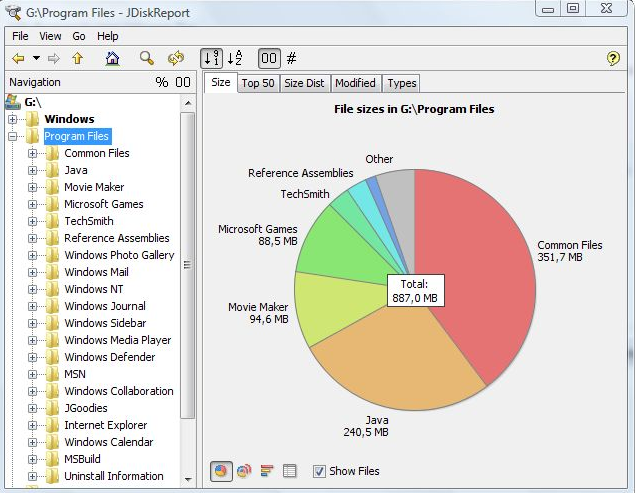
JDiskReport enables you to understand how much space the files and directories consume on your disk drives, and it helps you find obsolete files and folders. The tool analyses your disk drives and collects several statistics which you can view as overview charts and details tables. This is ad-free uncrippled no-charge software that never expires. JDiskReport runs on Windows, Mac, Linux, and other platforms. It requires Java. JDiskReport requires Java. Make sure Java is installed before you install JDiskReport. The tool has been tested on Windows, Mac, and Linux; it runs also on Solaris and other Java-enabled operating systems. A stable preview of JDiskReport 2 is available. This version is rawer than other releases that you have downloaded from JGoodies in the past. It lacks some features (you cannot click in the size pie), but can be run as a cron job (executed in the background), provides more information, and has seen a visual cleanup.
|
|||||
Platforms Supported
Windows
Not Supported
Mac
Supported
Linux
Not Supported
Cloud
Not Supported
On-Premises
Not Supported
iPhone
Not Supported
iPad
Not Supported
Android
Not Supported
Chromebook
Not Supported
|
Platforms Supported
Windows
Supported
Mac
Supported
Linux
Supported
Cloud
Not Supported
On-Premises
Not Supported
iPhone
Not Supported
iPad
Not Supported
Android
Not Supported
Chromebook
Not Supported
|
|||||
Audience
Mac drive management for individuals
|
Audience
Users looking for a solution to see and manage the space that files and directories consume on disk drives
|
|||||
Support
Phone Support
Not Supported
24/7 Live Support
Not Supported
Online
Supported
|
Support
Phone Support
Supported
24/7 Live Support
Not Supported
Online
Supported
|
|||||
API
Offers API
Not Supported
|
API
Offers API
Not Supported
|
|||||
Screenshots and Videos |
Screenshots and Videos |
|||||
Pricing
No information available.
Free Version
Not Supported
Free Trial
Not Supported
|
Pricing
Free
Free Version
Supported
Free Trial
Not Supported
|
|||||
Reviews/
|
Reviews/
|
|||||
Training
Documentation
Supported
Webinars
Not Supported
Live Online
Not Supported
In Person
Not Supported
|
Training
Documentation
Supported
Webinars
Not Supported
Live Online
Not Supported
In Person
Supported
|
|||||
Company InformationMacPaw
Founded: 2009
United States
macpaw.com/cleanmydrive
|
Company InformationJGoodies
Germany
www.jgoodies.com/freeware/jdiskreport/
|
|||||
Alternatives |
Alternatives |
|||||
|
|
||||||
|
|
|
|||||
|
|
|
|||||
Categories |
Categories |
|||||
|
|
|