MasoLabelAlways (Shanghai) Technologies Co., Ltd.
|
||||||
Related Products
|
||||||
About
Barcode label maker for Publishing Industry is the finest solution for barcode generation:
Step 1: Download and Install the Publisher Barcode Generator for Windows.
Step 2: Launch the software and choose Quick Barcode Mode or Barcode Designing View Mode.
Step 3 (i): In Quick Barcode Mode, user can choose Linear or 2D Barcode font.
(ii): Enter Barcode, Header and Footer value.
(iii): For multiple barcodes enable Batch Processing from the right side.
Step 3 (a): Choose Barcode Designing View Mode to customize the label with General label properties, label background properties and image processing properties.
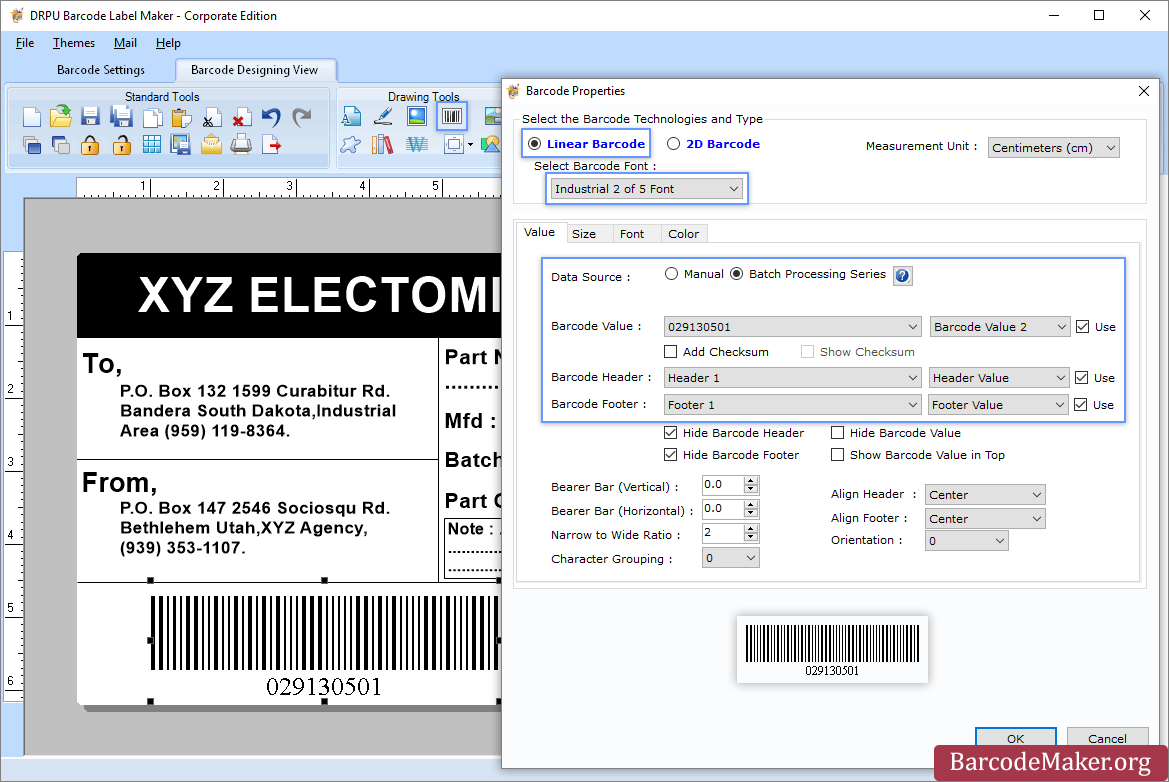
(b): Add Barcode from Drawing Tools tab and go to properties of barcode by double clicking on it.
(c): Now choose Linear or 2D Barcode and also select the barcode font.
(d): Enter the barcode values.
(e): For batch processing, check Batch Processing Series option.
Step 4: Save created barcode labels or tags in a variety of file formats.
|
About
MasoLabel is a versatile and user-friendly barcode label printing software designed to simplify the creation and printing of labels. It supports a wide range of features, including barcode and QR code generation, Excel batch printing, serial number printing, and even PDF file printing. The platform offers a variety of templates for different industries and allows for team collaboration in label creation and management. MasoLabel is compatible with all major printers and is ideal for businesses looking to streamline their labeling process without the need for expensive software or complicated setups.
|
|||||
Platforms Supported
Windows
Mac
Linux
Cloud
On-Premises
iPhone
iPad
Android
Chromebook
|
Platforms Supported
Windows
Mac
Linux
Cloud
On-Premises
iPhone
iPad
Android
Chromebook
|
|||||
Audience
All types of users, organizations, and industries
|
Audience
Small to medium-sized businesses and teams looking for a simple, free, and efficient way to create and print barcode labels and QR codes
|
|||||
Support
Phone Support
24/7 Live Support
Online
|
Support
Phone Support
24/7 Live Support
Online
|
|||||
API
Offers API
|
API
Offers API
|
|||||
Screenshots and Videos |
Screenshots and Videos |
|||||
Pricing
$50 one-time payment
Free Version
Free Trial
|
Pricing
$6.9
Free Version
Free Trial
|
|||||
Reviews/
|
Reviews/
|
|||||
Training
Documentation
Webinars
Live Online
In Person
|
Training
Documentation
Webinars
Live Online
In Person
|
|||||
Company InformationBarcodeMaker.org
India
www.barcodemaker.org
|
Company InformationAlways (Shanghai) Technologies Co., Ltd.
Founded: 2003
China
www.always-china.com.cn/
|
|||||
Alternatives |
Alternatives |
|||||
|
|
|
|||||
|
|
||||||
|
|
|
|||||
Categories |
Categories |
|||||
Label Printing Features
Automation
Barcode Support
Categorization
Design Tools
Hardware Integration
Multi-Language Support
Product Data Integration
Regulatory Compliance
Templates
|
||||||
Integrations
Kingdee Cloud
Yonyou ERP
|
||||||
|
|
|