LabelPathVDPSOFT
|
||||||
Related Products
|
||||||
About
Barcode label maker for Publishing Industry is the finest solution for barcode generation:
Step 1: Download and Install the Publisher Barcode Generator for Windows.
Step 2: Launch the software and choose Quick Barcode Mode or Barcode Designing View Mode.
Step 3 (i): In Quick Barcode Mode, user can choose Linear or 2D Barcode font.
(ii): Enter Barcode, Header and Footer value.
(iii): For multiple barcodes enable Batch Processing from the right side.
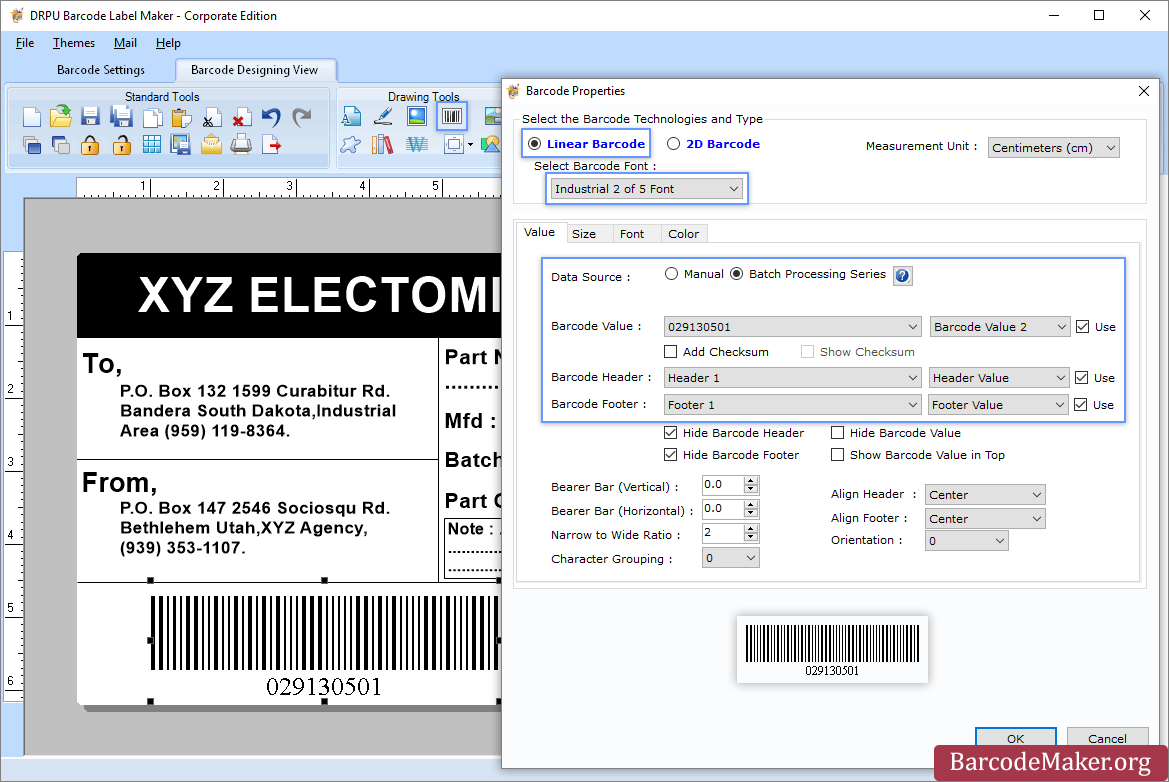
Step 3 (a): Choose Barcode Designing View Mode to customize the label with General label properties, label background properties and image processing properties.
(b): Add Barcode from Drawing Tools tab and go to properties of barcode by double clicking on it.
(c): Now choose Linear or 2D Barcode and also select the barcode font.
(d): Enter the barcode values.
(e): For batch processing, check Batch Processing Series option.
Step 4: Save created barcode labels or tags in a variety of file formats.
|
About
LablePath barcode label maker and printing software (popular as barcode maker) is an advanced and customized tool, which is a complete solution for all your barcode labeling and printing needs. Easy-to-use barcode label software creates high-resolution and printable barcode labels (including Barcode stickers, asset tags, and security tags) with the use of linear and 2D (2 Dimensional) barcode fonts within a couple of mouse clicks. Easy to use bar code generator generates colorful barcode labels in any size with the specified text, and caption and saves generated images in standard file formats such as JPEG, GIF, Bitmap, and PNG on your PC. Create barcode labels in a few easy steps.
|
|||||
Platforms Supported
Windows
Mac
Linux
Cloud
On-Premises
iPhone
iPad
Android
Chromebook
|
Platforms Supported
Windows
Mac
Linux
Cloud
On-Premises
iPhone
iPad
Android
Chromebook
|
|||||
Audience
All types of users, organizations, and industries
|
Audience
Businesses requiring a Label Printing software that helps improve quality and reduce downtime
|
|||||
Support
Phone Support
24/7 Live Support
Online
|
Support
Phone Support
24/7 Live Support
Online
|
|||||
API
Offers API
|
API
Offers API
|
|||||
Screenshots and Videos |
Screenshots and Videos |
|||||
Pricing
$50 one-time payment
Free Version
Free Trial
|
Pricing
No information available.
Free Version
Free Trial
|
|||||
Reviews/
|
Reviews/
|
|||||
Training
Documentation
Webinars
Live Online
In Person
|
Training
Documentation
Webinars
Live Online
In Person
|
|||||
Company InformationBarcodeMaker.org
India
www.barcodemaker.org
|
Company InformationVDPSOFT
www.vdpsoft.com/label/barcode-label-printing-software.html
|
|||||
Alternatives |
Alternatives |
|||||
|
|
||||||
|
|
||||||
|
|
||||||
|
|
|
|||||
Categories |
Categories |
|||||
Integrations
No info available.
|
Integrations
No info available.
|
|||||
|
|
|