B-CoderTALtech
|
||||||
Related Products
|
||||||
About
B-Coder is a Windows-based software will allow you to easily generate professional barcode graphic files and insert them into any Word document, label software, graphics application and more. There is full support for most standard barcode types used in a variety of industries. B-Coder's intuitive layout lets you create and customize your perfect barcode, quickly and easily. Select from an array of common (and even many uncommon) symbologies to create professional UPC barcodes for retail, store inventory, health industry, and even large 2-D barcodes for storing URLs or data on marketing materials! Simply enter a message, click your mouse and your barcodes are instantly displayed on screen and copied to the clipboard for pasting into other programs. You can also save barcode images to disk files in any image file format.
|
About
Barcode label maker for Publishing Industry is the finest solution for barcode generation:
Step 1: Download and Install the Publisher Barcode Generator for Windows.
Step 2: Launch the software and choose Quick Barcode Mode or Barcode Designing View Mode.
Step 3 (i): In Quick Barcode Mode, user can choose Linear or 2D Barcode font.
(ii): Enter Barcode, Header and Footer value.
(iii): For multiple barcodes enable Batch Processing from the right side.
Step 3 (a): Choose Barcode Designing View Mode to customize the label with General label properties, label background properties and image processing properties.
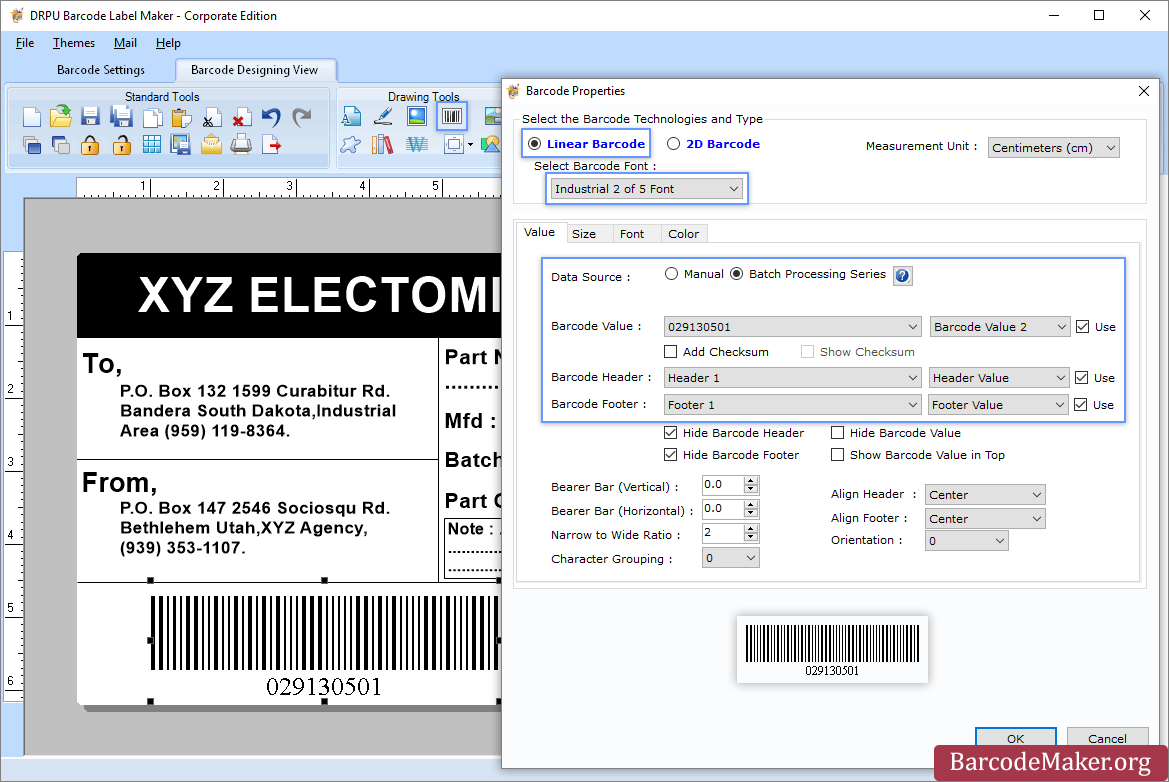
(b): Add Barcode from Drawing Tools tab and go to properties of barcode by double clicking on it.
(c): Now choose Linear or 2D Barcode and also select the barcode font.
(d): Enter the barcode values.
(e): For batch processing, check Batch Processing Series option.
Step 4: Save created barcode labels or tags in a variety of file formats.
|
|||||
Platforms Supported
Windows
Mac
Linux
Cloud
On-Premises
iPhone
iPad
Android
Chromebook
|
Platforms Supported
Windows
Mac
Linux
Cloud
On-Premises
iPhone
iPad
Android
Chromebook
|
|||||
Audience
Companies that need a barcode solution for Windows
|
Audience
All types of users, organizations, and industries
|
|||||
Support
Phone Support
24/7 Live Support
Online
|
Support
Phone Support
24/7 Live Support
Online
|
|||||
API
Offers API
|
API
Offers API
|
|||||
Screenshots and Videos |
Screenshots and Videos |
|||||
Pricing
$399 one-time payment
Free Version
Free Trial
|
Pricing
$50 one-time payment
Free Version
Free Trial
|
|||||
Reviews/
|
Reviews/
|
|||||
Training
Documentation
Webinars
Live Online
In Person
|
Training
Documentation
Webinars
Live Online
In Person
|
|||||
Company InformationTALtech
www.taltech.com
|
Company InformationBarcodeMaker.org
India
www.barcodemaker.org
|
|||||
Alternatives |
Alternatives |
|||||
|
|
|
|||||
|
|
||||||
|
|
||||||
|
|
||||||
Categories |
Categories |
|||||
Barcoding Features
Barcode Generation
Barcode Scanning
Custom Labels
Inventory Management
Label Templates
Receiving Labels
RFID
Serial Number Tracking
Shipping Labels
|
||||||
Integrations
No info available.
|
Integrations
No info available.
|
|||||
|
|
|