Azure Data StudioMicrosoft
|
dbForge SQL CompleteDevart
|
|||||
Related Products
|
||||||
About
Azure Data Studio is a cross-platform database tool for data professionals who use on-premises and cloud data platforms on Windows, macOS, and Linux. Azure Data Studio offers a modern editor experience with IntelliSense, code snippets, source control integration, and an integrated terminal. It's engineered with the data platform user in mind, with the built-in charting of query result sets and customizable dashboards. Use Azure Data Studio to query, design, and manage your databases and data warehouses wherever they are, on your local computer or in the cloud. We recommend the user installer, which simplifies installations and updates and doesn't require Administrator privileges.
|
About
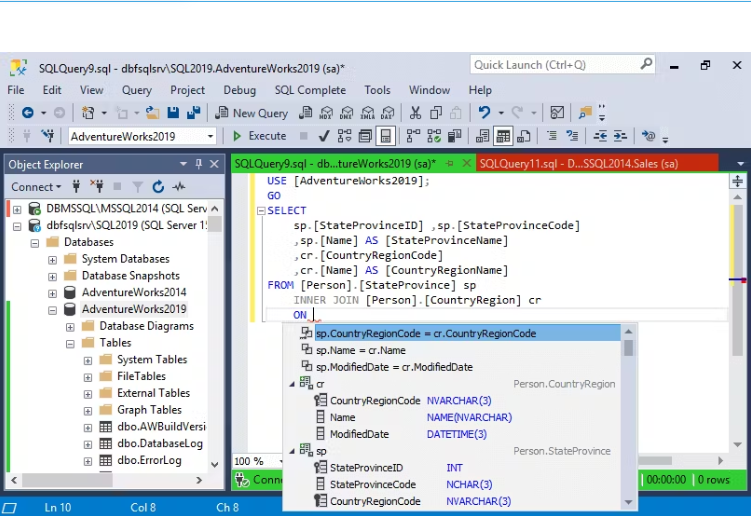
dbForge SQL Complete is a powerful coding assistance tool available as an add-in for SQL Server Management Studio (SSMS) and Visual Studio (VS). It offers numerous features to enhance code quality and accelerate code creation within the standard interface.
Key Features:
- Intelligent SQL completion and suggestion
- T-SQL formatting and code standardizing
- Code Refactoring * Productivity Extension
- Support for SSMS 21.0 Preview 7
dbForge SQL Complete greatly reduces human typing errors. Its integration with SSMS enhances coding capabilities, providing users with a robust toolset.
|
|||||
Platforms Supported
Windows
Supported
Mac
Supported
Linux
Supported
Cloud
Not Supported
On-Premises
Not Supported
iPhone
Not Supported
iPad
Not Supported
Android
Not Supported
Chromebook
Not Supported
|
Platforms Supported
Windows
Supported
Mac
Not Supported
Linux
Not Supported
Cloud
Not Supported
On-Premises
Not Supported
iPhone
Not Supported
iPad
Not Supported
Android
Not Supported
Chromebook
Not Supported
|
|||||
Audience
IT teams searching for a powerful Database solution
|
Audience
Database developers and administrators
|
|||||
Support
Phone Support
Not Supported
24/7 Live Support
Not Supported
Online
Supported
|
Support
Phone Support
Supported
24/7 Live Support
Not Supported
Online
Supported
|
|||||
API
Offers API
Not Supported
|
API
Offers API
Not Supported
|
|||||
Screenshots and Videos |
Screenshots and Videos |
|||||
Pricing
No information available.
Free Version
Not Supported
Free Trial
Not Supported
|
Pricing
$129.95
Free Version
Supported
Free Trial
Supported
|
|||||
Reviews/
|
Reviews/
|
|||||
Pros & Cons from Real UsersPros
Cons
|
||||||
Training
Documentation
Supported
Webinars
Not Supported
Live Online
Not Supported
In Person
Not Supported
|
Training
Documentation
Supported
Webinars
Not Supported
Live Online
Supported
In Person
Not Supported
|
|||||
Company InformationMicrosoft
Founded: 1975
United States
learn.microsoft.com/en-us/sql/azure-data-studio/download-azure-data-studio
|
Company InformationDevart
Founded: 1997
United States of America
www.devart.com
|
|||||
Alternatives |
Alternatives |
|||||
|
|
|
|||||
|
|
||||||
|
|
||||||
Categories |
Categories |
|||||
Integrations
Azure Database Migration Service
Supported
Azure Database for PostgreSQL
Supported
Azure SQL Managed Instance
Supported
GitHub Copilot
Supported
IntelliSense
Supported
MariaDB
Supported
MySQL
Supported
Pieces
Supported
SQL
Not Supported
SQL Prompt
Supported
|
Integrations
Azure Database Migration Service
Not Supported
Azure Database for PostgreSQL
Not Supported
Azure SQL Managed Instance
Not Supported
GitHub Copilot
Not Supported
IntelliSense
Not Supported
MariaDB
Not Supported
MySQL
Not Supported
Pieces
Not Supported
SQL
Supported
SQL Prompt
Not Supported
|
|||||
|
|
|