Autonote

Autonote

Setout Labs
Notezilla

Notezilla

Conceptworld Corporation
4.6 out of 5 stars
Autonote Notezilla

Related Products

  • Fathom
    5.0 out of 5 stars 7,880 Ratings
    Visit Website for Fathom
  • Google Workspace
    4.6 out of 5 stars 69,294 Ratings
    Visit Website for Google Workspace
  • Athena
    5.0 out of 5 stars 1 Rating
    Visit Website for Athena
  • Nasdaq Metrio
    4.5 out of 5 stars 14 Ratings
    Visit Website for Nasdaq Metrio
  • CharityTracker
    4.5 out of 5 stars 1,429 Ratings
    Visit Website for CharityTracker
  • Construction Daily Reports
    4.3 out of 5 stars 22 Ratings
    Visit Website for Construction Daily Reports
  • Canopy
    4.6 out of 5 stars 1,259 Ratings
    Visit Website for Canopy
  • Proton Pass
    4.8 out of 5 stars 31,996 Ratings
    Visit Website for Proton Pass
  • AestheticsPro
    4.5 out of 5 stars 745 Ratings
    Visit Website for AestheticsPro
  • Portfolio Manager
    5.0 out of 5 stars 3 Ratings
    Visit Website for Portfolio Manager
Autonote:

About

Autonote is an AI note-taking app for iPhone, iPad and Android that turns spoken and written material into organized notes. Record meetings, lectures, interviews and voice memos, including in the background while switching apps or locking the screen, or import an audio file. You can also paste a YouTube link, web article or PDF. Autonote creates a concise summary, a full transcript with speaker labels, and AI-generated notes; meeting notes can surface decisions, action items and next steps. Tap transcript timestamps to revisit the corresponding moment in a recording, or ask questions about a note. Notebooks, tags and search help organize content, and notes sync across devices. The app is free to download, with full use available through a subscription that starts with a free trial. It serves professionals, researchers, students and creators who need to review recordings and source material.
Notezilla:

About

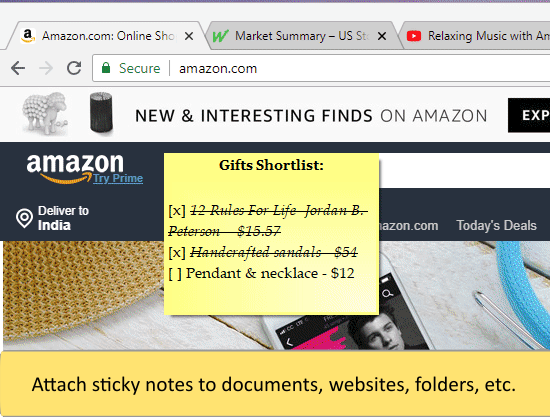
Notezilla is a sticky notes app for Windows & Phones designed to keep you well-equipped & well-organized. It lets you take quick notes on sticky notes (that look like 3M Post-It® Notes), right on your Windows desktop & gives you the best sticky notes experience. With the optional cloud synchronization feature, you can sync sticky notes between computers, access them from any smartphone using our free apps for iPhone/iPad, Android, etc or send sticky notes to any contact across the globe. Notezilla is a professionally designed, simple & elegant sticky notes software. Over the last 15 years, it has gained an excellent reputation (read customer reviews) from all over the world.
Autonote:

Platforms Supported

Windows Not Supported
Mac Not Supported
Linux Not Supported
Cloud Supported
On-Premises Not Supported
iPhone Supported
iPad Supported
Android Supported
Chromebook Not Supported
Notezilla:

Platforms Supported

Windows Supported
Mac Not Supported
Linux Not Supported
Cloud Supported
On-Premises Not Supported
iPhone Supported
iPad Supported
Android Supported
Chromebook Not Supported
Autonote:

Audience

Professionals, researchers, students and creators who record meetings, interviews, lectures or voice memos.
Notezilla:

Audience

Anyone who wants to use sticky notes
Autonote:

Support

Phone Support Not Supported
24/7 Live Support Not Supported
Online Supported
Notezilla:

Support

Phone Support Not Supported
24/7 Live Support Not Supported
Online Supported
Autonote:

API

Offers API Not Supported
Notezilla:

API

Offers API Not Supported
Autonote:

Screenshots and Videos

No images available
Notezilla:

Screenshots and Videos

Autonote:

Pricing

$13.99/month
Autonote Pro is available as an in-app subscription for $13.99 monthly or $99.99 annually.
Free Version Not Supported
Free Trial Supported
Notezilla:

Pricing

$29.95/year/user
Free Version Not Supported
Free Trial Supported
Autonote:

Reviews/Ratings

Overall 0.0 / 5
ease 0.0 / 5
features 0.0 / 5
design 0.0 / 5
support 0.0 / 5

This software hasn't been reviewed yet. Be the first to provide a review:

Review this Software
Notezilla:

Reviews/Ratings

Overall 4.6 / 5
ease 4.6 / 5
features 4.6 / 5
design 4.4 / 5
support 4.6 / 5
Notezilla:

Pros & Cons from Real Users

Pros

  • Easy to use - intuitive. Highly Customizable and Lightweight. Sync between devices. Available across platforms and online as well. Frequent updates. Good support.
  • You can use it as notes or convert a series of items into a checklist to use for task management. Each sticky note can be assigned to a specific folder and have tags added. It feels very similar to Evernote in some regards, albeit significantly trimmed down in functionality. Notes can be starred for later and you can assign due dates with reminders to each note.
  • Create multiple notes Add reminders to notes Formatting options Sync across devices Also Available on mobile devices
  • #1- It's also available on mobile platforms. #1- Very convenient to add notes, the sticky notes are very attractive and catch your attention every time you open desktop. #3- Note reminder option is there, in case you missed it.
  • Notezilla is a very intuitive sticky notes app. It gives me each on-time reminder alarm. You can sync your notes between any devices. Notezilla app is available on cross platforms. Backup notes is also available.

Cons

  • No free personal version (only 30 day trial) - although there is a lifetime validity license at decent price.
  • The app looks unfinished. I know it's supposed to look like Post-it sticky notes, but that's no reason for there to be so much padding missing. If you use the checklist feature, there's practically no padding whatsoever between the checkbox and the edge of the sticky note. For notes that are checklists, the titles have a [x] in them to distinguish them from the others, but this looks awful and is pointless since every note shows a preview of the first line and you will see a [] in the first line of any note that has a checklist anyway. That itself also looks bad. Why not use a symbol like a checkmark or something? Titles have nearly no padding from the top of the notes either. While it's meant to look like a Post-it note, the illusion is entirely lost with the checklists and their highlighted boxes and the symbol on the other side of each line to let you know you can move the list items up and down. I'm really confused as to what they were going for, which makes it look even more like the app is unpolished and unfinished.
  • Expensive - the pricing is too high for such a basic utility
  • #1- We had a very positive overall experience with it.
  • Notezilla is a very intuitive app, I never had any bad experience.
Autonote:

Training

Documentation Not Supported
Webinars Not Supported
Live Online Not Supported
In Person Not Supported
Notezilla:

Training

Documentation Supported
Webinars Not Supported
Live Online Not Supported
In Person Not Supported
Autonote:

Company Information

Setout Labs
United States
autonote.io
Notezilla:

Company Information

Conceptworld Corporation
Founded: 2000
India
www.conceptworld.com
Autonote:

Alternatives

Notee

Notee

GM UniverseApps Limited
Notezilla:

Alternatives

ShixxNOTE

ShixxNOTE

Mavel
5.0 out of 5 stars
Autonote:
Notezilla:
Sticki.ly

Sticki.ly

Bravely Studios
Autonote:
Kilonotes

Kilonotes

Hefei Stack Top Information Technology
Notezilla:
Oxid Note

Oxid Note

Oxid Apps
Autonote:
Notezilla:
HideNStick Notes

HideNStick Notes

Code A Program Studio
Autonote:
Spiik

Spiik

Fadel.io OÜ
Notezilla:
Autonote:

Categories

Note-Taking Supported
Notezilla:

Categories

Note-Taking Supported
Autonote:

Integrations

No info available.
Notezilla:

Integrations

No info available.
Autonote:
Claim Autonote and update features and information
Notezilla:
Claim Notezilla and update features and information