
 Download Latest Version
WhyNotWin11.zip (1.9 MB)
Download Latest Version
WhyNotWin11.zip (1.9 MB)

Get an email when there's a new version of WhyNotWin11
| Name | Modified | Size | Downloads / Week |
|---|---|---|---|
| Parent folder | |||
| checksums.sha256 | 2021-08-27 | 170 Bytes | |
| WhyNotWin11.exe | 2021-08-27 | 2.3 MB | |
| WhyNotWin11.zip | 2021-08-27 | 1.8 MB | |
| WhyNotWin11_x86.exe | 2021-08-27 | 2.2 MB | |
| 2.4.0.tar.gz | 2021-08-27 | 465.4 kB | |
| 2.4.0.zip | 2021-08-27 | 555.8 kB | |
| README.md | 2021-08-27 | 2.9 kB | |
| Totals: 7 Items | 7.4 MB | 0 | |
2.4.0 comes with the following changes:
- Cleaned up Code
- Updated Language Files
- Fixed Command Line Switches (see below and WhyNotWin11.exe /?)
- Added New Supported Intel Processors
- Re-Added Cross for Failed Checks for Accessibility
- Removed "Unsure" Result for CPUs now that Microsoft testing is complete
- Added Note that WIndows 11 can be installed, but not updated to, if you completely delete your existing Windows 10 data
(Various other minor changes to be documented in 6-8 hours)
Note from the Programmer:
Microsoft's Business team has confirmed that Windows 11 can be installed on old hardware! The only thing you have to do is COMPLETELY WIPE your old Windows 10 install and install a clean version of Windows 11. Additionally, it appears Microsoft will be releasing a reasonably clear version of the PC Health Check tool "soon", and I expect popularity of this project to die off. If you need a feature that the new check tool doesn't have, please create an issue so I can try to fill any remaining niches!
Thank you for using WhyNotWin11
Manually Updating Older 2.x Builds Processor Compatibility
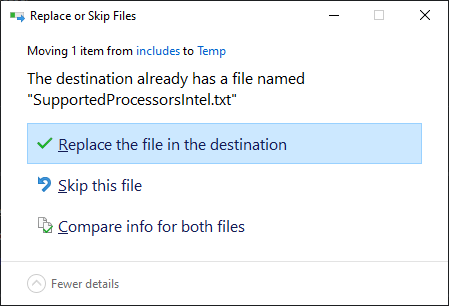
1, Download SupportedProcessors<name>.txt
2. Place File in %localappdata%\WhyNotWin11
 3. Override Existing Files when Prompted
Command Line Switches
Below are the available command line switches and their details:
| Switch | Parameters | Description |
|---|---|---|
| /e /export |
* filetype * filepath |
Exports requirement check results to a file of a certain format: CSV: Comma Separated Values, will append without headers to an existing file if one exists. TXT: Plain Text File, will always overwrite existing files |
| /h /help /? |
- | Displays a help dialog, then exits. Can NOT be used with any other switch |
| /s /silent |
- | Does not display the GUI but still runs checks and returns an Exit Code. Exit Code can be obtained using:(Start-Process WhyNotWin11.exe -PassThru -Wait).ExitCode |
System Requirements
| Minimum Requirements | Recommended | |
|---|---|---|
| OS | Windows 8.1 | Latest Windows 10 Build |
| CPU | 32-bit Single Core | 64-bit Dual Core or Higher |
| RAM (Memory) | 40MB Free | 100MB Free |
| Disk (Storage) | 5MB Free | 100MB Free |
| Limitations | DirectX 12 Check Inaccurate | None |
Image Preview

