
 Download
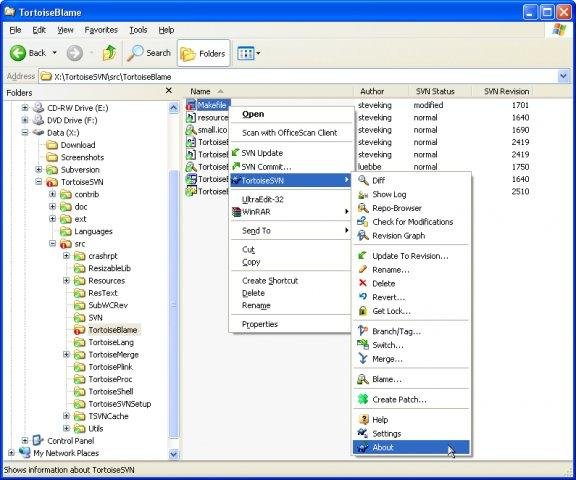
TortoiseSVN is a Subversion (SVN) client, implemented as a windows shell extension. Which means it's available right where you need it: in the Windows file explorer.
It's intuitive and easy to use, since it doesn't require the Subversion command line client to run. Simply the coolest Interface to (Sub)Version Control!
Features
- powerful commit dialog
- fast log UI
- Revision graph
- svn
- version control
Project Samples



License
GNU General Public License version 2.0 (GPLv2), Public DomainFollow TortoiseSVN
Other Useful Business Software
AI-powered service management for IT and enterprise teams
Give your IT, operations, and business teams the ability to deliver exceptional services—without the complexity. Maximize operational efficiency with refreshingly simple, AI-powered Freshservice.
Rate This Project
Login To Rate This Project
User Reviews
-
I once read somewhere that if you're using Subversion on Windows, this is the only Subversion client you should consider. Indeed, I always use it on Windows and wish it existed on Linux. You may find more convenient subversion clients that integrate into whatever IDE you use, but this is the best stand-alone, general purpose Subversion client.
-
TortoiseSVN is like a Morse Code Translator—turning scattered developer changes into clear, structured signals everyone can read.
-
TortoiseSVN is a very useful tool for version control, specially for Windows users. It integrates nicely with file explorer which makes it easy to use without opening extra software. Commit, update, and compare options are clear and helpful. It works stable even for big projects. Good choice for teams using SVN and want simple workflow. Little learning needed for beginners but once understood it works smooth
-
If it would install on windows 11 x64 pro, I sure it would be great, but it doesn't. OS Name Microsoft Windows 11 Pro Version 10.0.26120 Build 26120
-
For using SVN TortoiseSVN has been useful, even today as many are using Git and Mercurial.
Additional Project Details
Operating Systems
Windows, Windows ServerLanguages
Brazilian Portuguese, Bulgarian, Catalan, Chinese (Simplified), Chinese (Traditional), Croatian, Czech, Danish, Dutch, English, Finnish, French, Georgian, German, Greek, Hungarian, Indonesian, Italian, Japanese, Korean, Latvian, Lithuanian, Macedonian, Norwegian, Persian, Polish, Portuguese, Romanian, Russian, Serbian, Slovak, Slovene, Spanish, Swedish, Thai, Turkish, Ukrainian, VietnameseIntended Audience
Developers, End Users/Desktop, Information Technology, Science/Research, Telecommunications IndustryUser Interface
Plugins, Win32 (MS Windows), Windows AeroProgramming Language
C, C++Related Categories
C++ Version Control Software, C++ Usability Software, C++ Subversion Software, C Version Control Software, C Usability Software, C Subversion SoftwareRegistered
Find a Partner


Add-ons & Plugins

Gurtle

TortoiseMantis

TurtleMine
Atlassian Jira
JiraSVN
TurtleALM
TurtleTFS
TracExplorer
Artifacts
VurtleOne
BEurtle

TurtleSift