
 Download
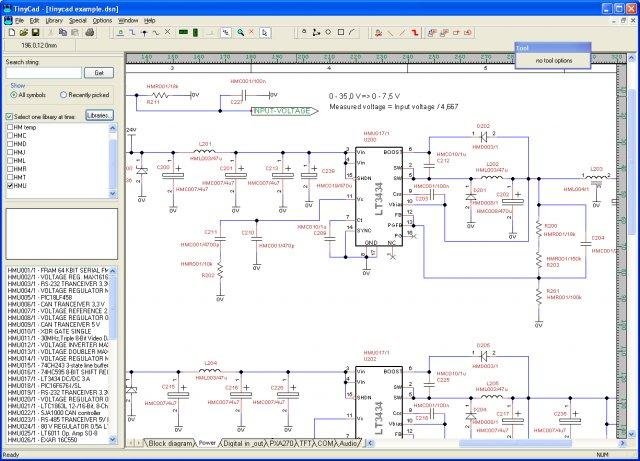
TinyCAD is a program for drawing electrical circuit diagrams commonly known as schematic drawings. It supports standard and custom symbol libraries. It supports PCB layout programs with several netlist formats and can also produce SPICE simulation netlists. It is also often used to draw one-line diagrams, block diagrams, and presentation drawings.
The source code for TinyCAD is now on GitHub: https://github.com/matt123p/TinyCAD
Online documentation can be found here: https://github.com/matt123p/TinyCAD/wiki
Features
- Flat or Hierarchical Schematic Entry
- Many popular PCB Layout compatible netlist formats
- Convenient support for embedding graphical images in drawings
Project Samples
Categories
Electronic Design Automation (EDA)License
GNU Library or Lesser General Public License version 2.0 (LGPLv2)Follow TinyCAD
Other Useful Business Software
MongoDB Atlas runs apps anywhere
MongoDB Atlas gives you the freedom to build and run modern applications anywhere—across AWS, Azure, and Google Cloud. With global availability in over 115 regions, Atlas lets you deploy close to your users, meet compliance needs, and scale with confidence across any geography.
Rate This Project
Login To Rate This Project
User Reviews
-
TinyCAD is definetlay a useful piece of tool and also open source 👍👏. However, the UI is a bit old style
-
It's easy to use and simple. I've been able to create my own library objects and update them as well. There are lots of duplications in the libraries. I'd like to see it handle "letter" documents better, obviously it's designed around A4. Objects that are not in "grid" sometimes seem to wander when reloaded so that the object and the wires don't align (Vacuum tubes and mainly transformers - for guitar amps).
-
In spite of its faults, TinyCAD is one of the better schematic capture tools I've used. Faults include a rather clumsy user interface, and schematic symbols (especially analog/discrete parts) that often look like a 2-year-old drew them (but TinyCAD is no worse than most other tools in this regard). The latter is especially problematic when trying to draw professional level schematics to hand off to a customer. I solved by creating my own set of symbols. Another problem is the title block and optional border, extend right to the very edge of the page.... come on guys; you KNOW that printers don't print to the very edge of a page! This can be solved by first outputting to a PDF file using Acrobat's "fit page" option, then printing the PDF. Having said all that, I have to say that TinyCAD is very serviceable and a pretty useful tool, and what is especially amazing is its small size.... the entire installation is only about 10MB !
-
After a little search I came to Tinycad and in my search for a method of drawing circuit schematics it seems rather good. In the past I have tried Smartdraw (okay but not very nice looking in the end and no print that worked under the free download I had) and the original Visio (once Microsoft brought it out I would never use a MS product especially as they ruined it in the next release and made it less than a clever solution) so now TinyCad seems to be my best option. I have had 20 minutes with it and although I am not quite sure why I cannot remove the tool box once I have collected all my circuit elements I am after all just a beginner on this package. I have to say I am impressed. I will update you with my thoughts as I play with it but it has been a good start! Thanks guys!
-
TinyCAD is ideal for my simple circuit diagramming and design projects. I used it when designing a six IC pressure alert module. The output of TinyCAD made my project documentation appear professional. However, getting there I had to improve the scanty library, which had no NE555 timer. I copied another 8-pin symbol and made my own NE555. I had to add several chips to the library that way. Since I can make new symbols or convert existing ones, I am content with TinyCAD.



