
 Download
TinyCAD is a program for drawing electrical circuit diagrams commonly known as schematic drawings. It supports standard and custom symbol libraries. It supports PCB layout programs with several netlist formats and can also produce SPICE simulation netlists. It is also often used to draw one-line diagrams, block diagrams, and presentation drawings.
The source code for TinyCAD is now on GitHub: https://github.com/matt123p/TinyCAD
Online documentation can be found here: https://github.com/matt123p/TinyCAD/wiki
Features
- Flat or Hierarchical Schematic Entry
- Many popular PCB Layout compatible netlist formats
- Convenient support for embedding graphical images in drawings
Project Samples
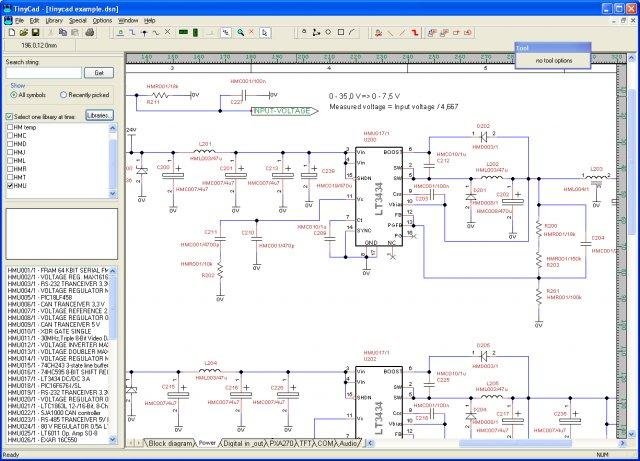
Categories
Electronic Design Automation (EDA)License
GNU Library or Lesser General Public License version 2.0 (LGPLv2)Follow TinyCAD
Other Useful Business Software
Gemini 3 and 200+ AI Models on One Platform
Build generative AI apps with Vertex AI Studio. Switch between models without switching platforms.
Rate This Project
Login To Rate This Project
User Reviews
-
What a crap!!! Using this crap for a few weeks now and if u want a divorce, keep using this crap. I dont so I happy deleted it!!! It gives u so much frustation and stress. that it makes u a walking timebomb. The user interface really sucks!!! No logica behind! Using for example the X symbol TWO TIMES ON THE TOOLBAR is just stupid. Even my son of 14 will never program like that. Thats really dumb to do like that. Other issue is that u need to click many times with ur mouse to get things done. Other solutions do it in 1-2 clicks while this crap needs 3-4 times. It delays ur designtime a lot and ur finger get easily tired. Take for example the power symbol. U have to click on the GND symbol, select the arrow and rotate it! This should be available with one click. Its used on each sheet!!! Same with placing a symbol, the text NEVER shows up where it ahould be. U need ALWAYS to correct the placing of the text of the part. Like the ID of an IC always shows up in front of a pin in the way. Or try to copy and paste something. Thats really hell. First u select an area to copy, most of the times it will grab other parts in the area and unwilling moving them to screw up ur design. Then u undo it and try it again. Sometimes I had to try 4 times before the right area was selected. Or i had to zoom in able to select. Also zooming with the mouse doesnt work always. Have tried on 3 laptopw with different mouses, all same problem. Then when u able to paste..... moat of the connections are disconnected and parts are misplaced. U AGAIN busy with reconnecting and dragging text. Same when u update a component and replace it. U can NOT update all components one time but only by SHEET!!! What the.other reviewer wrote is correct! Then u have to CHECK EACH COMPONENT or the text is still correct placed. It will jump around and probably u have to adjust EACH COMPONENT MANUALLY!!! Also the NAME of the component is NOT UPDATED and u have to edit it again one by one. One letter wrong and ur unsortable parts list get crazy. Make a lot of backups.of ur libraries as files can become suddenly corrupt without a plausibe reason. Someone else mentioned the same problem. That people are positive about this crap is for me a miracle... maybe never used professional cad programs or just tiny projects... THIS IS NOT A SIMPLE VERSION OF A CAD PROGRAM BUT AN IDIOTIC VERSION!!!! There are much better free CAD versions out there who do all those basic CAD functions without any frustation.
-
I just don't believe how is it possible to have so much good reviews for this SW, it misses so much features to be just useable : - folio managment - folio wire following tool - .sgv import for external libraries - nomenclature managment There is no dynamic libraries : you modify a symbol in a middle of a project, you have to replace ALL the symbols one by one by hand in the whole project .... this is insane ! Trying to work with TinyCad is just a waste of time. Simple is not simplistic. You have try Qelectrotech just for comparison (also free, and open source, and linux/mac/Win, bla bla bla)Reply from TinyCAD
-
Using/testing TC for a few weeks now : - randomly corrupt custom libraries saves - inexusable basic functions is missing : - reorder sheet is not possible - reorder lists (other than alphabetical order) is not possible - no version managment, no index managment - no upgrading document content when object is modified in the librarie - no follow-up of the names of the cables/busses from one sheet to another Really painfull to have another usage but tiny project with tiny expectations with the output.

