


| Name | Modified | Size | Downloads / Week |
|---|---|---|---|
| 2.0.0 | 2026-11-14 | ||
| README.md | 2026-11-14 | 3.4 kB | |
| AboutMe.md | 2026-11-14 | 5.2 kB | |
| LICENSE | 2026-11-14 | 18.1 kB | |
| funding.md | 2026-11-14 | 2.6 kB | |
| EULA.txt | 2026-11-14 | 5.0 kB | |
| Totals: 6 Items | 34.4 kB | 5 |
Synapta OS 2.0.0
Synapta OS is an educational operating system built on the Linux kernel that brings local Artificial Intelligence to schools and remote areas where Internet access is limited or unavailable. One ordinary PC becomes the AI server of a small computer lab; students use it from any web browser on the classroom network. No Internet connection is needed after installation.
📦 Files of this release (folder 2.0.0)
| File | Content |
|---|---|
synapta-os-2.0.0-x86_64.iso |
Install / live image (USB or DVD), BIOS and UEFI |
synapta-os-2.0.0-x86_64.iso.sha256 |
SHA-256 checksum of the ISO |
synapta-os-2.0.0-legal-info.tar |
Source code and licenses of every component included in the ISO (GPL compliance) |
SHA-256 of the ISO: 8b30f47b0fab25cf72932993a26b35d875649cf218ad10f26a5356e2cc8f7622
✨ What is new in 2.0.0
- Completely new system, built from source with Buildroot (Linux 6.1 LTS) — not a derivative of another distribution.
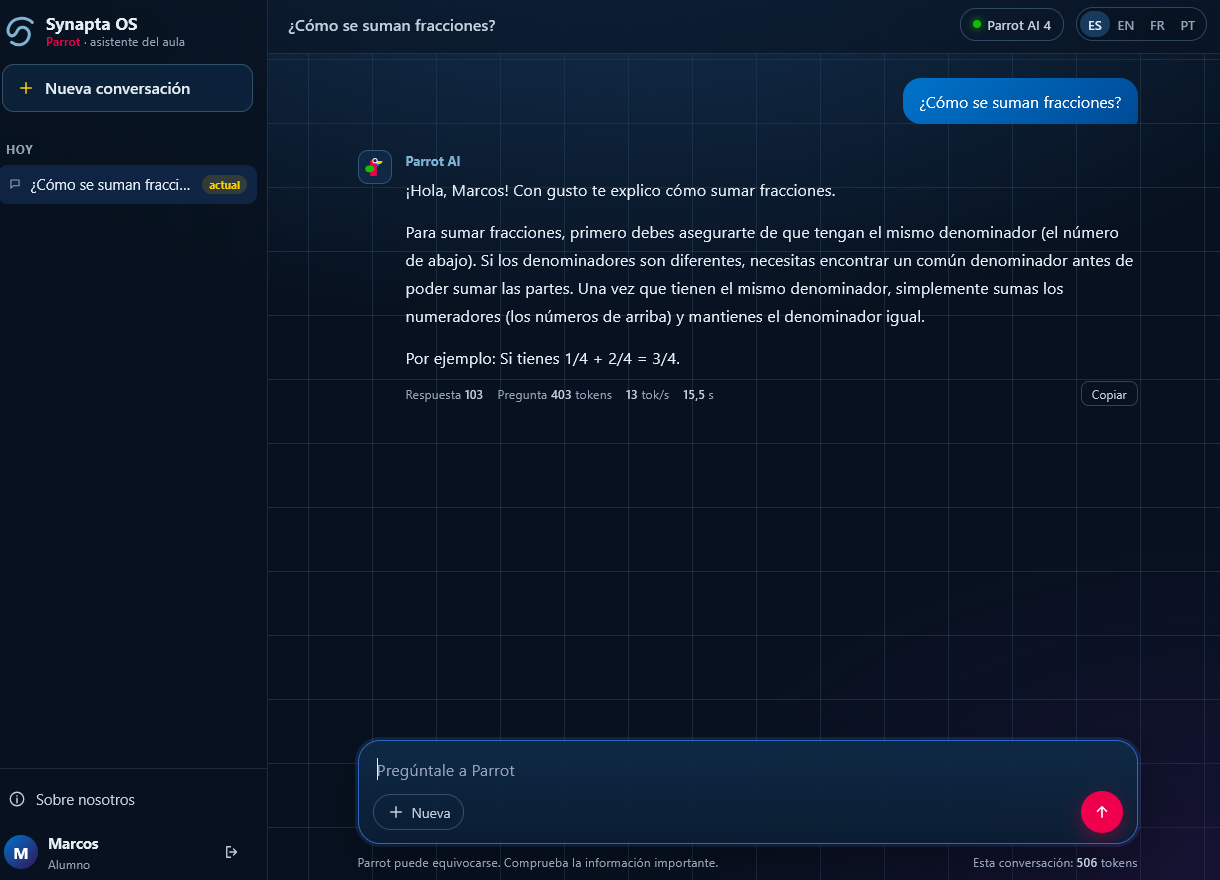
- Parrot, the classroom assistant, with a new interface: teacher and student accounts, separate conversations with history, token counter, and interface in Spanish, English, French and Portuguese.
- Parrot AI 4, the local language model, adapted as an educational assistant: short, clear answers in Spanish (main language), English, French and Portuguese.
- Guided installer in four languages, BIOS and UEFI.
- Server console panel: shows the address of Parrot and the teacher account, and lets the teacher reset the password, reboot or power off.
💻 Reference hardware
| CPU | Intel Core i5, 4 cores (x86_64) |
| RAM | 8 GB |
| Disk | 250 GB SSD |
| Network | Ethernet (classroom LAN); no Internet required |
The AI runs entirely on the CPU (no graphics card needed). With this configuration, 5 students can use Parrot at the same time; questions are answered one at a time, in a queue.
🚀 Quick start
- Download the ISO and check its SHA-256.
- Write it to a USB stick of 8 GB or more with Rufus — choose Write in DD Image mode when asked — or with balenaEtcher.
- Boot the PC from the USB and choose Install Synapta OS 2.0.0.
- After installation, the server screen shows the address of Parrot (
http://<ip>:8000) and the teacher account: userTeacher, initial passwordSyn4pta01.
Full instructions: https://github.com/alimentadorweb/SynaptaOS
📜 License
Synapta OS is free and open source software under the GNU General Public License v2 or later. The model Parrot AI 4 is a modification of Gemma 4 E2B by Google, distributed under the Apache License 2.0; Gemma is a trademark of Google LLC and Synapta OS is not affiliated with or endorsed by Google. All third-party licenses are included in the system (/usr/share/licenses/) and in synapta-os-2.0.0-legal-info.tar.
👤 Author
Synapta OS, Parrot and Parrot AI were created by David Arriaga, systems architect, and the Synapta OS development team (San Salvador, El Salvador).
- Source code: https://github.com/alimentadorweb/SynaptaOS · https://sourceforge.net/p/synaptaos/code/
- Web: https://synaptaos.com
© 2018–2026 David Arriaga and the Synapta OS development team.
