
 Browse Code

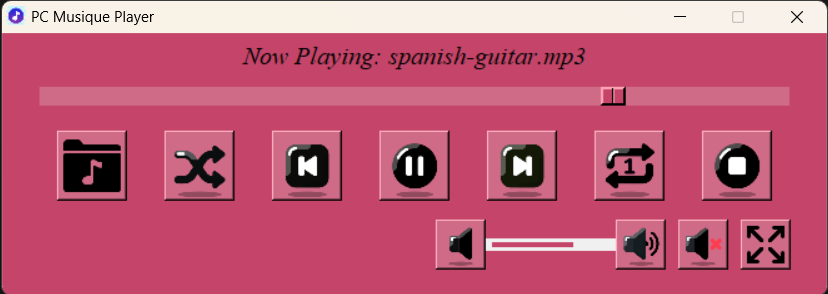
PC Musique Player has 23 different themes to change the player background and UI control background. It has (Play/Pause/Resume) in a single button, Previous, Next, Select library folder, shuffle, loop button(loop ON/loop OFF/loop All), stop, volume increase, volume decrease, mute. Choose any folder to play the audio files from the folder as library. To play audio files in the library listed towards the right side of the app, double click on it. Also use the <space> bar in your keyboard to control Play/Pause/Resume. Now in the lastest version, PC Musique player has mini player mode along with the compact mode.
Features
- Music Playback
- Play from the library selected from your PC or storage device
- Play/Pause/Resume in a single button
- Mini player mode
- Play songs in random order by shuffling
- Displays album art and more metadata from the audio file
- Sorting the music library based on album, song name, or the album year in library
- Turn Shuffle ON or OFF with button
- Loop button with 3 modes
- Open a single audio file from menu bar
- 20+ different themes to choose
- Music visualizer that plays with audio
- Make the player compact by hiding the library
- Widen the window by showing the library also
- Slider to seek through the track
- Double-click to play any track from the library
- Stop button to stop the music player anytime
- Menu bar with buttons to exit, select folder for library, increase or decrease volume
Project Samples



License
MIT LicenseFollow PC Musique Player
Other Useful Business Software
MongoDB Atlas runs apps anywhere
MongoDB Atlas gives you the freedom to build and run modern applications anywhere—across AWS, Azure, and Google Cloud. With global availability in over 115 regions, Atlas lets you deploy close to your users, meet compliance needs, and scale with confidence across any geography.
Rate This Project
Login To Rate This Project
User Reviews
Be the first to post a review of PC Musique Player!

