


| Name | Modified | Size | Downloads / Week |
|---|---|---|---|
| Parent folder | |||
| PadForge-v6.0.0-win-arm64.zip | 2026-11-21 | 252.8 MB | |
| PadForge-v6.0.0-win-x64.zip | 2026-11-21 | 273.4 MB | |
| PadForge v6.0.0 source code.tar.gz | 2026-11-21 | 266.1 MB | |
| PadForge v6.0.0 source code.zip | 2026-11-21 | 267.8 MB | |
| README.md | 2026-11-21 | 37.5 kB | |
| Totals: 5 Items | 1.1 GB | 0 | |
PadForge is a Softpedia Editor's Pick: rated 5/5, Excellent.
"PadForge shines best in its incredibly vast range of supported controller types." (Softpedia's editor review)
PadForge 6 rebuilds the interface around what most people do first. Home replaces the Dashboard, the services move to an Extras page, a controller's tabs, up to fourteen, become six sections, and Ctrl+K finds pages, settings and actions. No setting is removed. Virtual controllers now work on Windows on ARM, where the ARM64 build installed but its controllers did not. A force feedback wheel can now center the way a car's steering does, from the car's speed and the road's grip in your game. Crosshairs and a magnifier join the extras. Flydigi's Apex 4, Apex 5 and Apex 6 Pro get their triggers, lights and screens. SInput pads work as input devices and as a virtual controller, and the polling rate is set in Hz, up to 10000. PadForge now knows 2,687 devices by USB identity and lights 1,572 of them.
Something not working? Tell us right away. If anything in PadForge 6.0 does not work as described, on Windows on ARM or on any other PC, start a Q&A discussion and attach the file from Save Snapshot on the Diagnostics card in Settings, or ask on Discord. A report is how a problem gets found and fixed.
4.5.3 and later offer this release from the Updates card in Settings. 4.5.2 and older need one manual download.
| Home | A controller's page |
|---|---|
 |
 |
| Devices | Profiles |
|---|---|
 |
 |
PadForge 6
The interface was drawn on design boards first and every page was rebuilt to them. Every setting keeps its reset button. (#574)
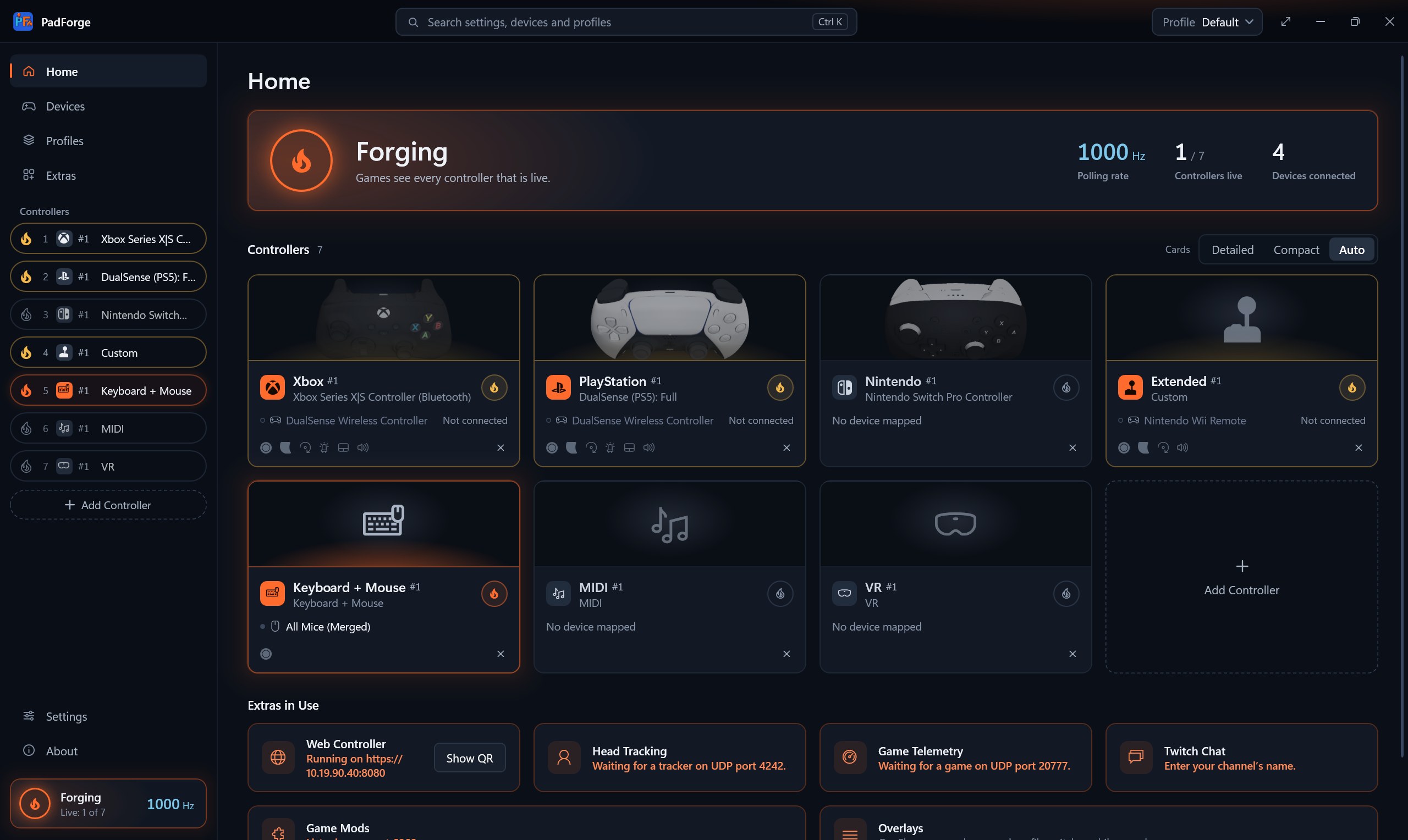
- The sidebar reads Home, Devices, Profiles, Extras, your virtual controllers, then Settings and About, with the engine's state and polling rate at its foot. It no longer folds to a rail of icons. The title bar holds the search box and the profile switcher. The status bar is gone, and a message shows on a line at the bottom of the window while there is one.
- Ctrl+K, or the box in the title bar, finds pages, controllers, devices, profiles, settings and actions. A result opens its page, scrolls to the control and rings it.
- Home's engine card has one switch, the flame. Each virtual controller has a card with a picture of its controller that lights as you press, pull and push: a held button, a trigger as far as it is pulled, a stick as far as it is pushed. While the controller runs, the card's 3D or 2D picture moves with it. Cards are Detailed, Compact or Auto. The extras that are on show as tiles under the cards.
- When PadForge first meets a game controller that is connected and on no virtual controller, Home offers one for it. Use It opens Add a Controller for that device, and Not Now ends the offer for that device. The offer has its own switch in Settings, Offer New Devices on Home, on the Assignment Prompts card. On a first run, Home's first page takes the place of the Welcome Tour: one click makes the first controller for the connected device, mapped 1:1.
- On the Extras page, the ten services that stood on the Dashboard, with this release's Crosshair and Magnifier, are tiles in three groups: More Ways to Play, Send It Elsewhere and On Screen. A tile has the extra's name, one line, its switch and its state. Each extra has its own page with its switch, its one action, its live status and the rest under More. Head Tracking, Overlays and Screen Overlay have several switches, and their tile's switch turns them all off and brings back the ones that were on. Motion Server's page says where an emulator finds it: on this PC, at 127.0.0.1 and the port shown.
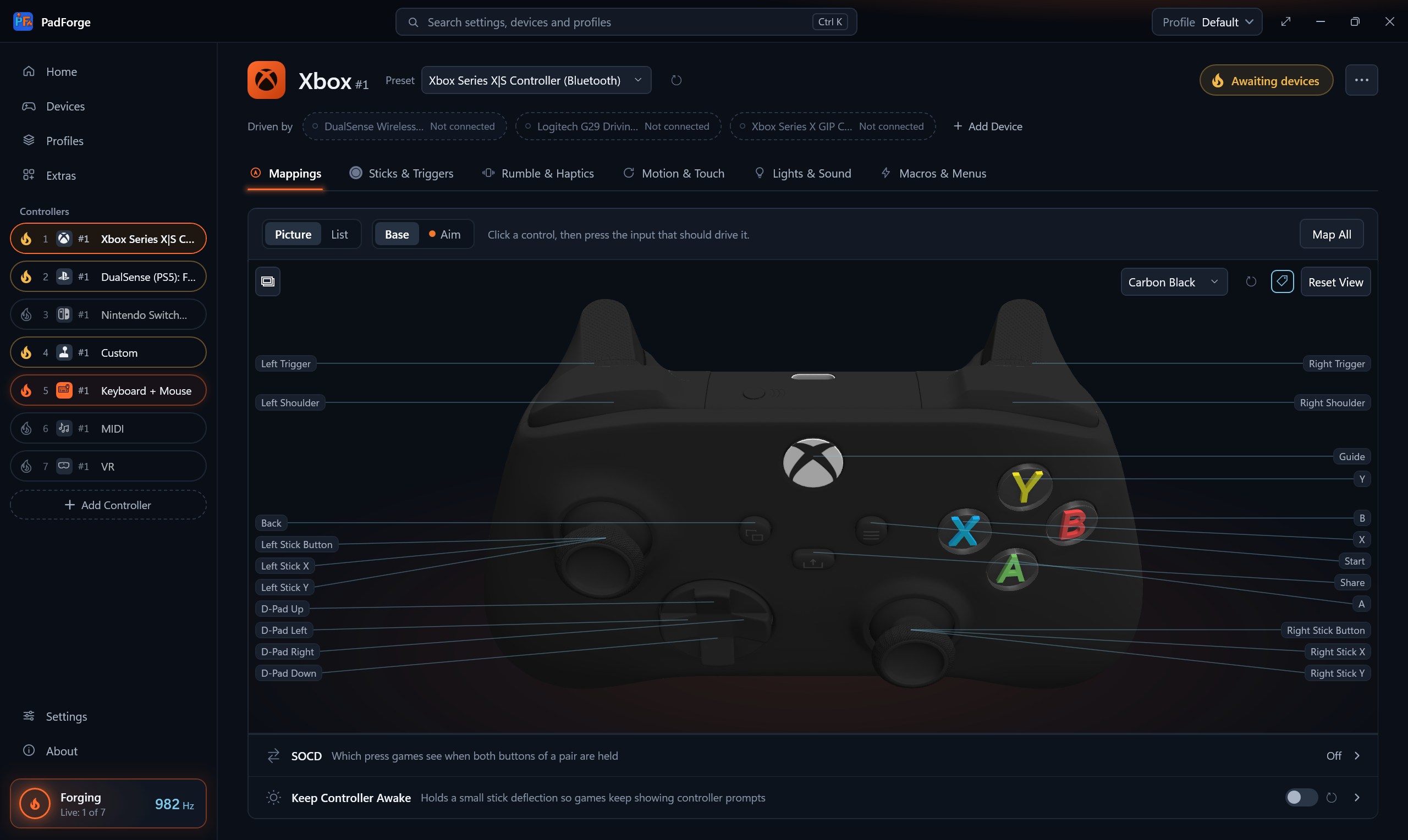
- A controller's page trades up to fourteen tabs in two rows for one row of six sections: Mappings, Sticks & Triggers, Rumble & Haptics, Motion & Touch, Lights & Sound, Macros & Menus. The header holds the type chip, the title, the Preset, the power pill with the slot's state, and More with Copy, Paste, Copy From, Clear All and Delete. Under it, Driven by shows a pill for each device.
- In Mappings, Picture shows the 3D or 2D controller at full width. Click a control and a bar under the picture shows its inputs, Record, Clear and its live value, with the control ringed on the picture. A click on no control, or Escape, lets go of it. A click on a control with none of the slot's devices connected now says why no recording starts. List shows every mapping in bands by kind, with a column for each device that drives the controller and a tag for each input with its live level. A click on a cell records from that device alone.
- In the other sections, each part is one card with Reset All in its head. A card opens on its first settings, More opens the rest in place, and 32 cards start folded to one line: the title, a hint and the state. Macros & Menus lists macros and menus side by side with the editor. A macro reads When, Do and More, its actions are numbered steps, and the picked step opens where it stands. A menu reads Opens, Cells and More, with its cells as numbered rows and Add Cell.
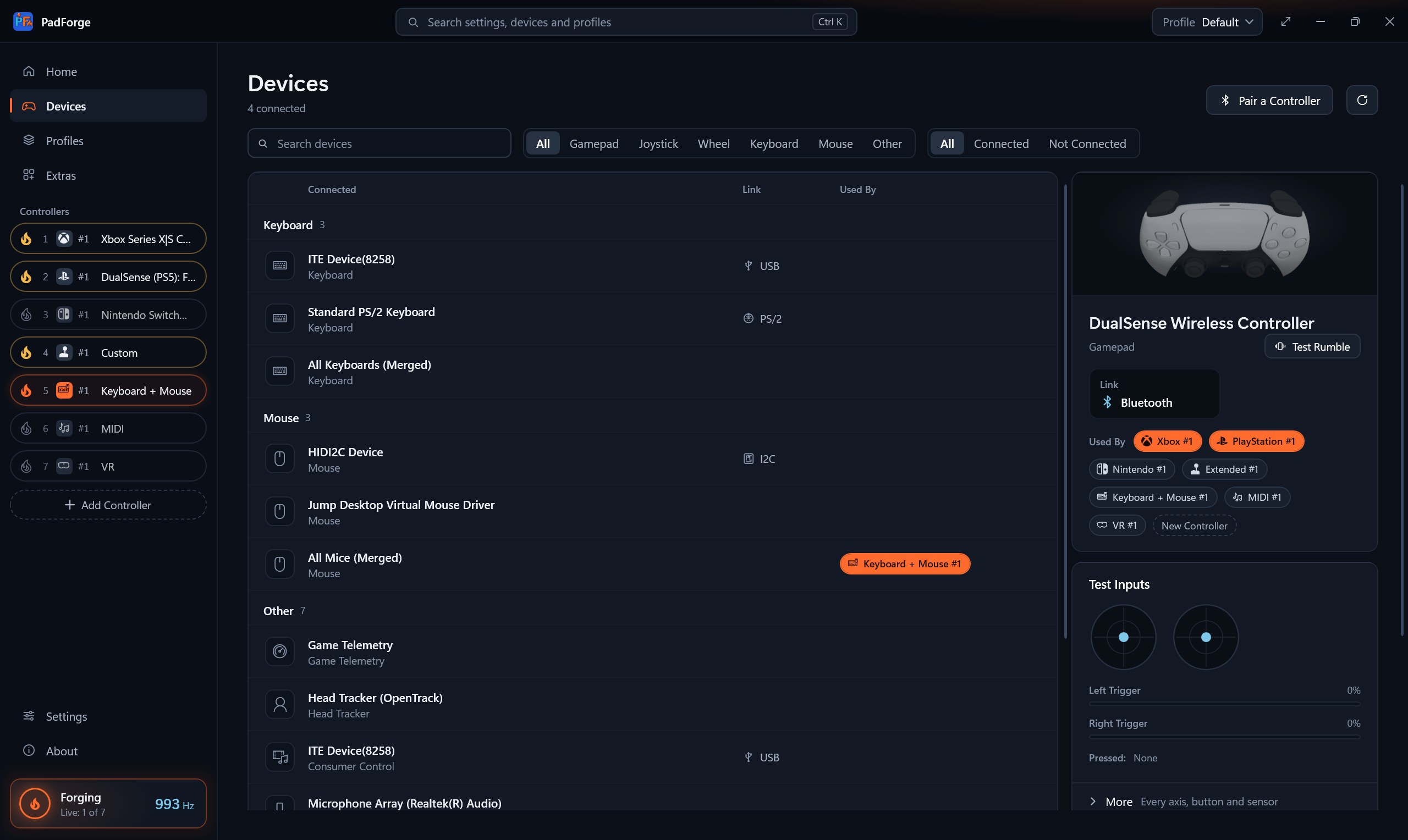
- The Devices page lists connected devices first, by kind: Gamepad, Joystick, Wheel, Keyboard, Mouse and Other. All, Connected and Not Connected pick what the list shows. Every row is one size with its type under its name, a tile that lights while the device sends, and a remove button under the pointer. The Link column names USB, Bluetooth, PS/2 and I2C, with each link's mark, and a device that is away shows the link it last had. Wheels and joysticks have drawings of their own, where they took the gamepad's. The page opens with no device selected, and a device's panel shows its picture, link and battery, then Used By, Test Inputs, a Settings card with Hide from Games (HidHide) and a wireless controller's power rows, and Details.
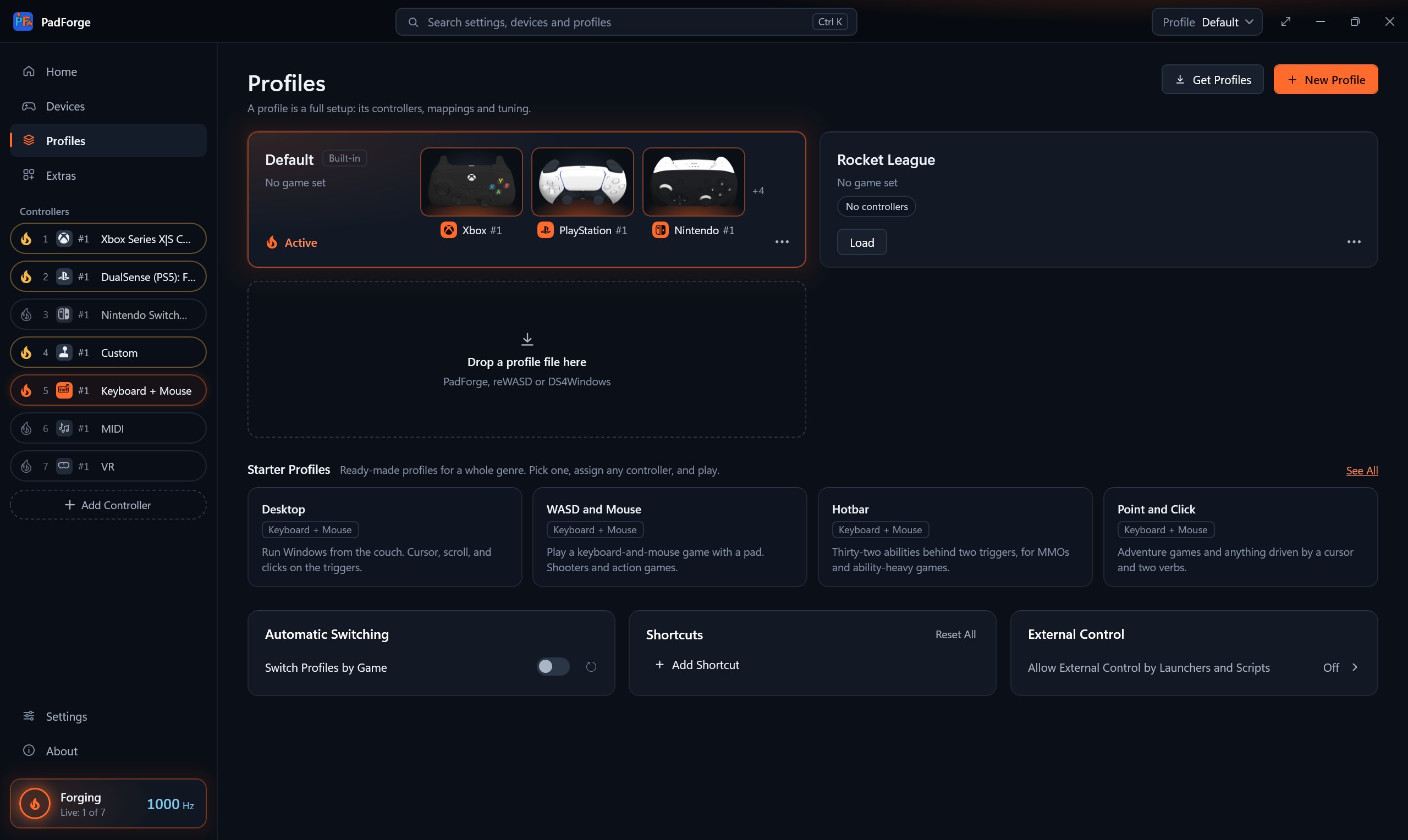
- The Profiles page has a card for each profile, with stills of its controllers, Load on the card, and Edit, Save As, Save Current Setup Here, Export and Delete under its menu. Get Profiles is one window with Starters, Community and Import a File. Automatic Switching, Shortcuts and External Control are three cards in one row.
- Settings has five groups and a search box: General, Input, Hardware, Drivers, Data & Privacy. The drivers are one list with a status and a button each. About has a search box for its credits and shows each credit's license on a chip.
- All 27 dialogs and the icon picker share one frame. Add a Controller shows each type with its name and one line on what it is for. A MIDI or VR type that cannot be added says why and points to Settings, under Drivers.
- All text is set in Segoe UI Variable, none of it under 12 outside the controller pictures, and numbers that change hold their width. Labels written in capitals or abbreviations are words now: Raw, Output, Hex, Inverted, Trigger 1. English strings use curly quotes and the ellipsis character.
- The web controller's pages take the program's colors, and its home page shows your last layout as one button, four common layouts, and the rest under More Layouts. A custom pad keeps each control's shape on a screen held sideways or upright, and can keep one arrangement for each.
- Every page was walked with accessibility tools after it moved. On the redesign's last build the UI Automation audit read 0 findings, down from 190, and Axe.Windows read 2 errors, down from 152, both on one button whose setting's name ends in the word Button. NVDA was heard on Home, Devices, Profiles, the Extras page, the five Settings groups, About and the controller's sections. In the light theme, gold and ember text now passes 4.5 to 1 contrast.
Five settings have shorter names: Switch Profiles by Game (was Auto-Switch Profiles Based on Foreground Application), Gamepad Only (Limit This PC to Gamepad Input Only), Auto-Reconnect (Reconnect Automatically), Pairing Identity (Identity Protection) and Unmapped Controls (Inherit Unmapped Targets from Base).
Windows on ARM works
The win-arm64 zip has been a native build since 4.5.1, but its virtual controllers did not work with HIDMaestro, so anyone who downloaded it for an ARM64 PC got no working controller. HIDMaestro 2.3.0 runs every one of its profiles on Windows 11 on ARM64, each as the device it is, and PadForge 6.0 carries it: every Xbox, PlayStation, Nintendo and Extended virtual controller works there, and HidHide hides your controller from games. It was tested on a Surface Pro with a Snapdragon X2 Plus: a DualSense over Bluetooth drove an Xbox controller, hidden from games. If anything does not work on your ARM64 PC, tell us right away.
- Testing on that PC found two more faults, both fixed: PadForge listed its own Xbox virtual controller as an input device, and a controller set to hide stayed visible to games when HidHide was installed while PadForge ran.
- A virtual controller on Windows on ARM is a USB device on usbip-win2's host controller, which HIDMaestro installs, and Windows' own drivers bind it. The HIDMaestro row in Settings, under Drivers, reads Installed there once that host controller is installed.
- HidHide, the DualShock 3 Bluetooth driver and the Windows MIDI Services runtime install their ARM64 versions, and the Vosk voice engine and the Xbox Elite paddle reader are built for ARM64.
- Razer Sensa HD haptics, Logitech G-keys and the VR headset and controllers through SteamVR wait on their vendors' ARM64 libraries.
Wheel centering from a car's steering
A force feedback wheel had one centering setting, a spring of one strength. The new Centering card under the Wheel card keeps that as Spring mode, the default, unchanged, and adds Vehicle mode: the torque a car's steering puts on the rim at its speed and grip, from the steering feel model of Balachandran and Gerdes. (#588)
- Vehicle picks the car: Sedan, Compact, Van, Race Car or Stanford X1, each built from its published parameters. Speed comes From the Game or is Fixed, and Steering Weight sets how heavy it feels. The card draws the torque at the rim against steering angle, in N·m, with four measures of steering feel under it.
- Speed comes from all eleven game telemetry sources, and grip from the games that send the surface under the front wheels or how wet the track is. Torque is in N·m from the figures Logitech and Fanatec publish for their wheels, or from your own Wheel Torque setting.
- The spring, damper and friction run in the wheel's own firmware, and PadForge sets the steering curve from the PC on each poll. A rule ties the PC's part to the damping the wheel carries, and a guard cuts it if the wheel swings by itself.
- Release Test measures the wheel with your hands off it: friction, inertia, the loop's delay, the damper and the spring. It then sets the least damping that returns the wheel without swinging past center, and shows a release before and after.
- A wheel on another PC over Remote Link gets centering too.
Crosshair and Magnifier
Two extras in the On Screen group. (#585, from discussion #577)
- Crosshair shows up to ten crosshairs, each its own click-through window centered on the display it names, plus an offset. Cross is the CS:GO classic, with a gap, a center dot and a T shape. Circle is a ring of 3 to 64 sides. Dot is a filled dot. Picture takes any PNG, GIF, BMP, ICO, TIFF, JPEG or WebP with its transparency, up to 8000 pixels a side. Color, opacity, rotation, an outline and Smooth Edges apply, and each card draws a live preview.
- Magnifier is a lens like a sniper scope, the whole display zoomed in through Windows' full-screen magnifier, or a spotlight that darkens the rest. It centers on the display, the pointer or the first crosshair that is on, and zooms from 1.25 to 16 times. The lens leaves the crosshairs out of what it shows.
- New macro actions: Toggle Crosshair, by number or every one, Toggle Magnifier, and Magnifier (While Held), for aiming down sights. Both extras are saved globally and in each profile.
- reWASD's crosshair commands now import as Toggle Crosshair 1 to 10, and command 120 as every crosshair. They had folded onto the Screen Overlays, and the ninth and tenth were skipped.
Flydigi Apex 4, Apex 5 and Apex 6 Pro
A Flydigi Apex 4 (in DInput mode), Apex 5 or Apex 6 Pro now gets the features a DualSense or an Xbox pad gets on a slot. (#586, from discussion #570)
- Adaptive Triggers, Impulse Triggers, a game's trigger effects, macros and game mods reach the triggers: resistance on the Apex 4 and Apex 5, and vibration that follows each effect's meaning on the Apex 6 Pro's trigger coils.
- The Apex 6 Pro's grip coils play the DualSense haptic track itself once Play DualSense Haptics on This Controller is on. The switch and its Haptics Gain are on the Audio card in Lights & Sound, and the switch starts off.
- The Lighting card in Lights & Sound paints the Apex 4's four groups, the Apex 5's twelve lights and the Apex 6 Pro's one color, then gives each pad its own lighting back.
- Controller Screen… on the Devices page sends a picture, a GIF, or the active profile's picture, name or number to the pad's screen, by cable.
SInput
SInput is Hand Held Legend's HID gamepad protocol. (#584, from discussion #578)
- An SInput pad arrives with its buttons, sticks, triggers, gyro, accelerometer, touchpads, battery and rumble. Its player light shows its PadForge slot, the second touchpad's click is read where SDL puts it, and its HD haptics play PadForge's tones, so it gets the Audio card, sound macros, the haptic mirror and touchpad pulses.
- An Extended slot can pick SInput Gamepad, a virtual SInput controller that SDL opens with its motion and both touchpads. A game's rumble on it, or on the Joypad-OS Steam Input Gamepad, reaches the slot's devices, and both slots get a Bass Shakers card.
The polling rate in Hz
Polling Rate (Unless a Profile Overrides It) in Settings, and a profile's Polling Rate, take a rate from 60 to 10000 Hz where they took a whole number of milliseconds. The default stays 1000 Hz. A profile offers 10000, 8000, 4000, 2000, 1000, 500, 250, 125 and 60 Hz. A settings file or profile from an earlier version holds an interval, which becomes its rate as it loads, to the nearest hertz: 16 ms reads 63 Hz.
The loop sleeps on a high-resolution timer between passes and no longer spins. Windows ends a sleep about every half millisecond, so above 2000 Hz the passes due at one wake run back to back: two a wake at 4000 Hz, five at 10000. The setting's tooltip gives the wake rate of your PC. Measured on one PC with a controller on a slot of 71 rows, the engine took 3.7 to 4.1% of one core at 1000 Hz and 14.9 to 15.9% at 10000 Hz. Above 1000 Hz, rules that counted passes count time, so the stick fling, Flick Stick's smoothing, touchpad scrolling and gyro smoothing act as they do at 1000 Hz. Home and the sidebar read the rate from the times the passes were due, so a steady loop reads its own rate.
RGB devices
The lighting tables were read again from their references as those stand now: OpenRGB at commit 6b681e3c, G-Helper at aa0037c5, QMK firmware at 80973aa0 and tuxedo-drivers at 07a681fc. PadForge knows 2,687 devices by USB identity, up from 2,669, and lights 1,572 of them itself, up from 1,565, under 1,357 names. The Supported Devices page names them.
- The ROG Falchion Ace 75 HE is lit key by key, as G-Helper drives it, in the ANSI or ISO layout the keyboard reports.
- Cooler Master's MK721 and CK721 LINE, and the MK721, CK721 and CK721 LINE behind their dongles, are lit as OpenRGB's V3 keyboards.
- The Roccat Kone XTD's four lights take live colors, and the mouse gets them back when PadForge lets go.
- The Dukharo VN66 is lit on its vendor collection, and the Alienware 15 R4 in its twelve zones.
- The Corsair K70 PRO MINI WIRELESS is driven as OpenRGB drives it. Its 28 light bars, which OpenRGB's table leaves dark, stay lit from SignalRGB's plugin.
- The 2026 ROG Scar 18 lights its lightbar with a per-key picture.
- An Akko 3068B Plus or PC75B Plus is sent one color under the option OpenRGB now names for it. OpenRGB swapped the board's single-color and random-color options, and PadForge had followed the old pair.
- The Corsair K70 RGB PRO and K100 RGB Optical V1 take the report lengths OpenRGB now gives them, 129 and 1025 bytes.
- When PadForge lets go of a ROG Falchion RX or Falchion Ace HFX, it sends the keyboard's Wave effect in the three reports G-Helper sends. G-Helper's code names both as keyboards that reject the single report PadForge sent.
Also new
- The Logitech RS50 is a wheel in its PC, PlayStation and Xbox modes, so it gets the Centering card through the generic wheel path. (#572)
- Rumble plays on top of a wheel's centering spring. The spring now has an effect of its own, so a game's rumble, Audio Rumble and haptics reach a wheel while it centers. Before, turning centering on silenced rumble. A game's own force feedback and Constant Force still take the wheel from the spring. A wheel that runs only one effect at a time keeps the spring and drops rumble, as before. (#572)
- Audio Rumble's Sensitivity runs from 1 to 60 and its Bass Cutoff (Hz) from 20 to 2000, on the Force Feedback and Impulse Triggers chains, for engine notes above 200 Hz. The defaults stay 4 and 80 Hz. (#571)
- Each shift layer sets how long its flyout stays. The Shift Layer window's Flyout row offers While the Layer Is On, the default and what every layer did, For 2 Seconds and Never. Base has the row in Configure Base. (#581, from discussion #576)
- Settings an imported profile carries now have controls of their own. The Gyro card gains Layer, Gyro On, Gyro On Buttons, Needs and Re-Center When Gyro Turns On, which hold Steam's gyro activation and re-center. Every source line of a mapping has Only While, And While, Curve, Outer Range, Anti-Deadzone, Deadzone Shape and Inner Deadzone, each with its reset. The steering modes have a Stick Deadzone row.
- A Bluetooth Switch 2 controller is kept through a lost link. Its row stays, with its controls at rest, while the link comes back for up to 12 seconds, then the pad is removed. A pad PadForge turns off, on idle or with the disconnect chord, leaves at once. A Joy-Con 2 clone such as the Mobapad M12-S sends a pairing request after each connect, and Windows drops its link about 30 seconds later. Such a clone is expected to pause for a moment each time, where it was lost for good. (#568)
- Rumble that SDL finds after a pad opens reaches PadForge within 5 seconds, as when a Switch 2 pad's link dropped during its setup. Before, such a pad had no rumble until it was opened again.
- HIDMaestro 2.3.0 brings six more virtual controller profiles: Xbox One S Controller (Model 1708): Full, a wired Xbox One S pad that Windows' own Xbox drivers bind, and the USB forms of the Nintendo Switch Online Genesis, N64 and SNES pads and the Joy-Con Charging Grip with the left or the right Joy-Con. SDL opens the Joy-Cons and those pads in the Switch protocol. On x64 the Xbox One S: Full profile and the two Charging Grip forms run on usbip-win2's host controller, which HIDMaestro installs with the first of them.
- The Steam Controller 2026's digital trigger clicks map as buttons 18 and 19 of PadForge's gamepad layout.
Fixes
- Hiding a controller works when HidHide was installed while PadForge was already running. The toggle stayed on and the controller stayed visible to games.
- PadForge no longer lists its own Xbox One or Xbox Series virtual controller as an input device. It was seen and fixed on Windows on ARM. Windows' device records on x64 PCs hold the same device tree, so x64 had it too.
- With two XInput pads of one ID, such as a DualShock 3 and a Navigation controller on DsHidMini's XInput mode, rumble and Hide from Games reach the pad on each row's number. Rumble went to whichever pad Windows listed at that position, and neither pad was hidden. Which row a pad gets is unchanged: pads of one model follow the order they connect. (#583, from discussion #567)
- Forces meant to last now last on a DirectInput wheel. PadForge asked for effects with no end, and SDL turned that into about 71.6 minutes, which a wheel's driver then cut to its 16-bit duration field. That is the likely reason Constant Force gave up in under a minute. (#572)
- A steady rumble lasts on every controller. SDL stops a rumble 65.5 seconds after it is set, and PadForge sent a level again only when it changed, so a held level stopped while the Force Feedback card still showed it.
- A Logitech wheel that arrives in Driving Force mode, or a G923 in its PlayStation mode, is switched to its native mode, as the Linux new-lg4ff driver does, so it turns its full range.
- Logitech, Fanatec and Thrustmaster wheels stop their forces when the engine stops or PadForge crashes, and a Remote Link peer's wheel stops when the peer leaves. A game's spring, damper or friction on a Fanatec base no longer stays in its slot after the game stops it.
- FPS Mouse moves at the same speed at every polling rate. It moved in proportion to each pass's length, twice as fast at 500 Hz as at 1000.
- A virtual DualShock 4's frame timestamp follows the clock at every polling rate. It counted a millisecond a frame, which matched the pad only at 1000 Hz.
- Polling holds steady after launch. The poll loop's optimized code is compiled before its first pass. Compiled mid-loop, 15 to 20 seconds after launch, it held the loop 9 to 14 ms on the PC it was measured on. Controller models share their parsed meshes and decoded pictures, so Home's pictures and a controller's page build one copy between them.
- PadForge makes less garbage at rest, so collections pause the poll loop less often. The DualShock 3 driver check, the driver lookups in the registry, the tablet walk, profile lookups and the running-program match each do less work. On one PC the DualShock 3 check alone cut steady allocation from about 5.3 to 3.1 MB per five seconds.
- Opening a controller's page no longer rewrites PadForge.xml.
- PadForge read the frame counter in the Automobilista 2 and Project CARS shared memory 4 bytes early, from the cloud brightness field. It reads the counter now.
- The sidebar's polling rate wrote "Hz" in every language. It now uses each language's own unit.
- The gyro's Easy Aim Threshold and Aim Engage Button tooltips name the Engage Stick. They said the right stick whichever stick was set. Engage Mode's tooltip lists Release to Aim, the third mode, which it left out.
- A mapping row's Mode picker shows the mode the row was saved with. After a profile switch, a Rapid Trigger or Invert On Hold row could read blank, and a stick row with steering on read Unassigned, with a blank Mode and no Source picker.
- A line that counts one item names it in the singular: "Running, 1 key event", "Exported 1 name.", "1 subscriber". The G-keys status, macro summaries, the Steam Workshop browser, the extended clone prompt and the import and export lines said "1 key events" and the like.
- Home's count of connected devices matches the Devices page, one for each device plugged in. Home counted every row that was online, a keyboard's media keys, merged rows and PadForge's own inputs among them.
- The 3D Steam Deck has its View button on the left and Menu on the right. The model had them the other way round. The Steam Deck picture no longer has a green line down the left edge of its screen.
- Every legend on the keyboard picture fits inside its key. NumLk was cut at its right edge, and Home, PgUp and PgDn ran from edge to edge. The MIDI picture keeps its CC Outputs and Note Outputs titles whole when a slot has one control or one note.
- An analog keyboard's key chips in Test Inputs show whole names. "Backspace", "Right Shift" and "Numpad Enter" were cut short.
- Aim Engage Button, the two Trigger Routing activators, Mouse Gestures' Custom Activation Input and the audio mirror's Engage Input show the saved input inside the picker, and Unassigned only when nothing is saved. An input whose device was away read Unassigned.
- The Extended controller's Custom preset is named in the interface's language. It read "Custom" in English in every language.
- In a right-to-left language, a Latin name cut short ends with its ellipsis after the last letter shown. The ellipsis stood before its first letter.
Bundled
- HIDMaestro 2.3.0, up from 2.1.0, with 344 device profiles. The pickers offer 246 of them: 143 controllers, 51 keyboards and 52 mice. 97 cannot be deployed yet. On x64 the driver is the one 2.1.0 installed, so nothing reinstalls.
- BthPS3 3.2.1, unchanged.
- PadForge's SDL build at fork commit 51470ad786, synced with upstream SDL at f391753c9f. It lists the Logitech RS50 as a wheel and gives DirectInput effects with no end a duration with no end (hifihedgehog/SDL#48), and it keeps a Bluetooth Switch 2 controller through a lost link (hifihedgehog/SDL#49, hifihedgehog/SDL#50).
- PadForge's OpenXInput build at fork commit 082eefc, which gives PadForge's own Xbox One and Xbox Series virtual controllers no XInput slot (hifihedgehog/SDL#51).
- The NuGet packages are unchanged.
Localization
PadForge has 109 languages. The 42 complete ones, American and British English among them, carry every new and reworded string. The other 67 show English wherever they have no string. This release adds 840 strings, removes 166 and changes 572, 277 of them only in their quote marks or ellipsis. The English table holds 5,470.
Credits and licenses
- Three new credits on the About page, in LICENSE and in README. Crosshair and magnifier references: the Cross and its dot follow Skarbo's CSGOCrosshair (no license published), the Circle, picture and outlined styles follow Crosshair-Overlay (MIT), and the Lens and full-screen zoom follow Microsoft's Windows-classic-samples (MIT). RetroArch (GPL-3.0-or-later): a custom web pad keeps each cluster's distance from the nearer edge of a wider screen, as RetroArch's overlays move their two halves. SInput references: Hand Held Legend's SINPUT-LIB-HID (MIT-0) and HOJA-LIB-RP2040 (CC BY-NC-SA 3.0), and OpenPuck's SInput mode (AGPL-3.0). All three were read as documentation, and none of their code ships.
- The Flydigi Apex references have four rows on the About page and one entry, Flydigi Apex references, in LICENSE and README. The trigger effect translation, the Apex 6 Pro's trigger rendering and haptic stream, and the Apex 5 and Apex 6 Pro lighting writes are ported from ReynArts' ApexSenseBridge (GPL-3.0-or-later), whose full text LICENSE now carries. The screen upload follows Mikalai Kaliaha's openflydigi (MIT and CC0-1.0, by file), the Apex 4's lights and screen follow Uilton Lopes' flydigi-space-station-mac (MIT), and the Apex 4's trigger pacing follows Jackwmtr's flydigi-apex4-linux (MIT).
- A Steering feel references row: the model of Balachandran and Gerdes, "Designing Steering Feel for Steer-by-Wire Vehicles Using Objective Measures", the car parameters from commonroad-vehicle-models (BSD-3-Clause) and TUM's global_racetrajectory_optimization (LGPL-3.0), the tire's trail from Pacejka's Tire and Vehicle Dynamics and road grip from Wong's Theory of Ground Vehicles. PadForge takes figures from them and ships none of their code.
- The racing telemetry references add CrewChiefV4 (MIT) and r3e-api (Unlicense). The Eden credit adds what a custom web pad takes from it: control sizes measured against the screen's shorter side.
- DualSenseY-v2 is credited as MIT, the license its author has since published. OpenSynapse is credited as AGPL-3.0-only, and as MIT when PadForge read it.
- LICENSE carries the copyright lines of NAudio, Nefarius.Utilities.DeviceManagement, Windows MIDI Services and WPF UI, which it lacked.
- The OpenRGB credit names commit 6b681e3c, the one the lighting tables are read at.
- The usbip-win2 credit says which controllers it carries: every virtual controller on Windows on ARM, and on x64 the composite controllers, the Steam Controller (2026), the Xbox One S: Full profile and the Joy-Con Charging Grip forms.
- Bouncy Castle's credit names its license MIT, as its package does. The Ionicons credit left the About page and LICENSE with the drawing that used it.
Install
Download the win-x64 zip, or the win-arm64 zip on Windows on ARM, and extract PadForge.exe. It is one file and needs nothing else installed. Run it, and accept the UAC prompt: PadForge always runs elevated. The first Xbox, PlayStation, Nintendo or Extended virtual controller it starts installs HIDMaestro.
Upgrade
- Settings → Updates in 4.5.3 and later finds this release and installs it in place. PadForge.xml is not touched.
- A 5.3.1 settings file opens as it is. Its polling interval, and each profile's, becomes a rate in Hz. The Welcome Tour's flag is no longer read, and the next save drops it.
- FPS Mouse moved at a speed that followed the polling rate. A speed tuned at a rate other than 1000 Hz moves differently now and needs tuning again.
- The sidebar no longer folds. Home's offer for a new controller comes only for a controller PadForge first meets after the upgrade, and a device known before is never offered.
Compatibility
- Windows 10 or 11 on x64, and Windows 11 on ARM64. The .NET 10 Desktop Runtime is inside
PadForge.exe. - On Windows 11 on ARM64, every Xbox, PlayStation, Nintendo and Extended virtual controller runs, and HidHide hides devices. Razer Sensa HD haptics, Logitech G-keys and SteamVR input are not available there, as the README lists.
- Profiles, mappings, macros and menus from 5.x load unchanged.
Known limitations
- Wheel centering has not run on a wheel. Every stability and Release Test result comes from a simulated wheel with delay, friction and inertia. A game with no telemetry, or a format with no speed field, uses Fixed speed, and Codemasters' flat telemetry and OutGauge send no surface, so grip falls back to the one you chose. The force comes in only after the wheel has been at rest for 0.3 seconds, then over a second. Its runaway stop has one false trip: a wheel at rest off center when the force starts, turned farther out by hand at over 200 degrees a second within its first 1.3 seconds. Setting the mode again or running the Release Test clears it.
- A wheel whose maker publishes no torque figure, Thrustmaster's among them, starts from a high figure, so its forces are weak until you enter the wheel's own Wheel Torque. Over Remote Link, centering reaches a Logitech, Fanatec or Thrustmaster wheel only. On a Logitech wheel, while a game's own spring, damper or friction plays, the centering curve plays as a constant force and friction rests. On a Fanatec base, Spring mode and Vehicle mode's spring share one slot, which belongs to the mode that is on. On a coarse wheel axis the Release Test keeps no delay under 10 ms.
- No Logitech wheel has run the native-mode switch, and no RS50 has run as a wheel or with rumble on top of its spring. Whether it runs two effects at once is unknown. If it cannot, it keeps centering and drops rumble. No DirectInput wheel has held an effect with no end past a minute with this build.
- No Flydigi pad has run against PadForge. The frames, lighting blocks and screen packets match the references' own test vectors and captures. The screen takes a picture by cable only. An Apex 4 send moves the pad to Xbox mode and WinUSB for the send and needs every other Xbox 360 pad unplugged. The Apex 6 Pro stores each light write, so its color changes at most once every 1.5 seconds and 300 times a run. The plain Apex 6 is refused, as both references refuse it. While Flydigi Space Station runs, it holds the pad's replies.
- No SInput pad has run against PadForge. HOJA firmware plays a tone's pitch and OpenPuck its amplitude alone. The SInput Gamepad persona was read back through SDL on the bench, and no game has run on it.
- None of this release's lighting changes has run on a device. That covers the Falchion Ace 75 HE, the Cooler Master keyboards and dongles, the Kone XTD, the Dukharo VN66 and the Alienware 15 R4. It also covers the K70 PRO MINI WIRELESS's light bars, the Scar 18's lightbar, the Akko's color option, the two Corsair report lengths and the Falchion RX and Falchion Ace HFX hand-back. Tests hold their frames to the bytes of OpenRGB, G-Helper and SignalRGB's plugins. SignalRGB's plugin writes the K70 PRO MINI WIRELESS's bars on another handle than the OpenRGB frame PadForge sends them in. Most of the 1,572 lit devices have not run against PadForge.
- The Falchion Ace 75 HE and the Cooler Master MK721, CK721 LINE and dongle keyboards have no hand-back in their references, so they keep PadForge's last picture when it lets go. PadForge repaints the Falchion Ace 75 HE about 30 times a second, a rate no reference sends its frames at. OpenRGB's page says the Cooler Master keyboards save every update, so PadForge spaces their pictures out and fast color changes do not follow.
- The Switch 2 link recovery has not run on a Joy-Con 2 clone. Whether an M12-S comes back, and how fast, is a hypothesis. Such a clone sends its pairing request at every connect, so it is expected to pause about every 30 seconds.
- A game in exclusive full screen hides the crosshairs, the lens and the spotlight, so run it windowed or borderless. Full Screen zoom enlarges the crosshairs with everything else. Windows' full-screen magnifier serves one program at a time, and the page says so when Windows refuses.
- Above 1000 Hz, what a game reads from a persona whose frames carry a clock has not been measured.
- No PadForge build has driven any of the six new HIDMaestro profiles. On Windows on ARM, the DualShock 3 Bluetooth driver, Vosk voice macros and Xbox Elite paddles have not run on an ARM64 PC. The fix that keeps PadForge's own Xbox controller off its device list ran on Windows on ARM only: no x64 PC was run with a virtual Xbox controller on usbip-win2's host controller connected. A first HidHide install while PadForge runs, the case the hiding fix answers, has not run with this build.
- The interface was checked in page renders, UI Automation and NVDA, and no controller was put through every page by hand. The custom pad's new layout and the web controller's new look have not been seen on a phone.
- No native speaker has reviewed the translations.
- The known limitations of 5.3.0 still apply, except its last line: PadForge 6.0 runs on ARM64 hardware.
Full changelog: https://github.com/hifihedgehog/PadForge/compare/v5.3.1...v6.0.0