


| Name | Modified | Size | Downloads / Week |
|---|---|---|---|
| Parent folder | |||
| PadForge-v5.3.0-win-arm64.zip | 2026-11-09 | 254.6 MB | |
| PadForge-v5.3.0-win-x64.zip | 2026-11-09 | 275.2 MB | |
| PadForge v5.3.0 source code.tar.gz | 2026-11-09 | 265.1 MB | |
| PadForge v5.3.0 source code.zip | 2026-11-09 | 266.7 MB | |
| README.md | 2026-11-09 | 29.6 kB | |
| Totals: 5 Items | 1.1 GB | 0 | |
PadForge is a Softpedia Editor's Pick: rated 5/5, Excellent.
"PadForge shines best in its incredibly vast range of supported controller types." (Softpedia's editor review)
PadForge 5.3.0 brings your reWASD configs and DS4Windows profiles into PadForge, with a preview of every binding before anything changes. It lights 1,563 RGB keyboards, mice, headsets and other devices by itself, key by key where it knows each light, and the new Screen Color mode lights them, and your controllers' lightbars, with the colors on your screen. Any controller can now type into any Windows program through the Keyboard menu style, and Steam's hotbar arrives as the Hotbar menu style. Your stream's viewers can play a slot by typing in your Twitch chat, a Screen Overlay shows what a keyboard screen shows in a window over your game, and Use Only in PadForge takes a USB keyboard or mouse, or a precision touchpad, away from Windows so its keys reach only your mappings and macros.
4.5.3, 5.0.0, 5.1.0, 5.2.0, 5.2.1 and 5.2.2 offer this release from the Updates card in Settings. 4.5.2 and older need one manual download.
| reWASD and DS4Windows import | Map Key Lights |
|---|---|
 |
 |
| Screen Color | Screen Overlay |
|---|---|
 |
 |
| The Keyboard menu style | The Hotbar menu style |
|---|---|
 |
 |
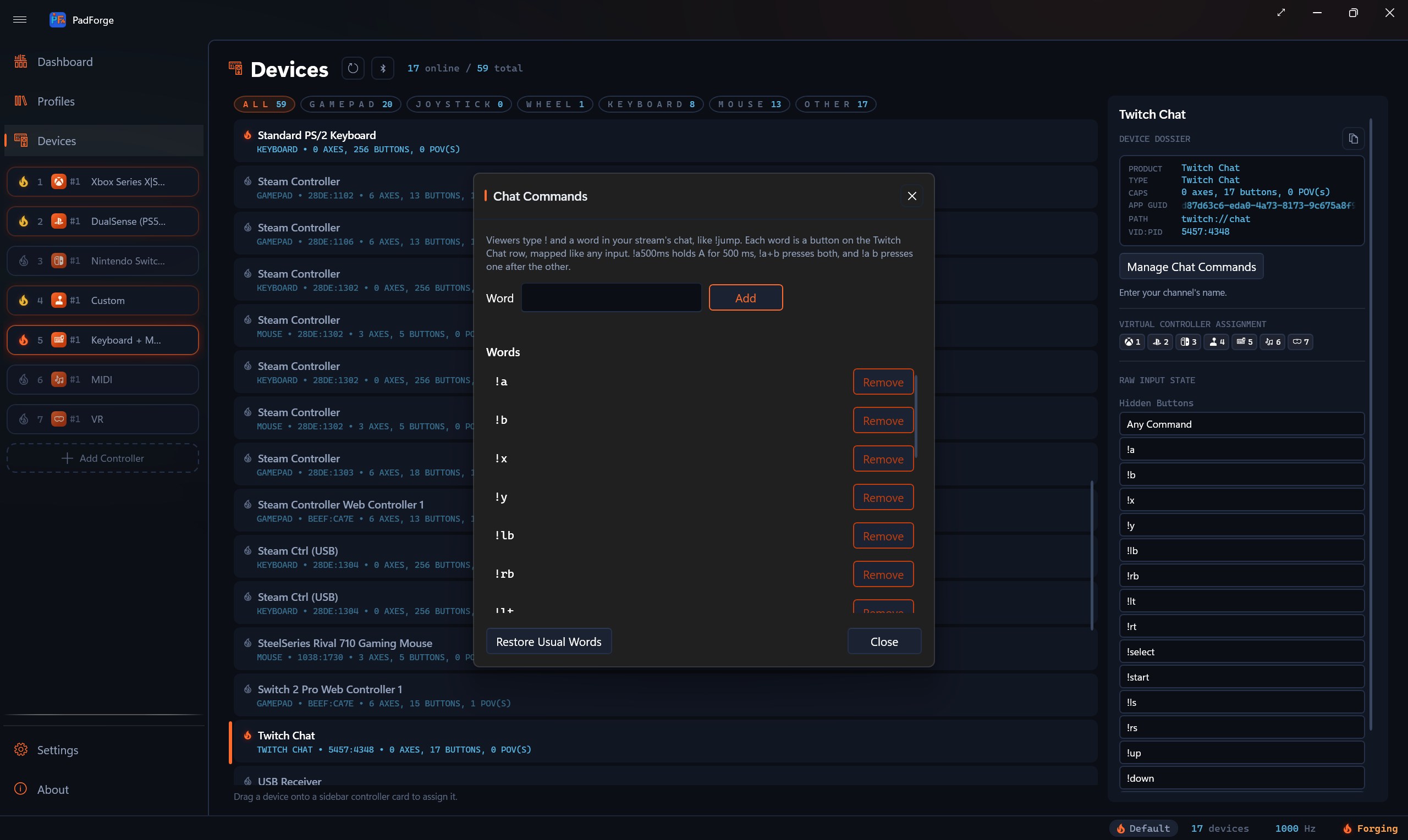
| Twitch Chat | Chat Commands |
|---|---|
 |
 |
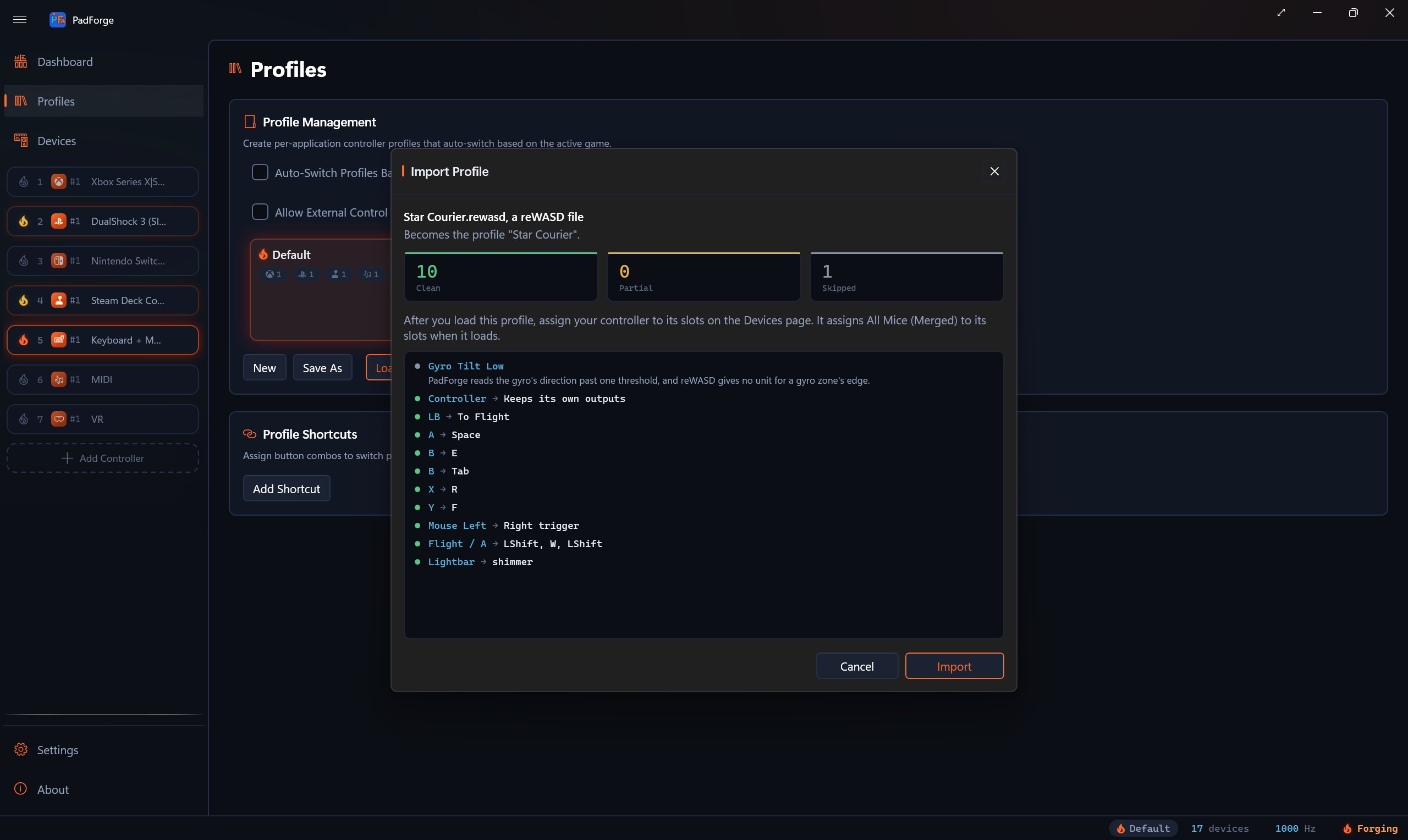
reWASD and DS4Windows import
Open a reWASD config (.rewasd) or a DS4Windows profile (.xml) with Import… on the Profiles page, or drop the file on the profile list. Before anything changes, the Import Profile window lists every binding as Clean, Partial or Skipped, gives the reason under each Partial and Skipped row, and names every program the profile's buttons run and every program it starts when it loads. Import adds an ordinary profile and leaves the loaded one as it was. (#561, from discussion #553)
- reWASD's shifts become shift layers, and its single, double, triple and long presses become macros that keep the file's wait times. Its turbo, toggles, radial menus and each layer's lightbar come across, and a crosshair command toggles a Screen Overlay, which shows a picture you choose.
- A DS4Windows profile brings its shift modifiers, the special actions in its
Actions.xml, its gyro and touchpad output modes, its lightbar, its Rigid, Full Click and Pulse trigger effects and its two-stage triggers. - Keyboard and mouse inputs read All Keyboards (Merged) and All Mice (Merged), which the profile assigns to its slots when it loads, so they work at once on any PC. Assign your controller to the controller slots on the Devices page.
- reWASD's process names, and the programs DS4Windows'
Auto Profiles.xmlties to the profile, become the profile's programs. - The file dialog lists reWASD's and DS4Windows' profile folders when they exist on the PC.
- The import brought three macro additions. The Until Next Press repeat mode runs a macro's actions until its trigger is pressed again, Limit Mouse Region takes an Offset X and Offset Y, and the Profile Shortcut action loads a named, next or previous profile, shows or hides the window, or turns the virtual controllers off and on.
RGB devices, key by key
PadForge now lights 1,563 RGB keyboards, mice, headsets, mousepads, monitors, laptop keyboards, light strips and other devices by USB identity, in the protocols OpenRGB, OpenRazer, SignalRGB's plugins and QMK document. Until this release it lit Logitech, Razer, SteelSeries and Windows Dynamic Lighting devices. The Supported Devices page names them, and they join the count of devices PadForge knows by USB identity, now 2,667, up from 1,110. A device with no input row of its own, such as a mousepad, a headset stand, a dock or a light strip, gets a lighting row on the Devices page, so it can be assigned to a virtual controller. (#557, from discussion #538)
- Where PadForge knows a device's lights one by one, its Lighting tab gets a Key Colors card, or Zone Colors for a device lit in zones. Chosen keys take a color of their own on each shift layer, over whatever the mode, a game or the Input Reactive overlay sets, and Other Lights says what the rest show.
- The Set Key Colors macro action lights chosen keys steady, fading or counting down one key at a time, for a set time, while its trigger is held or until a Clear Key Colors action ends it.
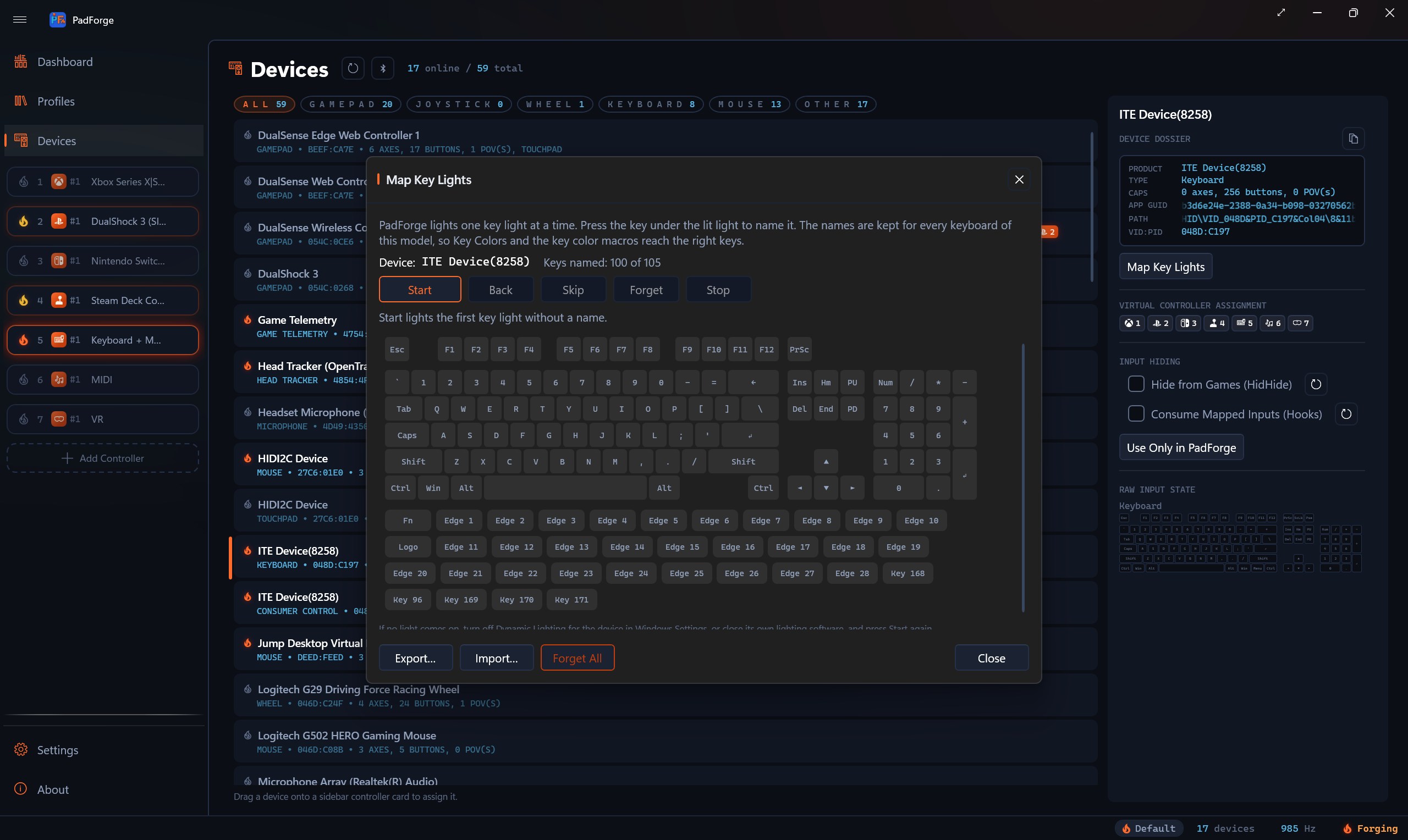
- For a keyboard whose description leaves keys unnamed or names one wrong, Map Key Lights on the Devices page names each light by the key you press under it, once for every keyboard of that model.
- An LED Strips card takes the length of the strip on each header of ASUS Aura USB, Cooler Master ARGB, Razer Chroma ARGB and GaiZhongGai controllers, so each LED takes its own color.
- Logitech, Razer and SteelSeries devices that took one color now take a color per key or zone, on their own and through G HUB, Logitech Gaming Software, Synapse and GG.
- While Armoury Crate, Mystic Light or Corsair iCUE runs, the new ASUS Aura, MSI Mystic Light and Corsair iCUE rows light those makers' devices through their SDKs, and Wooting keyboards light beside Wootility. The iCUE and Mystic Light routes are in the x64 build, which now carries both libraries.
- While OpenRGB runs with its SDK Server on, PadForge lights the devices OpenRGB holds through that server. While another maker's own program runs, such as Lenovo Vantage, NGENUITY or ROCCAT Swarm, PadForge leaves that maker's devices alone, and the Lighting tab names the program.
Screen Color
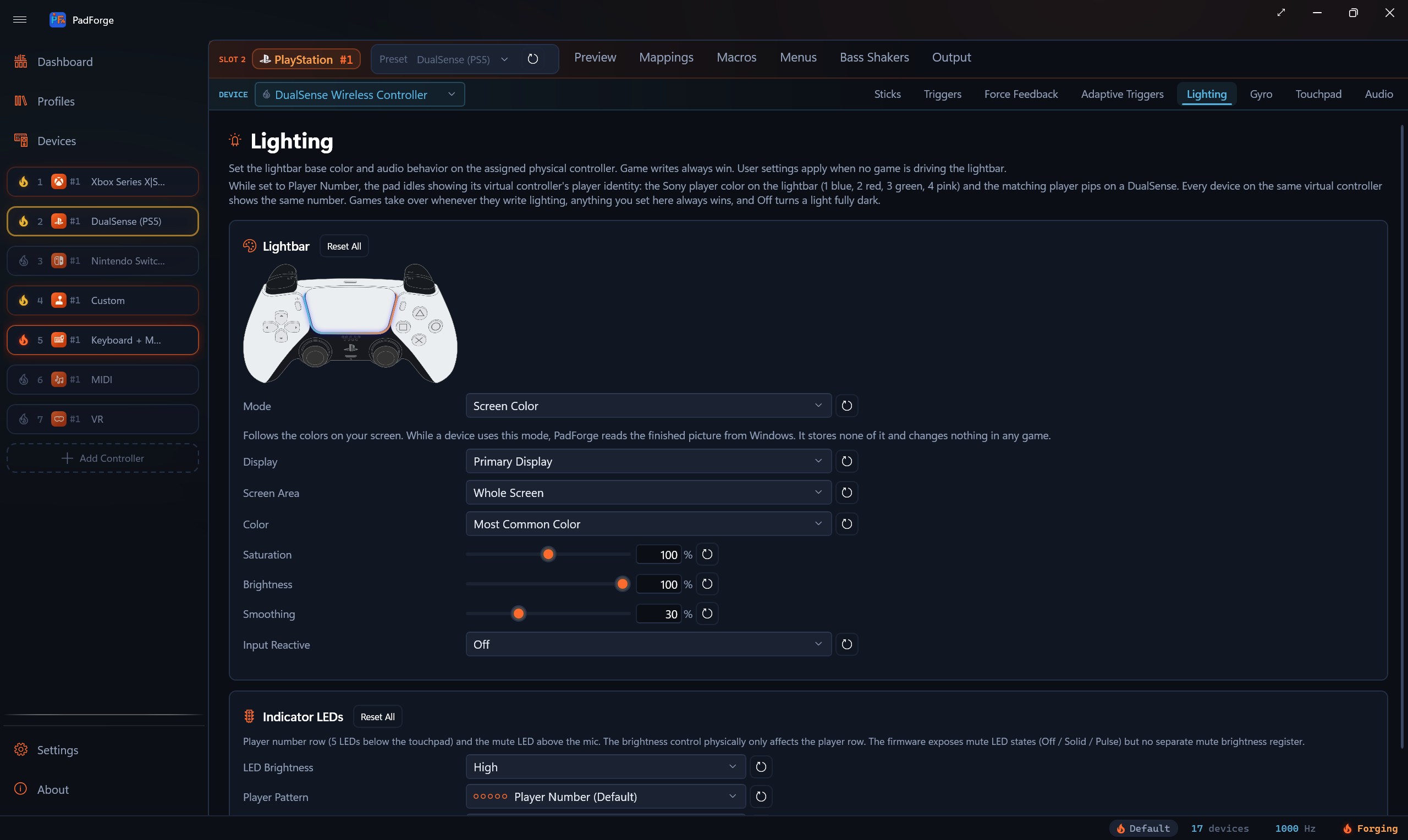
Screen Color is a new lighting mode that follows one display: the whole screen, an edge, a corner, the center or an area you set, read as its most common color or its average, with saturation, brightness and smoothing of your own. A DualSense, DualShock 4 or PS Move takes it on its light, and so do the web controller's lightbar and every mouse, keyboard and lighting row PadForge lights. On a device with more than one light, Spread the Screen Across This Device's Lights gives each light the color of the screen at its own place. It is the fifteenth mode on the Lighting tab. (#559, from discussion #539)
PadForge reads the finished picture Windows composes, through Desktop Duplication or, where that cannot run, Windows.Graphics.Capture. It keeps none of it. Nothing goes into a game, and nothing is read from one. On an HDR display it reads the desktop against the white level Windows draws SDR content at. A display's capture runs only while a device uses the mode and stops two seconds after the last one leaves it. A keyboard or headset that stores each picture in its own memory keeps its last steady color, since each stored write takes time and wears the device's memory, unless the keyboard also has a Windows Dynamic Lighting interface to take the changing colors.
The Keyboard and Hotbar menu styles
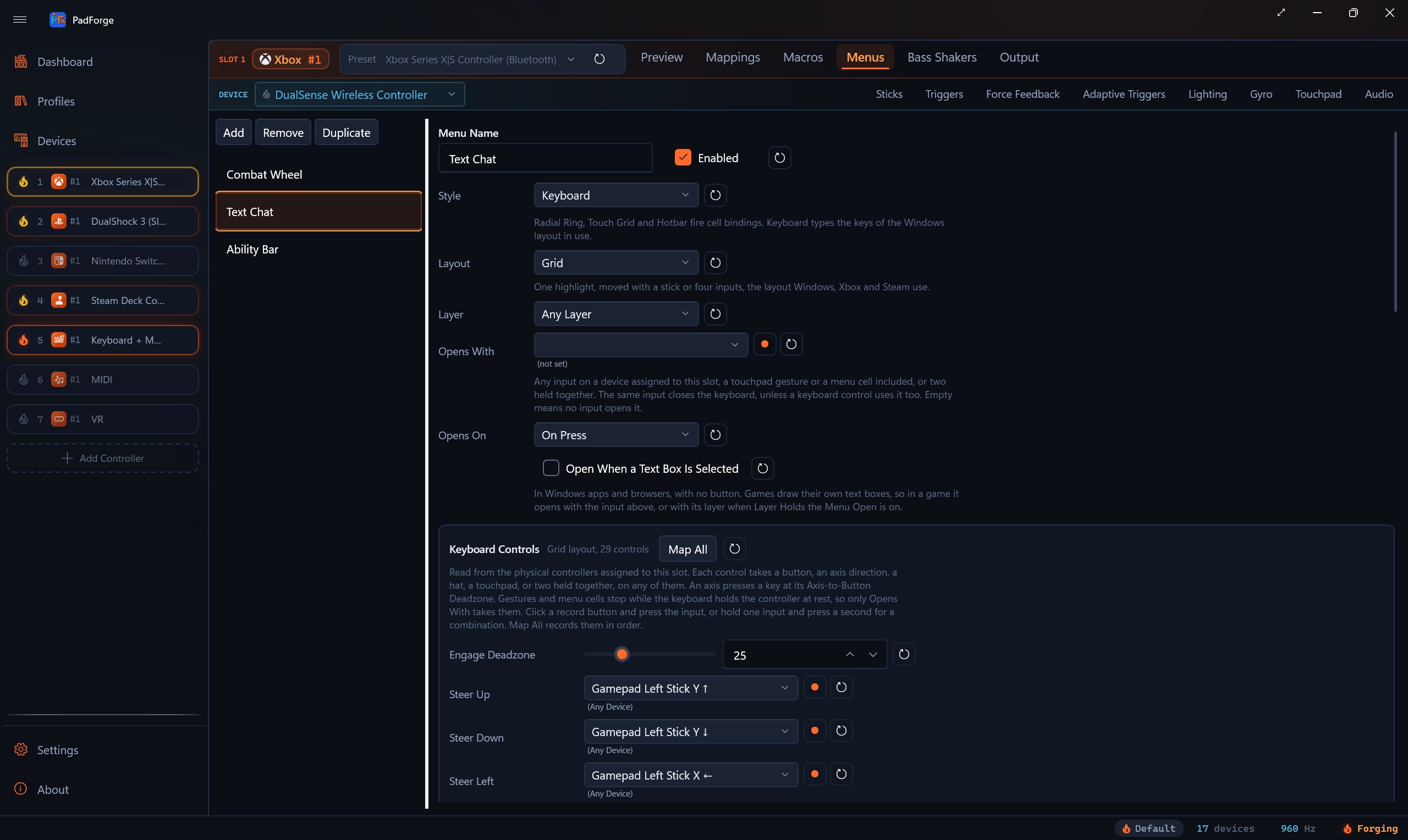
Keyboard is a new style on a slot's Menus tab: the controller types into any Windows program, in the keyboard layout of the window you type into. Grid moves one highlight, the way the keyboards of Windows, Xbox and Steam do. Split gives each thumb its own half of the keyboard, and Wheel is a daisy wheel of eight letter groups. Opens With takes any input on the slot's devices, or two held together, on any of a macro trigger's eight press modes, and Open When a Text Box Is Selected, off by default, opens the keyboard when a text box in a Windows app or a browser takes the focus. Every control records any input, and Map All records them in order. (#566, from discussion #554)
- Word suggestions come from the text prediction in Windows. Types Through sends the keys through Windows Input, through a Keyboard + Mouse slot's keyboard, or through a HIDMaestro keyboard that programs take for hardware.
- While the keyboard is open, the controllers that drive it read at rest for everything else, so a game sees the virtual controller sitting still. The window never takes the focus from the program you type into.
- The Desktop starter profile opens a keyboard on X, and a Steam Workshop config's Show Keyboard binding imports as a Keyboard menu on the same input, press and layer.
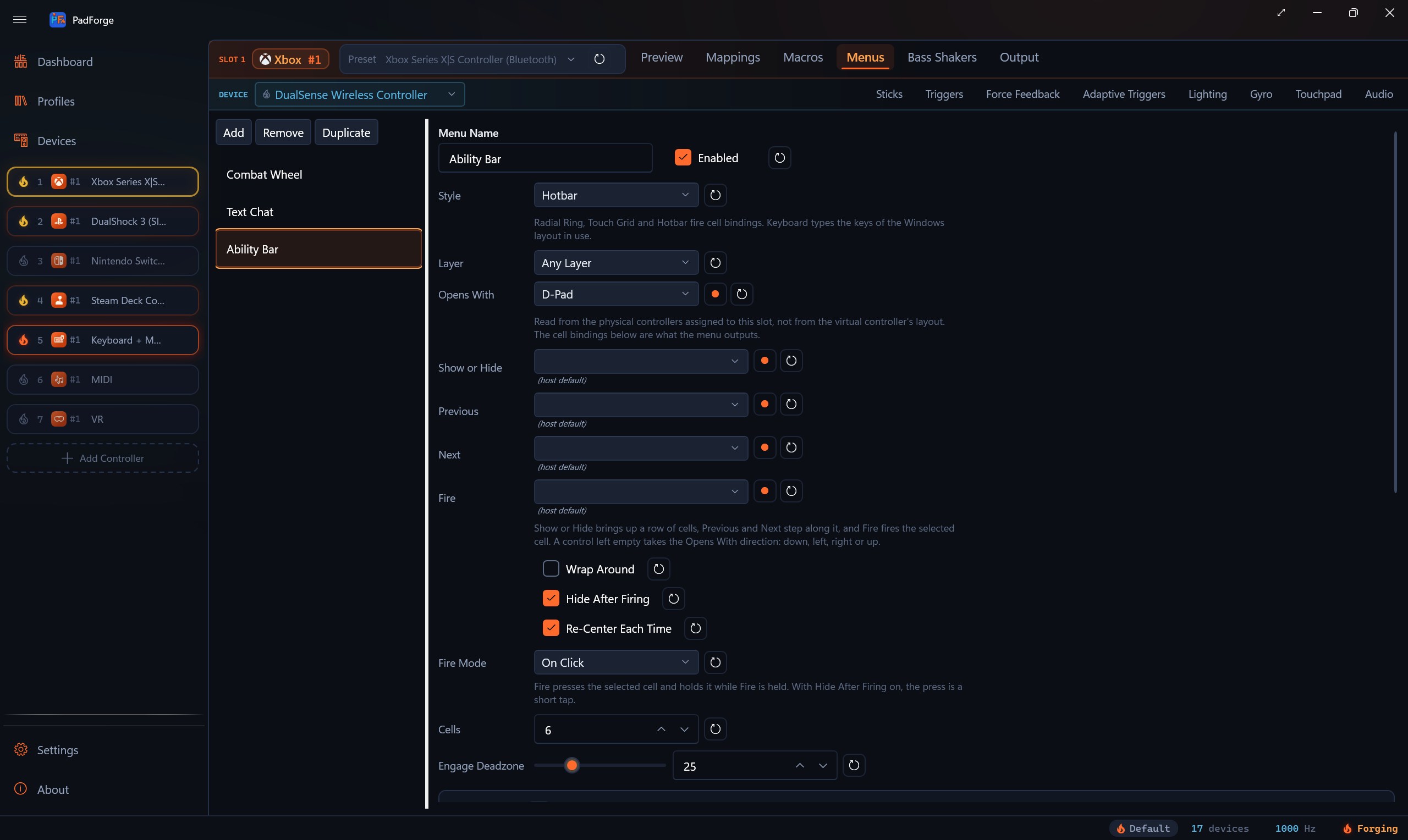
Hotbar is another new style, Steam Input's hotbar: a row of cells that Show or Hide brings up, Previous and Next step along, and Fire fires. Each control takes any button on the slot's devices. Wrap Around, Hide After Firing and Re-Center Each Time start at Steam's defaults, and each fire mode runs as Steam runs it. A Steam Workshop config's hotbars now import as this style, with their cells, switches and place near the bottom of the screen, where they imported as a Touch Grid.
Twitch Chat
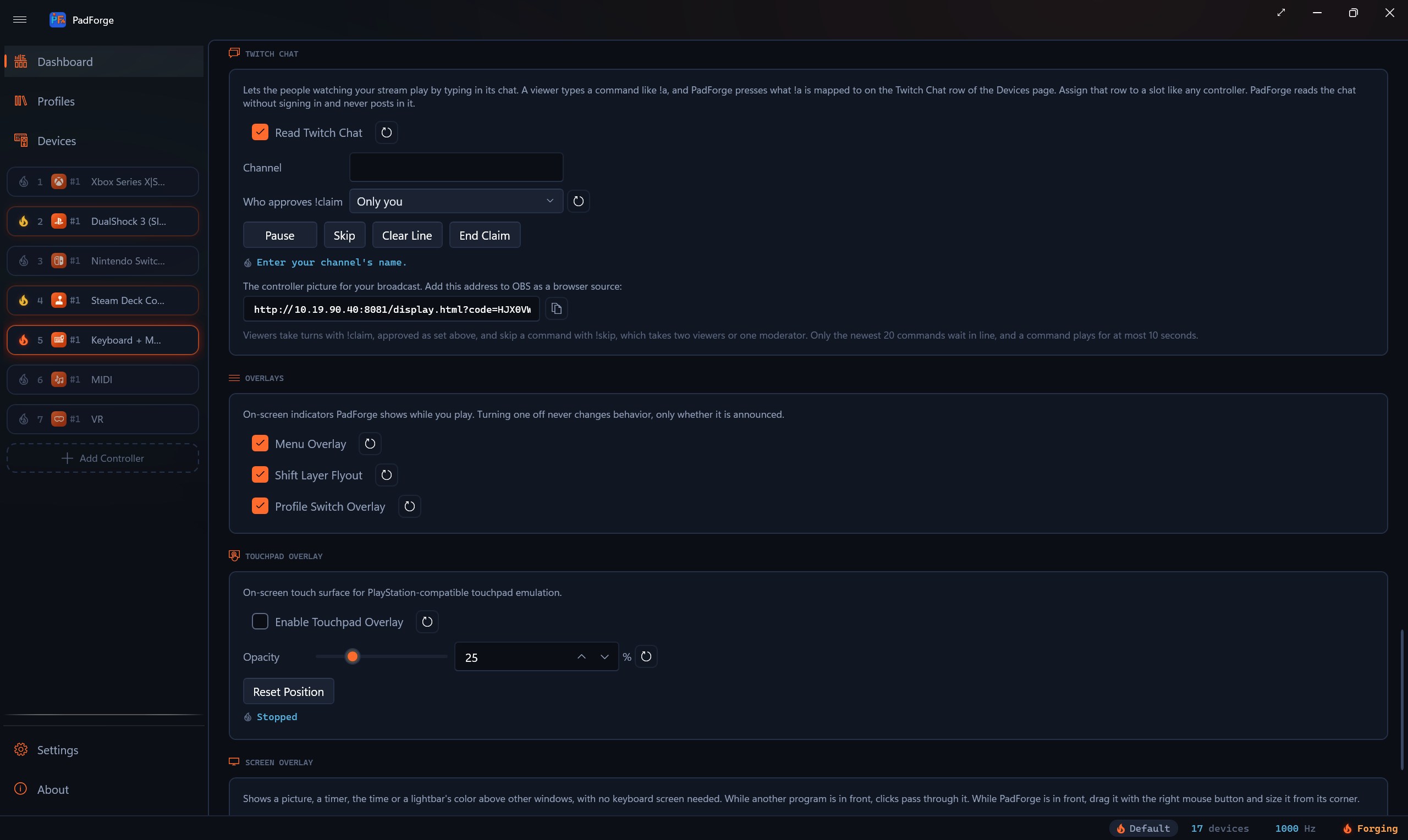
Turn on Read Twitch Chat on the Dashboard, enter your channel and assign the Twitch Chat row on the Devices page to a slot, and your stream's viewers play that slot by typing commands in your chat. Each command word is a button on the row, mapped like any controller's. The 16 usual words, such as !a, !lt and !up, come preset, and Manage Chat Commands adds your own. !a500ms holds A for 500 ms, !a+b presses both and !a b presses one after the other. Commands play one at a time, each for at most 10 seconds, and only the newest 20 wait. PadForge reads the chat without signing in and never posts in it. (#555, from discussion #544)
- Viewers take turns with
!claim. Who approves !claim sets who grants it: you alone, the default, you and your moderators, or you, your moderators or two other viewers.!skipstops a command with two viewers' votes or one moderator's. - The card gives an address to add to OBS as a browser source. It shows the slot's controller lit from its live output, with who is playing, what waits in line and who has control. It needs the Web Controller's Also Serve Plain HTTP address.
- The command grammar and the turn-taking rules are ported from Yuriy's ForgePlay, and its WLG finish joins the web controller's Xbox 360, Xbox Series and DualSense drawings. Phone controllers now carry the name typed on the web controller's home page, so their rows read Xbox 360 Web Controller: Alex.
Screen Overlay
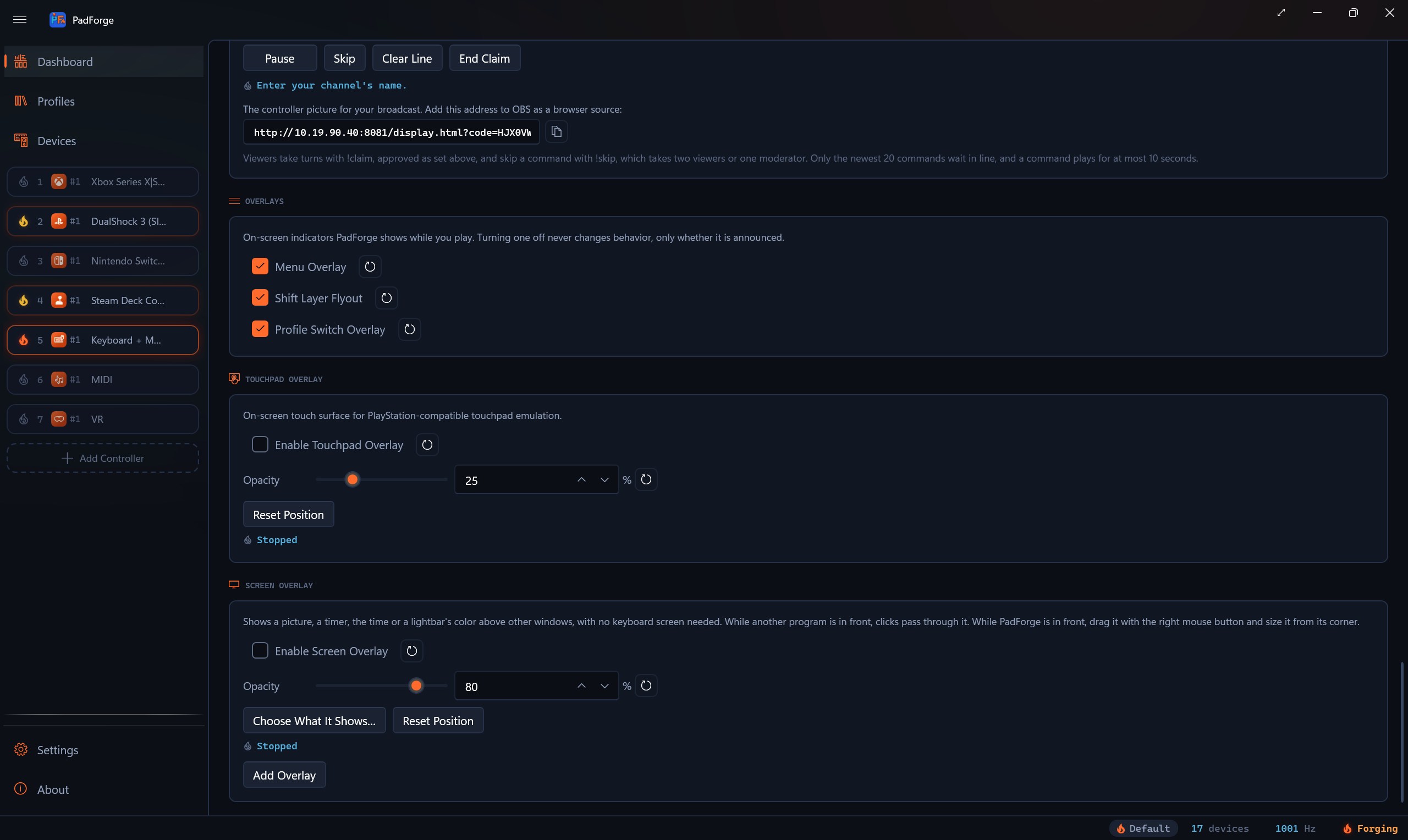
The Dashboard's Screen Overlay card shows what a keyboard screen shows in a borderless window above your game, on any PC and with no keyboard screen: a picture, the stopwatch, the time, play time, the profile or a lightbar's color. Add Overlay runs up to eight, each with its own window, opacity, monitor, place and size, kept per profile. While PadForge is in front, drag an overlay with the right mouse button and size it from its corner. While another program is in front, clicks pass through it. A chosen picture zooms to 2000% and pans, for a map. (#560, from discussion #548)
The keyboard screen macros reach the overlays from any slot, whether or not their windows are up, and Toggle Screen Overlay shows or hides one overlay or all of them. A Show Keyboard Screen macro with a repeat count of 0 now keeps playing until another Show Keyboard Screen or Keyboard Screen Mode macro, on keyboard screens too.
Use Only in PadForge
Use Only in PadForge, in the Input Hiding section of a device's details on the Devices page, takes a USB keyboard or mouse away from Windows by moving it to Windows' WinUSB driver. Windows then stops typing or moving the pointer with it in every program, even while PadForge is closed, and its keys and buttons reach only your mappings and macros, so a second keyboard becomes a macro pad. The row keeps its ID, so its slots, mappings and macros carry over. A precision touchpad is taken through HidHide while the engine runs, and Windows gets it back when the engine stops. (#549, from discussion #537)
- The switch asks first and names what else shares the device's USB connection, such as a mouse on a shared receiver or the media keys. A 15-second Keep prompt follows, and the device goes back to Windows unless you keep it. If PadForge crashes or the power goes out before then, or while a touchpad is taken, a boot task gives the device back.
- Restore the Windows Driver, or Give Back to Windows for a touchpad, returns it at any time. PadForge refuses the switch while another device of the same model is plugged in, since Windows moves every device with that ID at once.
- Hide from Games no longer acts on a touchpad's rows. A touchpad it hid with nothing reading it went dead in Windows and in PadForge alike.
Also new
- A second-model DualShock 4 (CUH-ZCT2) on a cable, or any DualShock 4 on Sony's USB wireless adapter, plays PadForge's sound through its built-in speaker as well as its headphone jack. Output Path picks the route, Headphones + Speaker included, and Default puts the speaker on while PadForge plays to the pad and the headset back once it stops. The feature report that switches the route is the one mihaits found on a wired CUH-ZCT2. (#546)
- Battery Level is a new player light pattern on a DualSense: the five lights fill from the left, one for each fifth of the charge.
- Battery Alerts in Settings can repeat the low-battery notice at an interval you set while a pad stays low and is not charging, and Notify When Fully Charged announces a pad that reaches 100%. Both are off by default.
- The Device Dossier on the Devices page shows a FIRMWARE line for pads that report a version, the DualSense, Xbox, Switch and Flydigi pads among them, and a REV line with the product revision. Copy includes both, and the connection path a bridged DualShock 3 shows, which it left out.
- Slot cards in the sidebar and on the Dashboard show the Preset name and one chip for the slot's type, in place of seven type tiles that left little room to open the slot and changed its type at a stray click. A click on the chip opens the type bar Add Controller uses. (#545, from discussion #543)
- The diagnostics log names the HidHide entries PadForge did not add, and Save Snapshot records HidHide's list and each virtual controller's state in Windows. (#562)
Fixes
- A keyboard key or mouse button that alone triggers a macro no longer reaches other programs when its device has Consume Mapped Inputs (Hooks) on and the macro keeps Consume Trigger Buttons (Hide from Game) on. The key typed itself before the macro ran. A trigger of several keys is left alone, since the hook cannot tell a chord from its first key. (discussion #537)
- Consume Mapped Inputs (Hooks) holds back a key mapped on a shift layer alone while that layer is engaged, and no longer the rest of the time. While no slot runs, it holds back nothing.
- An On Single Press macro and an On Long Press macro on the same trigger and layer now split a button's presses, so a long press fires the long-press macro alone. The single-press macro fired too, once its press window passed, held or not.
- When PadForge closes, crashes, stops its engine or stops mapping a Sony pad, a pad it moved off its headphone path goes back to it, and a DualSense whose Headphone Volume it lowered goes back to full, so Windows audio to the pad keeps playing through the jack. A DualSense set from an explicit Output Path back to Default returns to its headphone path too. A pad left on its speaker sent Windows audio there.
- A device that arrives or leaves while PadForge stops its engine or exits no longer hangs it. SDL's GameInput driver removed its device callback at exit while holding the lock that callback takes (hifihedgehog/SDL#45).
- An empty slot of a Mayflash DolphinBar no longer turns into a Wii Remote, which gave the next remote synced into that slot high button numbers. (#562, from discussion #541)
- A Wii Remote on a DolphinBar keeps its PadForge slot in whichever bar slot it lands. The bar gives no serial, so SDL now makes one from the remote's own factory calibration, and a remote saved under a bar slot takes that slot's settings the first time it connects.
- A DolphinBar in mode 3 crashed PadForge on a PC with the USB Vibration driver, whose EZFRD64.DLL cannot work in memory above 4 GB. SDL now keeps that DLL's memory below 4 GB as it loads, the patch Dolphin uses, so the device keeps its force feedback.
- With the engine stopped, turning a slot on or off updates its Dashboard card as it updates the sidebar card. (discussion #543)
- A slot switched from its Dashboard card to an Extended preset such as Custom is mapped automatically, as it is from the sidebar. It came up with no mapping. Picking the type a slot already has now changes nothing, where both cards ran the automatic mapping over the slot again.
- A Keyboard + Mouse slot's keys and buttons, and a macro's Text Block, go to Windows from a thread of their own. From the polling thread, one key stalled polling for 31 ms under another program's keyboard hook that took 30 ms.
- On a Keyboard + Mouse slot, a mouse row's Invert On Hold flips the gyro and touchpad parts of the pointer too, and a Flick Stick source follows its own Invert and the row's Invert On Hold.
- The Gyro Aim starter profile looks up when you tip the controller's nose up. It looked down.
- PadForge.xml is written to a temporary file that then replaces it, so PadForge closed by force or a full disk during a save leaves the previous file whole. A save wrote over the file in place.
- The glow around a selected or hovered sidebar card no longer redraws itself without end. Since 4.0.0 it held the interface thread at up to 85% of a processor core with the window open on a 240 Hz display.
- The Touchpad Overlay comes back where you left it on a monitor left of or above the main display, where it came back centered. It no longer takes the focus when it first shows, stops following the pointer when a drag loses the mouse, and reads Stopped once the engine stops.
- A precision touchpad that sends another report beside its touch reports, such as its maker's own, no longer reads as every finger lifting.
- A keyboard screen in Picture mode shows a small picture at its own size. A 320 by 240 picture was enlarged to 2048 by 1536, and the screen showed one corner of it.
- A lighting or rumble row on the Devices page, a vendor row among them, no longer shows an empty Raw Input State section, and a slot's page hides its Sticks and Triggers tabs while such a row is selected.
- A SteelSeries Rival 3 Wireless takes each color in one report, as OpenRGB colors it, and follows a color cycle or sound. It took four reports 60 ms apart, about a quarter second a color.
- PadForge's open and save dialogs name their file types in PadForge's language, where several named them in English in every language.
- A Steam Workshop config's stick modes send their output where Steam sends it. The import read Steam's
output_joystick1 as the left stick and 2 as the right, where Steam reads 0 as the left stick, 1 as the right and 2 as the mouse, and it sent Joystick Camera to the mouse in place of its stick. - A Steam Workshop config's gyro imports as the client runs it. Gyro modes that drive a stick read the controller's tilt, with Steam's dead zone and outer angle, where three of them imported nothing and the deflection mode read lean at a fixed sensitivity. The gyro button turns the gyro on while held, off while held, or on and off at each press, as the config says, where the import swapped on and off. A camera-style gyro stick looks up when the controller's nose tips up.
- A Steam Workshop config's yaw and roll scales, its vertical-to-horizontal ratio and its natural sensitivity come across, with Steam's defaults and its migrations of older settings. A diagonal yaw-and-roll turn runs at Steam's speed. It ran up to 1.41 times as fast.
- A Steam Workshop config's trigger fires its full pull at 95 percent of the travel, Steam's point, where the import used 75, and its soft pull follows the config's threshold trigger style, the Hip Fire waits included. Soft Press reads the analog value Steam reads and cancels where the client cancels it. D-pad and four-button modes on a stick, a trackpad or the gyro engage where Steam's own do, an outer ring command fires only on the modes that have one, and
KEYPAD_ENTERtypes Numpad Enter.
Bundled
- HIDMaestro 2.1.0 with 337 device profiles, unchanged.
- BthPS3 3.2.1, unchanged.
- PadForge's SDL build at fork commit b8afb934a2, synced with upstream SDL at c7038eb0a4. It reads the firmware versions the Device Dossier shows, fixes the hang at exit (hifihedgehog/SDL#45), and carries the DolphinBar and EZFRD64.DLL fixes (hifihedgehog/SDL#47).
- Corsair's iCUE SDK library,
iCUESDK.x64_2019.dll4.0.84, and MSI's Mystic Light SDK library,MysticLight_SDK_x64.dll1.0.0.8, unmodified and signed by their makers, in the x64 build. - The NuGet packages are unchanged.
Localization
The 42 complete languages, American and British English among them, carry every new string. The other 67 show English wherever they have no string.
Credits and licenses
- The About page, LICENSE and README credit the references behind this release's features, each under the license its own files state: the profile import references (hcn1z1's shunt schema dump, DatMoshu's reWASD-Powertools docs, reWASD's help and Schmaldeo's DS4Windows fork), the menu references (daisywheeljs for the Wheel layout and its first three character sets, sc-controller for where a stick engages and releases a radial menu's selection), the Screen Color references (Prismatik, AlkaidLab's foundation-sunshine fork of Sunshine, ScreenCapture.NET, RazerAmbilight, OpenRGBEffectsPlugin, Aurora and alienfx-tools) and the Twitch chat references (tmi.js, ComfyJS and DougDoug's TwitchPlays template).
- ForgePlay (ISC), by Yuriy (KLAVIATURKIN), has a row of its own: the Twitch Chat row's command grammar and turn-taking rules are ported from it, and the WLG finish is its art.
- New rows name DualSense-Windows (the player light bit order behind Battery Level), Kodi (the video controls of the Media Remote starter profile) and obs-browser (why OBS gets the plain address).
- The OpenRGB credit now says what PadForge takes from it: detection rules, report frames, LED tables and key layouts for the lighting families PadForge drives itself, ported and generated from OpenRGB at commit b9d903b5 (GPL-2.0-or-later). A new Lighting references row names the other sources of those tables with their licenses, SignalRGB's and SRGBmods' plugins as facts only, and the QMK Firmware credit adds the keys of keyboards flashed with SignalRGB's firmware.
- Corsair's iCUE SDK (Corsair's SDK terms) and MSI's Mystic Light SDK (no license named in MSI's download) have rows of their own, since both ship inside the x64 build.
- The DualShock 4 headset credit adds the Controllers Wiki and mihaits' NFSU2-SplitScreen for the speaker route on a cable, and the Linux kernel credit adds hid-input and usbmouse, which PadForge's own keyboard and mouse reading follows.
Known limitations
- Most of the 1,563 lit devices have not run against PadForge. Their frames follow the references' code, tests hold them to those references byte for byte, and SignalRGB's plugins were run against stand-in devices to check PadForge's rows. The new per-light routes through Synapse, G HUB and GG, and the routes through Armoury Crate, Mystic Light, iCUE, Wootility and OpenRGB's SDK Server, have not run against those programs.
- Screen Color has not been watched on a physical light. Both capture paths ran on one SDR display, and HDR and rotated displays have not run.
- Twitch Chat has not run against a live channel.
- No key or button read through Use Only in PadForge has been confirmed on hardware. The switch itself has moved one laptop keyboard and one mouse receiver to WinUSB and back, and a touchpad taken this way clicked and scrolled through PadForge. The boot task that gives a device back has not run through a real crash or restart.
- The wired DualShock 4 speaker route and the Sony pads' return to their headset have not run on a pad.
- The new firmware reads for Xbox, Switch, Flydigi and Bluetooth DualSense pads, and the four-part XInput version, have not run on a controller.
- No device event has arrived during an engine stop or an exit on the bench with SDL's hang fix.
- None of the DolphinBar fixes has run on a DolphinBar, and no device with the USB Vibration driver has run SDL's EZFRD64.DLL patch. One report had PadForge's virtual controllers go missing from other programs while the bar was plugged in. Two bench tests could not reproduce it, and Save Snapshot now records what such a report needs.
- Clean in the import preview describes the translation, not a play test. reWASD's unlock layers, its stick deflection range and the rule that reads a preset as Base follow reWASD's schema and forum descriptions, not a measurement, and how DS4Windows' gyro dead zone plays near full deflection is not measured.
- The Steam Workshop import's new readings come from the Steam client's own files, read and never run.
- Moving a Screen Overlay by touch has not run on a touch screen.
- No native speaker has reviewed the translations.
- The ARM64 build has not run on ARM64 hardware.
Full changelog: https://github.com/hifihedgehog/PadForge/compare/v5.2.2...v5.3.0