


| Name | Modified | Size | Downloads / Week |
|---|---|---|---|
| Parent folder | |||
| OfflineBackup-0.10.0-win64.zip | 2026-11-06 | 1.1 MB | |
| Offline Backup 0.10.0 - a new window source code.tar.gz | 2026-11-06 | 496.4 kB | |
| Offline Backup 0.10.0 - a new window source code.zip | 2026-11-06 | 516.0 kB | |
| README.md | 2026-11-06 | 2.4 kB | |
| Totals: 4 Items | 2.1 MB | 3 | |
A new, easier window. How copies work and what lands on your drives stay the same.
New
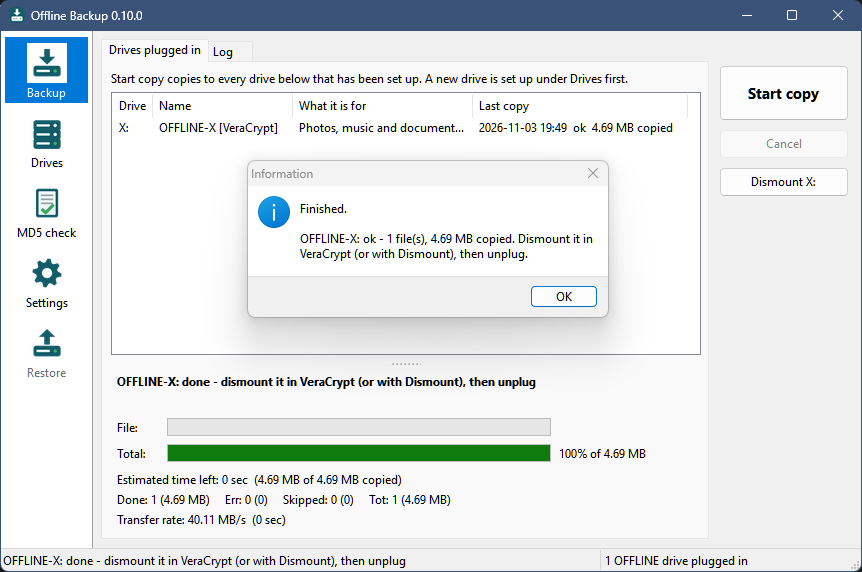
- A new window: a sidebar with one area each - Backup, Drives, MD5 check and Settings - and a status bar at the bottom. Drives, MD5 check and Settings are pages of the main window now instead of separate windows. The tray icon and its menu work as before.
- Progress under the drive list, with two bars: the file being copied and the whole run.
- Changes on the Drives and Settings pages wait for Save; Undo changes goes back, and leaving a page with unsaved changes asks first.
- Recording checksums after a copy shows its progress (file, files and bytes done, rate, time left).
- New setting on the MD5 check page: Record checksums after each copy (on by default). Off, a copy ends sooner, and Verify drive records the missing checksums later. Nothing is lost.
- Checksums are about 1.6 times faster in the download (built with full optimization).
- With the window open, plugging in a drive says so in the status bar and flashes the taskbar button; a drive that goes away is said too.
- The window opens when Offline Backup starts, so it is plain that it is running; closing it keeps it in the
tray. Start it with
/trayto start in the tray only./showis no longer needed. - About Offline Backup... in the window's title-bar menu (the icon at the top left, or Alt+Space).
Full list: CHANGELOG.
Install or update
Download OfflineBackup-0.10.0-win64.zip below. To update, exit Offline Backup from its tray icon and replace
OfflineBackup.exe with the new one - your settings (OfflineBackup.ini next to it) and your drives stay as they
are. New installs: see README.txt in the zip or the README.
Windows 10 or 11, 64-bit. Still a beta - keep more than one backup. MIT license.
SHA-256 of the zip: 6631b283eb5ec1f9374abf0220f69ef2105a499e5bc9dd744048958aad91360f
