Download
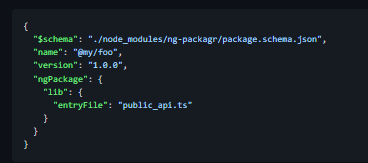
Compile and package Angular libraries in Angular Package Format (APF). Paths in the ngPackage section are resolved relative to the location of the package.json file. In the above example, public_api.ts is the entry file to the library's sources and must be placed next to package.json (a sibling in the same folder). You can easily run ng-package through a npm/yarn script. The build output is written to the dist folder, containing all those binaries to meet the Angular Package Format specification. You'll now be able to go ahead and npm publish dist your Angular library to the npm registry. Do you like to publish more libraries? Is your code living in a monorepo? Create one package.json per npm package, run ng-packagr for each! Creates scoped and non-scoped packages for publishing to npm registry. Inlines Templates and Stylesheets. Runs SCSS preprocessor, supporting the relative ~ import syntax and custom include paths.
Features
- You can easily run ng-packagr through a npm/yarn script
- Implements Angular Package Format
- Bundles your library in FESM2020
- npm package can be consumed by Angular CLI, Webpack, or SystemJS
- Creates type definitions (.d.ts)
- Auto-discovers and bundles secondary entry points
Project Samples