
 Download
Modified Debian netboot with rtw89 WiFi-support install image suitable to be 'burned' onto ~340 MB CD|USB media with command (assuming USB device is at /dev/sdc *else* modify or you risk data loss) at Linux shell:
dd if=metztli-reiser4.iso of=/dev/sdc bs=4M; sync
Enables native reiser4 create/partition/format of storage media during Debian OS installation—accomplished via Internet.
Guided non-expert install defaults to 500MB /boot JFS & reiser4 non-LVM others.
Expert requires
0.5 to 1 GB minimum /boot JFS|Ext2 partition--as GRUB cannot read reiser4 root-fs.
Rescue mode now automagically loads reiser4 module, Chingon! ;-)
Proceed normally with maintenance/rescue ops on reiser4 Software Framework Release Number (SFRN) 4.0.2 storage media.
Software available AS-IS: no warranties whatsoever.
WARNING: do not use rescue/maintenance ops on media formated with Reiser4, SFRN *lesser* than 4.0.2 nor equal to/or greater than NEW unstable reiser4 SFRN 5.1.3, aka 'reiser5'
Features
- Fixed SSL download issues on December 21, 2020, Birth of Huitzilopochtli anniversary!
- Stripped away commit 71f32f762d1a065ce27ec4922cb362aec122279d in 5.17.13+ branch < https://lore.kernel.org/all/20220510133805.1988292-1-chengzhihao1@huawei.com/ > which caused reiser4 SFRN 4.0.2 file system corruption when using the Telegram Desktop app < https://desktop.telegram.org/ >
- In the final installer phase d-i checks if dhcpcd-base is installed and if so d-i fetches our Trixie backport dhcpcd-base-10.2.4-4.1 sourced from 'Forky'; fact is, I have seen Trixie's dhcpcd-base causing a segfault whereas Forky's does not.
- Metztli Reiser4 includes our custom -patched initramfs-tools v0.151 since a reiser4 -formatted root '/' is negatively affected by Debian commit 0df1765e902e56d9698beacc1cc056f327ed58c2 in initramfs-tools v0.146 + branch < https://metztli.it/initramfs-tools >. Additionally, Metztli Reiser4 includes another way to generate a reiser4 -compatible initrd.img- with dracut.
- Please, disable the GNOME (flashback, etc.) automatic updates 'feature' since, if not, every time your reiser4 -enhanced Debian OS re/boots it will attempt to install their most recent non-reiser4-enhanced kernel, which will take priority in GRUB menu -- although your reiser4 -enhanced kernel remains as second in menu.
- Please boot Metztli Reiser4 in rescue mode in case a non-reiser4-compatible initrd.img- is installed by Debian/GNOME automatic routines. After mounting your root '/' and boot '/boot' partitions, you can generate a reiser4 -compatible initrd.img- with included Dracut at your command line, as: dracut --force
- Russian and Spanish partial translations relevant to reiser4 dialogs.
- Option: reiser4 transparent compression via Zstd plugin exposed via 'Expert install' d-i menu drop-down choice. Apologies : although I have translated strings into Russian and Spanish, I have not been able to have the d-i dialogs show in other than English.
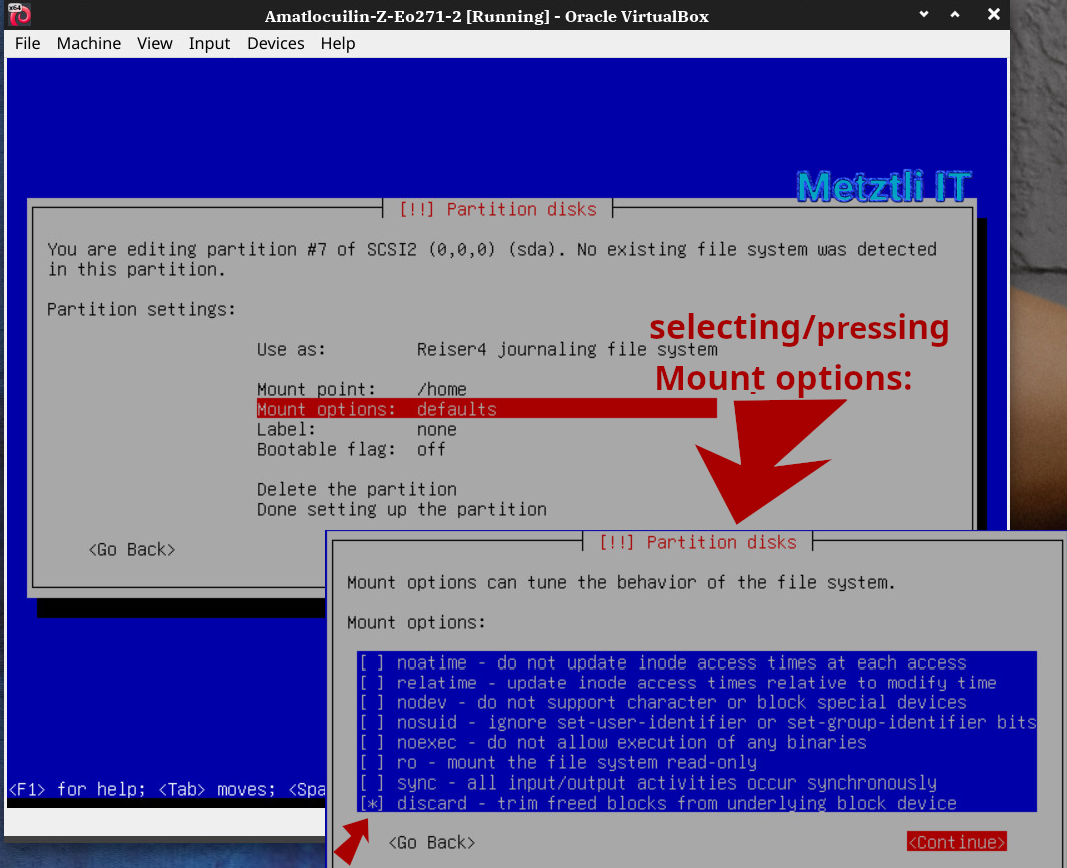
- Added support for 'discard' mount option for reiser4 in Debian Installer (d-i) netboot image
- d-i includes upgraded firmware for RTW89 wireless kernel module built from https://github.com/a5a5aa555oo/rtw89/tree/6.6-lts
- NEW! Zstd -compressed kernel and initramfs-tools automagically SSL -fetched and installed.
- For affected kernels, enhanced with patch to prevent system lockups: https://metztli.blog/index.php/amatl/reiser-nahui/patch-reiser4-prevent-system-lockups
- For some older kernels, applied JFS for kernel 5.11 patch https://git.kernel.org/pub/scm/linux/kernel/git/torvalds/linux.git/patch/?id=9867cb1fd510187d8f828540bdb48f78fceb70b3
- Will install reiser4 -enabled GNU Parted v3.6 updated for Debian 13 Trixie
- Build contains Cloud kernel: linux-image-5.17.0-3+reiser4.0.2-cloud-amd64_5.17.15-3+reiser4.0.2_amd64.deb
- NEW! Now includes most non-free firmware -- thus increased image size.
- I reserve right to link kernel image to newer/older version -- especially for security and bugfixes.
- Installer defaults to non-transparent-compression reiser4 -formatting.
- Only Debian 13 Trixie released with native reiser4 superb file system operations on your storage devices.
- Current kernel to be installed linux-image-5.17.0-3+reiser4.0.2-amd64_5.17.15-3+reiser4.0.2_amd64.deb
- NEW! xvi text editor available in Debian-Installer, in addition to elvis-tiny.
- Official Debian has disabled ntfs-modules build in installer due (CVE-2018-12929, CVE-2018-12930, CVE-2018-12931)
- Metztli-Reiser4 doubles as native data editing, recovery, and copying operations.
- For non-expert installation, installer makes sure the reiser4 kernel is installed at the end.
- For non-expert installation, trixie-backports directive is added automatically.
- After a successful installation, downloaded reiser4 kernel, etc., is moved to /var/log/ directory.
- If your host kernel configuration was built with CONFIG_NUMA_BALANCING_DEFAULT_ENABLED=n OR disabled, then VirtualBox fully supports reiser4 installation operations: < https://www.mail-archive.com/linux-kernel@vger.kernel.org/msg1914465.html >
- If booting reiser4 in VirtualBox random issues occur after successful install: try increasing/decreasing slightly 2048 MB base amount of RAM.
- Quirk: https://marc.info/?l=reiserfs-devel&m=150718301303531&w=2
- NOTE: Before blaming my kernel build if upon Linux boot the kernel appears to hang, please turn off computer and try again. See https://marc.info/?l=reiserfs-devel&m=151869816409554&w=2
- NOTE: very first boot after installation may show multiple errors. Wait for the disk checking utilities to complete and then reboot again and/or shut off your machine. Subsequent boots will be smooth.
- NOTE: Apparmor has been purged as an attempt to prevent very first boot issues; notwithstanding GNOME autoupdate feature may reinstall it without your consent; user can reinstall package as: apt-get install apparmor
- VirtualBox VMDK format provides the fastest experience but (YMMV)
- Apologies. Sometimes I make typos.
Project Samples




Follow Metztli Reiser4
User Reviews
-
Great job.. final produc (An iso) works.. but process are mostly undocumented.. i have an idea, build the nomal debian package of kernels 5.X of older releases (there is already 5.10 kernels for debian 8, 9 and debian 10 also) and provide a repository for server at least! i can help! is just use the normal package and rebuild using some dockers or free serviceReply from Metztli Reiser4