
 Download
A collection of extensions for Python's IDLE, the Python IDE built with the tkinter GUI toolkit.
Features
- Terminal-like behavior for Shell. Cursor stays in prompt and up/down arrow keys cycle the command history.
- Persistent history of Shell commands across sessions.
- Paste and run multiple lines in the shell.
- Non-blocking interactive GUI development for Tkinter, GTK, Qt, Qt4, PySide, wxPython
- Matplotlib support for interactive figures when using the subprocess.
- Clear Shell Window without restarting Shell.
- Capture large output and display it as an expandable button.
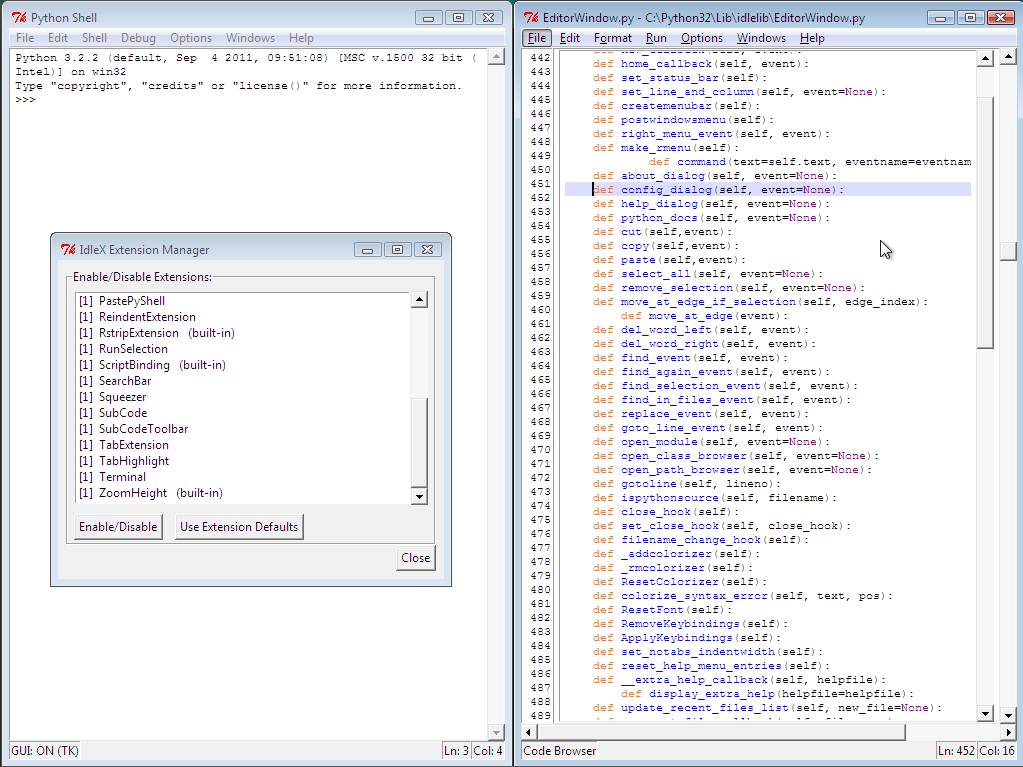
- Tabbed editor windows with drag'n'drop reordering.
- Improved code navigation with Code Browser.
- Line numbers for the editor.
- Find and Replace as a toolbar with incremental searching.
- Intelligent Paste from Shell. (remove >>> prompts)
- Highlight tabs (\t) in editor to help fix tab/space issues.
- Integrated reindent.py support.
- Horizontal scroll bar for the editor.
- Export contents with syntax highlighting as HTML.
- Cython editing and execution support.
- Execute highlighted code or a single line from the editor with F9.
- SubCodes, similar to MATLAB cell mode and IPython/Sagemath cells, for quick code prototyping without restarting the shell.
- Run parts of a script separated by "##" markers in the editor with Ctrl+Return.
- Stop a running script with Ctrl+C from the Editor.
- Documentation Viewer to view help() and doc strings in a separate window.
- Simple interface for enabling/disabling extensions.
- Right-click context menu with Cut, Copy, and Paste.
Project Samples



License
University of Illinois/NCSA Open Source LicenseFollow IdleX - IDLE Extensions for Python
Other Useful Business Software
Veeam Data Platform v13.1
Try Veeam Data Platform today. Experience the unified platform that's secure by design, portable by default, and proven to recover clean, fast, and anywhere.
Rate This Project
Login To Rate This Project
User Reviews
-
These extensions are especially useful when you learn Python for the first time or from the scratch.
-
Really usefull for teaching!
-
the line numbers on the left are a "must have", if you're a teacher looking at a student code over it's shoulder.
-
Good work:)
