
 Download
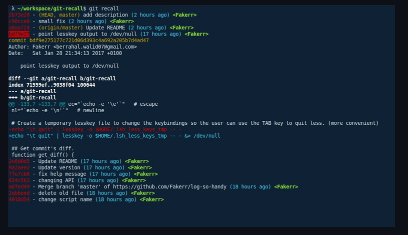
An interactive way to peruse your git history from the terminal. git-recall is a simple tool that allows you to easily go through your commits and check what you or other contributors in your team did. It doesn't aim to be a replacement for the git log command, but just to be a convenient way to recall what you've done from your terminal. You can install it by simply copying the git-recall script into any existing path (e.g. /usr/local/bin) or create your own directory and add it to the PATH variable. Once the commits are displayed, you can use either the arrow keys or j/k to switch between commits, press TAB or e to expand/reduce the commit's diff or q to quit.
Features
- Restrict search for a specific user (use -a "all" for all users)
- Display commits for the last n days
- Specify branch to display commits from
- Specify path/s or file/s to display commits from
- You can install it by simply copying the git-recall script into any existing path
- For a better UX, it's recommended to have installed the lesskey program
Project Samples
Categories
GitLicense
MIT LicenseFollow git-recall
Other Useful Business Software
Ship Agents Faster
Gemini Enterprise Agent Platform lets you rapidly build, scale, govern and optimize production-ready agents grounded in your organization's data. The platform enables developers to build custom or pre-built agents for virtually any use case. New customers get $300 in free credits.
Rate This Project
Login To Rate This Project
User Reviews
Be the first to post a review of git-recall!
