Download
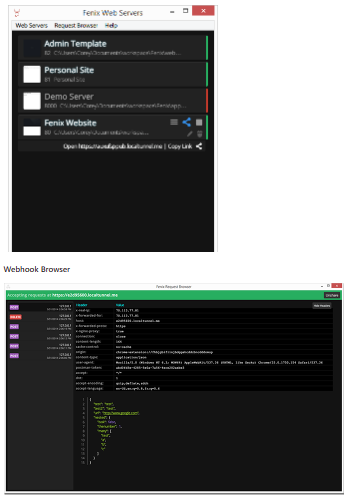
Fenix is a desktop-based static web server application built for developers who want a quick, visual, and easy way to serve local folders as HTTP servers — useful for previewing static sites, mocking APIs, or sharing directories without requiring heavy web server setup. It provides a GUI that lets you point to a local directory, pick a port (or auto-choose an available port), and start a server with a single click; this makes it a handy tool for front-end developers, static-site creators, or anyone needing a fast local web server. Beyond just serving static files, Fenix supports features like automatic port management, optional GZip compression, optional JS/CSS minification, Markdown-to-HTML rendering, and simple server logging — making it more capable than the most minimal style tools. The app can also share your local site publicly (for example via tunnelling) — useful for quick demos, sharing prototypes, or collaborating with remote reviewers.
Features
- GUI-based static web server for local directories — quick “serve this folder over HTTP” capability
- Automatic port management with conflict detection and selection of unused ports
- Optional features: JS/CSS minification, GZip compression, Markdown-to-HTML rendering for convenience
- Ability to share local sites publicly (e.g. via tunneling) — useful for demos or remote previews
- Logging and server status features to monitor usage and served files
- Cross-platform desktop builds (Windows/macOS) under GPL license for free, open usage
Project Samples