


| Name | Modified | Size | Downloads / Week |
|---|---|---|---|
| Parent folder | |||
| DiffusionBear-0.5.1-arm64.dmg | 2026-11-22 | 285.1 MB | |
| DiffusionBear-0.5.1-arm64.zip | 2026-11-22 | 217.7 MB | |
| DiffusionBear v0.5.1 source code.tar.gz | 2026-11-22 | 196.8 MB | |
| DiffusionBear v0.5.1 source code.zip | 2026-11-22 | 197.8 MB | |
| README.md | 2026-11-22 | 4.0 kB | |
| Totals: 5 Items | 897.3 MB | 4 | |
DiffusionBear v0.5.1
🍎 Important Note for macOS Users (Gatekeeper / First Launch)
Because DiffusionBear is an independent open-source project built with local ad-hoc code signing (without an expensive paid Apple Developer ID notarization certificate), macOS Gatekeeper protects your Mac by halting the initial double-click with this security alert:
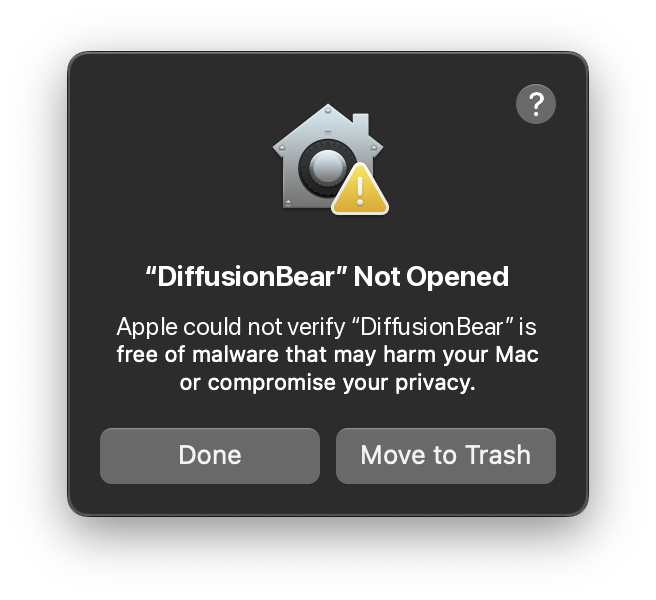
“DiffusionBear” Not Opened
Apple could not verify “DiffusionBear” is free of malware that may harm your Mac or compromise your privacy.
This is standard macOS security behavior for free open-source software. To authorize DiffusionBear:
- Move to Applications: Drag
DiffusionBear.appinto your /Applications folder (do not launch it directly from inside the mounted DMG or~/Downloads). - Authorize it (choose one of the two methods):
- Method A (Terminal 1-Liner — Fastest):
Open Terminal.app and run:bash xattr -cr /Applications/DiffusionBear.app(Or:sudo xattr -rd com.apple.quarantine /Applications/DiffusionBear.app)
Then simply double-clickDiffusionBear.app— it opens immediately! - Method B (System Settings — GUI):
- Click Done on the alert dialog.
- Open System Settings > Privacy & Security.
- Scroll down to the Security section: you will see “DiffusionBear” was blocked from use because it is not from an identified developer.
- Click Open Anyway, enter your Mac password / Touch ID, and confirm Open.
Once authorized, the warning will never return, and DiffusionBear will launch normally on every future click.
[0.5.1] — 2026-11-22
Release Date: 2026-11-22
Target OS: macOS 26.2+ (Apple Silicon M1 / M2 / M3 / M4 / Ultra)
Package: DiffusionBear-0.5.1-arm64.zip (217.7 MB) / DiffusionBear-0.5.1-arm64.dmg (285.1 MB)
SHA-256 (ZIP): fda8b2e03f28a6c641e36173efd78c1486d211d06cfce979a79a44aad4a2747c
SHA-256 (DMG): 20d431809970b22afc12964cb994c74821bb4e5519261f7c95d3d22a52f48f1f
✨ New in 0.5.1
- New built-in models & background removal: Added Anima Turbo 2B, DreamLite Mobile 0.39B, and Bria RMBG-3.0 background removal.
- Built-in MCP server & expanded ControlNet: Ships the local DiffusionBear MCP server (
mcp-server/) and ControlNet support across compatible MLX pipelines.
🚀 Improvements & Fixes
- Consent-gated downloads: Nothing is downloaded without your consent (accelerators, adapters, tokenizer repairs, and mini-VAEs), and the MOSS/Kromoss accelerator can be turned Off.
- MOSS-Image SFT 4-step: Uses
lvladikov/MOSS-SFT-Distill-4step-LoRA. - Flexible model storage & safer SDXL conversion: Local models can live in any absolute folder, external disks included. A failed SDXL conversion only removes the files it created.
- Native file picker: Add image opens the native macOS file picker.
- Engine speedups & stability: Faster Qwen-Image 2.1 VAE decode, Krea 2 denoising in bf16, eliminated FLUX.3 Klein VAE decoder recompilation on each generation, and Fast VAE (
taew2.1) support for Anima Turbo. - Launcher, memory & verification hardening: Improved Metal memory mode,
run.shWorkspace folder resolution, tokenizer validation, and updated M1 / M4 Pro VM benchmarks inREADME.md.
📦 Checksums
DiffusionBear-0.5.1-arm64.zipSHA-256:fda8b2e03f28a6c641e36173efd78c1486d211d06cfce979a79a44aad4a2747cDiffusionBear-0.5.1-arm64.dmgSHA-256:20d431809970b22afc12964cb994c74821bb4e5519261f7c95d3d22a52f48f1f(all checksums recorded inpackaging/ALL_SHA256SUMS).