Download
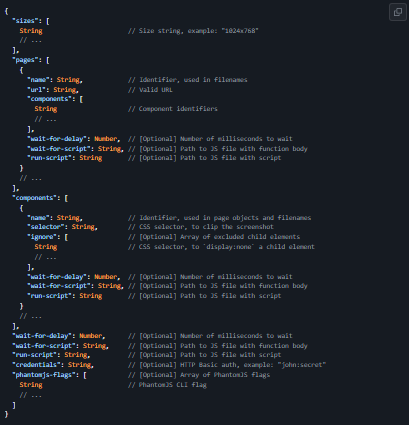
A lightweight command line tool for visual regression testing of UI components. After installing, you want to tell argus eyes which pages and which components to check for visual regression. Argus eyes work by going over a straightforward JSON file containing the resolutions you want to capture, as well as the pages with theirs url's, and the components with their CSS-selectors. Once argus eyes know where to find the components, it's time for some command line action. The first command you want to use is $ argus-eyes capture master. This makes argus eyes go over the config file and take screenshots of all specified components in there. The screenshots are saved in .argus-eyes/master and this set of screenshots can be compared with another set.
Features
- Take screenshots of UI components in different views and branches
- Test the screenshots for visual differences
- Create images of the visual differences
- Screenshots are caputured with PhantomJS
- Comparing sceenshots is done using Blink-diff.
- After installing, you want to tell argus eyes which pages and which components to check for visual regression
Project Samples