Sorry for the late reply.
The computer is Dell, windows 10 Pro (V 1803) - OS Build 17134.376
SMBIOSBIOSVersion
1.1.4
What I get just a black screen with a very small word "Password" on the top left of the screen.
I used TrueCrypt and VeraCrypt on different machines older versions with no issues like this.
I upgraded to 1.23 because older versions like 1.19 wasn't encrypting the system properly and throwing errors.
It is first time to install VeraCrypt on the machine as it is brand new one.
Thanks!
Last edit: Sam 2018-11-14
If you would like to refer to this comment somewhere else in this project, copy and paste the following link:
VeraCrypt is using the standard font embedded in the computer's firmware. I don't think that can be changed easily. To me it seems you have set a very high resolution (4K maybe?), and the computer does not scale maybe? The effect is that text gets really tiny.
If you would like to refer to this comment somewhere else in this project, copy and paste the following link:
Only because of safety due to obscurity can a BIOS / EFI password be considered effective. The intruder can simply bypass the BIOS password using a keyboard and a power button, or with physical access to the PC's internals.
So, how does it work? Okay, it's free, but it's really only detracting from people who can't stop it, even when everything you really need is a key generator. I mean, open source key generator built-in backdoors could not be safe. It's only due to the fact that there is still no common knowledge.
The system uses line and curve to describe the bitmap outline of a TrueType or Microsoft OpenType fonts (fontvilla) character or icon. The program changes the line lengths and curve shapes of the symbol or circle used to draw.
If you're already encrypting your hard drive and again your files, then that's about as secure as you can reasonably get. Even if there was no way to easily circumvent BIOS passwords, an attacker could easily swap hard drives to gain access to data, assuming they had physical access.
If you would like to refer to this comment somewhere else in this project, copy and paste the following link:
Wish I was tech'd-up enough to use Alex's really cool commands (I googled some of them but it left me in a spin!). Thought the Secure Desktop feature might be a workaround but it's not showing up at boot (maybe it never does? I looked up everything I could but I can't clarify). I have a v.complex password & I really need better visual feedback to get it right 1st time & avoid the timeout (& going completely blind!).
If you would like to refer to this comment somewhere else in this project, copy and paste the following link:
OK, i see now that "DcsProp" isn't a Command Prompt instruction at all, but actually a file within "VeraCrypt Rescue Disk.zip" (the thing you have to extract to a USB stick during installation). You can open it with Windows NotePad & there are all these fairly promising (?) settings to fiddle with, but what do you stick in there for a bigger password font? And how on earth would you activate the "PasswordPicture" feature (which is indeed listed, as Alex says, even though it has no mention anywhere in this forum or the official .html docs!)
& After that I presume you'd have to replace the boot-loader in the 1st track of your system drive with the new tweeked version for it to take effect?
Well, I'm not about to try that without some expert input. My Veracrypt v1.23 setup has finally turned out quite well (System + 2 auto-mounted system favorite partitions on Windows 8.1) & reading this forum it's clear that there's a LOT that can go wrong!
God bless Veracrypt & all who sail in her!
If you would like to refer to this comment somewhere else in this project, copy and paste the following link:
I think that it's the EFI version that uses just "Password:" but when you use the BIOS version, then you get the whole text about Veracrypt, press F5, etc. which I actually prefer. I'm interested, too, to see how to change the text.
If you would like to refer to this comment somewhere else in this project, copy and paste the following link:



Hi all,
I'm using veracryprt 1.23 and the startup password is very small and not noticebale unlike previous versions like 1.19 on windows 10
Any ideas how can i get something similar to
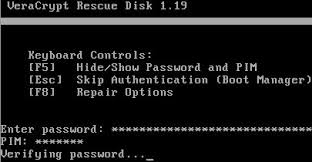
instead of just one word says password on top right of the startup?
Thanks!
Can you post a picture of the text in question for 1.23?
What is the specific make and model of your computer?
Are you running the latest BIOS firmware for your PC?
Did this font change occur due to VeraCrypt upgrade or Windows 10 upgrade which Microsoft can perform without your consent?
What version of Windows 10?
Click the lower left hand Windows icon and type winver. Then hit return to get the version and build number.
Last edit: Enigma2Illusion 2018-11-09
Hi Enigma2Illusio,
Sorry for the late reply.
The computer is Dell, windows 10 Pro (V 1803) - OS Build 17134.376
SMBIOSBIOSVersion
1.1.4
What I get just a black screen with a very small word "Password" on the top left of the screen.
I used TrueCrypt and VeraCrypt on different machines older versions with no issues like this.
I upgraded to 1.23 because older versions like 1.19 wasn't encrypting the system properly and throwing errors.
It is first time to install VeraCrypt on the machine as it is brand new one.
Thanks!
Last edit: Sam 2018-11-14
VeraCrypt is using the standard font embedded in the computer's firmware. I don't think that can be changed easily. To me it seems you have set a very high resolution (4K maybe?), and the computer does not scale maybe? The effect is that text gets really tiny.
That is correct Johannes, I have set a 4K resolution!
Thanks for your input.
for EFI it is possible to use picture password. It contains vector font. It is resizable.
One more - resolution can be selected via DcsProp. List of possible resolutions in ESP \EFI\VeraCrypt\PlatformInfo or via "DcsCfg -gl"
Only because of safety due to obscurity can a BIOS / EFI password be considered effective. The intruder can simply bypass the BIOS password using a keyboard and a power button, or with physical access to the PC's internals.
So, how does it work? Okay, it's free, but it's really only detracting from people who can't stop it, even when everything you really need is a key generator. I mean, open source key generator built-in backdoors could not be safe. It's only due to the fact that there is still no common knowledge.
The system uses line and curve to describe the bitmap outline of a TrueType or Microsoft OpenType fonts (fontvilla) character or icon. The program changes the line lengths and curve shapes of the symbol or circle used to draw.
If you're already encrypting your hard drive and again your files, then that's about as secure as you can reasonably get. Even if there was no way to easily circumvent BIOS passwords, an attacker could easily swap hard drives to gain access to data, assuming they had physical access.
Wish I was tech'd-up enough to use Alex's really cool commands (I googled some of them but it left me in a spin!). Thought the Secure Desktop feature might be a workaround but it's not showing up at boot (maybe it never does? I looked up everything I could but I can't clarify). I have a v.complex password & I really need better visual feedback to get it right 1st time & avoid the timeout (& going completely blind!).
OK, i see now that "DcsProp" isn't a Command Prompt instruction at all, but actually a file within "VeraCrypt Rescue Disk.zip" (the thing you have to extract to a USB stick during installation). You can open it with Windows NotePad & there are all these fairly promising (?) settings to fiddle with, but what do you stick in there for a bigger password font? And how on earth would you activate the "PasswordPicture" feature (which is indeed listed, as Alex says, even though it has no mention anywhere in this forum or the official .html docs!)
& After that I presume you'd have to replace the boot-loader in the 1st track of your system drive with the new tweeked version for it to take effect?
Well, I'm not about to try that without some expert input. My Veracrypt v1.23 setup has finally turned out quite well (System + 2 auto-mounted system favorite partitions on Windows 8.1) & reading this forum it's clear that there's a LOT that can go wrong!
God bless Veracrypt & all who sail in her!
I think that it's the EFI version that uses just "Password:" but when you use the BIOS version, then you get the whole text about Veracrypt, press F5, etc. which I actually prefer. I'm interested, too, to see how to change the text.