
Menu
▾
▴

OneMax 2
More fun with OneMax
In this second step of the tutorial, we will see how to modify µGP's configuration file, with a particular focus on the Constraints. It is recommended to read Population Constraints before proceeding.
In OneMax, each individual is a string of bits. So, open the constraints file (onemax.constraints.xml) and go to the last part.
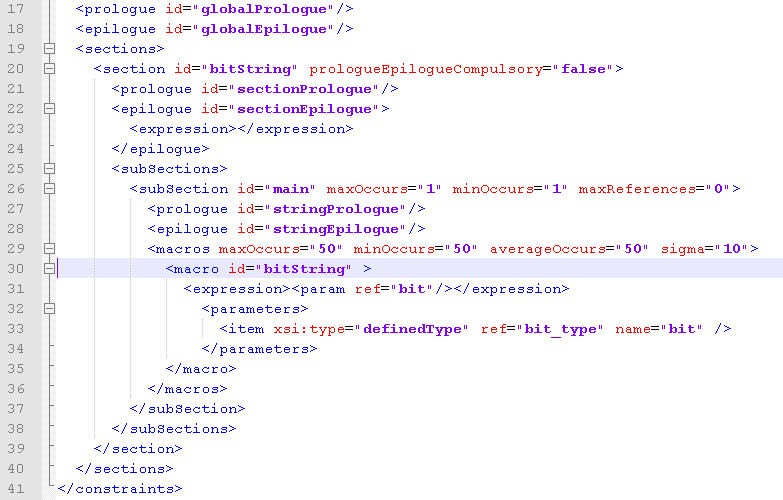
As you can see, both the global prologue and the global epilogue are empty. The list of sections includes only one section, called bitString. Both bitString’s prologue and epilogue are empty. In the list of bitString’s subsection there’s only one subsection called main, that again has an empty prologue and epilogue.
In the macros tag, we have our first interesting part: the parameters in macros specify the maximum, minimum, average and standard deviation of macro occurrences in our individual. So, in this simple case we have a maxOccurs of 50, a minOccurs of 50, an averageOccurs of 50 and a standard deviation (sigma) of 0: this means that each individual will contain EXACTLY 50 occurrences of the macros that are specified below.
The only macro described is called bitString. Inside the <expression> tags, there is a reference to one parameter, called bit. Below, between the <parameters> tags, we see that our bit is of type definedType (other valid types include integer and float).
Ok, so we know that each individual will contain 50 repetitions of the macro main, composed by a single variable bit. But what values can bit assume? To answer this question, let’s return to the top of onemax.constraints.xml
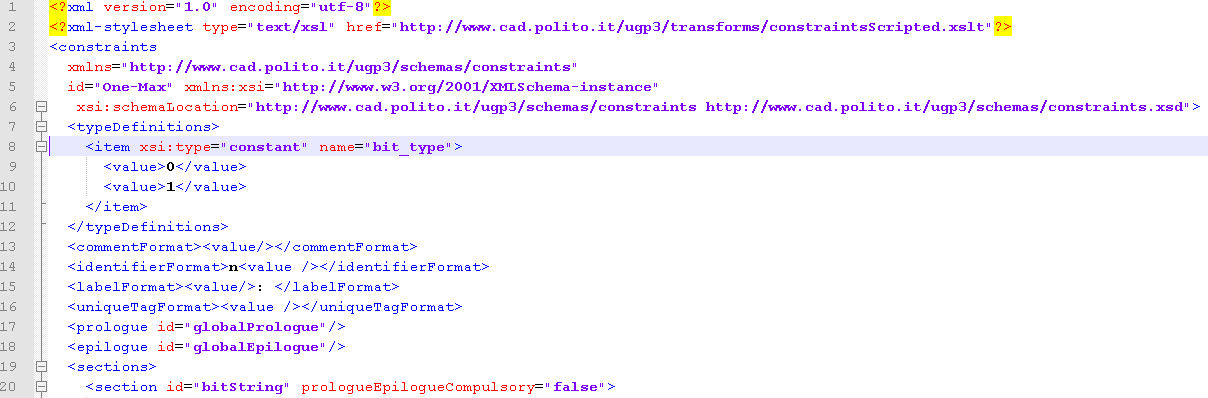
All variables of type definedType must be specified at the beginning of the Constraints file, in the tags typeDefinitions. As you can see, there's only one variable type specified, bit_type. And bit_type variables can assume only value 0 or 1. Our individual will then be a string of 50 values that can be either 0 or 1.
Verifying this claim is easy: open onemax.population.settings.xml, change the name of the evaluator to a non-existent executable in evaluatorPathName and run ugp3. The execution will terminate immediately, because ugp3 cannot find the evaluator: but in the directory, you will find a file called individualA.in, the text version of individual A in the population. Opening the file will reveal something like:
00011110000010000000100000101100110100110001111101
which is exactly what we were expecting.
Now, let's see how the Configuration file might be modified to suit your purpose, in Even more fun with OneMax!.
Related
Wiki: Genetic operators
Wiki: Home
Wiki: OneMax 3
Wiki: Population Constraints

