
Menu
▾
▴
1 Attachments
#1249 Add live regex (find) preview to Find strip/panel (Gtk/Windows; scintilla/scite)
This patch adds two new toggle buttons, "Live preview" and 'Show/filter only matching rows in live preview ("grep" style)' to the Find Strip/panel, if find.live.preview.enable option is set to 1.
The most of the implementation is in SciTEBase, then Gtk and Windows versions simply call SetLivePreview there for events of Find Strip/panel open/show (Ctrl-F), toggling the buttons, change of the Find combobox text, and switching a tab.
It is mostly intended to work on "current" tab documents - so you'd open new tab (which becomes "current"), paste or open your content, do live preview searching, (possibly turning to another tab to paste), then turn off live preview in current tab, and finally close current tab.
Here is a short video demonstration (should be directly viewable in say newer Firefox):
- http://sdaaubckp.sourceforge.net/scite/scite-live-gtk-ubuntu18.04.mp4
- http://sdaaubckp.sourceforge.net/scite/scite-live-windows-wine-ubuntu18.04.mp4
I've built the windows version, shown on the video using mingw on Ubuntu 18.04, and ran it using wine - that is why the response in the video is very slow, and "Mark All" additional selections do not show; for the interested, the build script I used is:
However, I'm reasonably certain it would work fine on a real Windows build.
The live preview follows the conventions I've seen for the other Find toggles in Scite - that is why there are three additional commands in Scintilla (to handle the respective toggle properties, and the enable property). Like rest of the Find, it also runs asynchronously, and simply changes styles of find selections and markers that are otherwise used in Find All.
I have created the icons from .svg files - see the source and README for that here:
The branches I've worked on are:
- https://sourceforge.net/u/sdaau/scintilla/ci/sdaau-live-regex-find/tree/
- https://sourceforge.net/u/sdaau/scite/ci/sdaau-live-regex-find/tree/
I can submit a "Merge Request" via Sourceforge, or a hg bundle for this patch, if needed - in the meantime, attached are the patchsets for the respective branches, generated with:
(cd scintilla; hg export --git 'branch(sdaau-live-regex-find)' -o ../sdaau-live-regex-find.scintilla.patch)
(cd scite; hg export --git 'branch(sdaau-live-regex-find)' -o ../sdaau-live-regex-find.scite.patch)


Here is the other patch,
sdaau-live-regex-find.scintilla.patch, since Sourceforge permits only one attachment per postLive preview seems fairly similar to find.strip.incremental=2 and replace.strip.incremental=2.
With live filtering, its unclear from the description (I haven't read all the code changes yet) how it interacts with folding. It may be reasonable to unfold all when entering live filter although filtering only visible lines could also be wanted. When exiting the strip, reapplying the old folds may be expected although that could be less useful if the filter discovered new lines of interest that would be hidden again by folding. Since its a strip and modeless, its possible to change folds while the strip is displayed which can further complicate things although folding functionality could be disabled while live filter is active. Live filter may (or may not) be better as a separate strip if it requires changes to folding behaviour.
Hi Neil,
Many thanks for your prompt response!
Thanks for mentioning that - I had no idea
:)There are changes in my branch now, that have reorganized the live preview mechanics according to your comments - among them, live preview now sets itself up as
find.strip.incremental=2, so it can reuse SciTE's engine for it.I have attached two patches for the latest changes, that were obtained with:
... so they include only the final changes "collapsed" into one changeset, instead of the entire history - I hope that makes them easier to review.
Indeed - thanks for suggesting that. Now there is a separate class,
FindLiveStrip, that takes over the live preview functionality; the.enabledproperty simply sets whetherFindLiveStripor the originalFindStripwill be shown upon Ctrl-F.At first, I thought that this change would be mostly "cosmetic" - but as I went along, it revealed that I ended up "fighting" SciTE's engine more than I need to; for instance, by trying to do my own queueing, I ended up calling SetIdler multiple times for each keypress; having a separate class obviated the need for that, and now SetIdler runs only once per keypress, just as in the original
FindStrip. I think even performance may have improved.But at the very least, there is the benefit, that if someone does not want to use/enable the live preview strip, they can rest assured that the usual Find strip functionality is as it always has been.
Apologies for that - I had failed to put in some documentation. Now I have added a section on live find preview in SciTEDoc.html - I hope it is not too verbose.
Btw, regarding live filtering, I also realized from the
SCI_HIDELINESdocumentation that "the first line can not be hidden". While it makes the line filtering a tiny bit weird, I don't find it all that problematic - and of course, I didn't dare change that; given that it's documented, there must be a good reason for it.Thanks for mentioning folding, I did not think about it at all. Now there is an enum with two behaviors:
The
ignoreFoldsdoes what it says, that is nothing - in which case, live preview typically destroys folds (though not always, depends if there are matches in them)The
expandAndRestoreFolds(the default) implements your suggestion of unfolding all when entering live filter, and then reapplying the old folds when exiting the strip.Unfortunately it would have taken me a lot more time to dig through the source, so as to implement more complex fold handlings (and I've already run out of ample time to use on this for this round), but at least there is a basis now for implementing more complex line filtering fold handlings in the future.
I noted this; however, as I'm running out of time, and there is only the
expandAndRestoreFoldsbehavior at the moment, which forces the restoration of old folds upon exit regardless, I did not look closer into disabling folding for the time being. Is there an existing command that does that?For reference, here are the commands I've used in the videos:
And here are the videos for this version:
If interested, this is the revision where I removed most of my comments:
.... which may explain why I've made some choices.
Please take a look, and let me know if the current state is acceptable for merging; I'm quite keen on seeing this functionality in SciTE.
The definitions added to Scintilla are not implemented in Scintilla. They are just for SciTE so do not belong in Scintilla.
The operators "and", "or", and "not" are not portable and should be replaced with "&&", "||", and "!". sys/time.h is not portable and should be replaced with GUI::ElapsedTime or std::chrono::high_resolution_clock.
The button images can not be seen when building with Visual C++ 2017. The background colour of the images should be exactly 192,192,192.
Thanks for the feedback Neil - as soon as I get a pocket of time in the coming week(s), I'll do that. I'll also try to get a hold of a proper Windows machine at work, and build in Visual Studio - will post back once done.
Hi Neil,
Apologies for the late response, life took over :)
Anyways, I think I have corrected everything from the last comment - attached is a patch, rebased to the latest tip of scite as of now (5291:022b9b4bd024); the same state should be present in my branch (link in OP).
Sorry about that, I just started "by example" and copied how the other Find settings were implemented. Had a slight confusion there, as I confused the
IDM_*numbers which are commands withSCFIND_*numbers, which are search bitmasks - but should be all fixed now, the patch is now standalone scite.Thanks for that, was not aware of the portability issue - should be fixed now
First I remade everything using std::chrono::high_resolution_clock - but then, it is only elapsed time that I need anyway, so reworked everything to use GUI::ElapsedTime
Turns out, I was using the wrong background color in my scripts to begin with - I guess, I was using
gpickto sample colors directly from the screen, which also took into account screen effects. Fixed now, double-checked in both Gimp and VS Resource View, background should be 0xC0C0C0This was tricky - I was using ImageMagick
convertas a final step in my scripts to generate the .bmp files, and by default - it turns out, - it exports a BMP4 format, which Visual Studio (and I guess, rest of Windows) cannot parse. Visual Studio does accept BMP3 however, so it was just a matter of persuadingconvertto output this format.Hope this is acceptable now, otherwise let me know what should be fixed.
That has addressed many of the issues which is great and it applied cleanly.
This is a fairly complex feature and it may take some time to fully understand its behaviour. I've mostly been looking at this on Windows.
It appears that while there are 2 buttons on the strip, the filter button is dependent on the live button so there are only 3 states. I was a bit confused when pressing the filter button had no effect and I expect more users will be confused with this. Ideally there would be a 3 state button but that would take significant effort.
The margin markers appear superfluous and noisy in filter mode and I couldn't see a way to turn them off.
In filter mode, pressing backspace to clear the search completely doesn't show all the lines.
Switching between tabs keeps the strip state but doesn't apply the filter to the new file. Applying the filter to each file may be better - say I'm interested in the use of 'unique_ptr' in some code so switch to the header and ask for a filter on 'unique_ptr' then switch to the implementation where it may be nice to just see lines with 'unique_ptr'. OTOH, if this is difficult, then the strip could be reset to an empty search string.
There are some warnings from cppcheck. The uninitialized variables in Strips.h and SciTEBase.cxx are trivial but redefining wCheck from FindStrip in the FindLiveStrip subclass is more complex and its also the sort of thing that leads to problems. Unsure what to do: possibly make it have 8 elements in FindStrip then only look at 6 elements or make it a vector (may require extra work on WCheckDraw and its superclasses) which is enlarged in the FindLiveStrip constructor.
Hi Neil,
Many thanks for your response!
Excellent, great to hear that!
Agreed - while I did try to make it "as simple as possible", that doesn't change the fact that the behavior introduced is still complex, and it's good to have discussed and clarified what the expectations from this feature might be.
Indeed, I can see your point - I didn't think about the fact that two buttons describing three states, would leave an "extra" state, and thus opportunity for confusion.
I am not quite sure 100% as of now, will need to double-check later - but assuming there is a "disabled button" state in both Gtk and Windows GUI toolkits - how about this, instead of a three state button? :
Does this sound as a reasonable alternative to a three state button? If so, I'd be glad to try and implement it ...
I see your point - although, for me, they actually do help (since I occasionally like to toggle the filter on an off quickly and repeatedly, to gain a better visual overview of where the matched lines are in respect to entire file) . How about adding an additional property variable, say
find.live.preview.filtermarkers(with value 0: don't show margin markers when filtering is on; 1: do show margin markers when filtering is on) - would that work?Interesting, I never thought of the filtering feature in these terms.
Maybe I should note what my use case is: I use Scite for two major things - coding, and note taking. In fact, what made me switch to Scite as my daily editor a decade ago or so, was the fact that Scite could open a MB-sized text file without crashing, and not only that, but it would perform (allow me to write and edit text) without noticeable slowdown even in MB-sized text files.
Now, a major component of my note taking is log analysis, where I often copy-paste log snippets into my notes (which is also why they end up MB-sized sometimes). However, the usual routine for me to do that is: have notes opened in one tab, then Ctrl-N to open a new tab. Then copy the log text from the terminal, paste in Scite, save somewhere (say, in
/tmp). Then, go back to terminal, issuegrep 'whatever' /tmp/logfile.txt- then, if making a mistake in thegrepregex, Arrow Up to repeat last command, Ctrl-Arrow Left/Right to find the query, re-type correction, Enter to rungrepagain. Once results are OK, click and drag in the terminal to select the output lines, switch to Scite to my notes tab, paste. Then finally close the tab that was for the original log paste.Considering I occasinally do this quite a lot, this routine becomes somewhat of a chore - and I thought, it would really be helpful if I could do the "grepping" - including the line filtering - directly from Scite. And in that case, I'd have a potentially MB-sized notes text file in one tab; then I'd open a new tab for log analysis, in which I'd do Live Row Filter. In that case, once I got the relevant results, I'd like to copy those rows from the filtered log tab, and switch to my notes tab for pasting - without doing any filtering in my notes tab (for one, in MB-sized file the search might take a while to complete; for another, filtering would quite likely lose the cursor position in my notes file, where I intended to paste my filtered rows result). And this is why the I tried to implement the current behavior as it is.
However, now that you mention it - I can also see a use case in programming tasks too (for instance, as in your example, looking up a keyword in both
.c*and.hfiles). If I think about a GUI solution, the most immediate thing I can think of right now, is adding a third button, which may be a bit too much (in terms of visually overloading the GUI)... So how about a new property variable,find.live.preview.applytabs- if 0, then we have the current behavior (i.e. only initial tab preserves Live Find Filtering setup); if 1, live find/filtering is auto-applied to every tab, which may be clicked/selected after the initial one?Thanks for mentioning this, was not aware that I should have run the code through
cppcheck. Now that I know, I will definitely run the code throughcppcheck, and try to fix any warnings that pop up (and thanks for the pointers on what I should pay attention to).I guess that is all I have for now - if you could let me know what your thoughts are on my suggestions above, then I can get started on a new round of fixes (and hopefully, they won't take as much time as they did before).
Thanks again!
That sounds better. I came up with alternatives that I think are worse:
filteron andliveis forced on.filterstate when the user may want to just flip betweenliveandstatic. -- Need better name for normal static state.static,liveandfilterstates. This would use more screen space (which would change depending on language) but would also be clearer.If filter can show markers then there should be a controling property. Possibly a boolean like
find.live.preview.filtermarkers(orfind.live.preview.filter.markers) . A choice of symbol/colour both for this and for thelivestate would be better but that may be a future addition - there could be a structured property for markers similar to the way indicators are specified.In the past, I've spent more time analyzing logs and considered writing a log reading tool but there are other desirable aspects like more complex boolean expressions (such as multiple line context-sensitivity) and displaying some 'range of interest' around each hit that I'd want.
For now, I'd like to avoid expanding scope too much, at least for the initial version, so would define tab change as reset out of filtering/live.
Corrupting fold state will confuse users and should not be possible, even at the cost of convenience. Users may want to push these features in different directions so the intial version should be limited in its goals but be simple to understand and safe. Entering
filtershould expand all contractions with no memorisation of the fold state and the user should not be able to contract folds while filter is active. This can be reviewed at a later time.SciTE's code is going through a large set of changes to improve >2GB file support and these are (mostly) committed and will be in the next release. Truncation to 32-bit values (int or long) needs to be avoided. All positions should use the Scintilla::API::Position type (aliased in most code to SA::Position), lines should be SA::Line and Sci_CharacterRange should be replaced with SA::Range. Scintilla messages should not be sent directly and are replaced by calls to methods on ScintillaCall:
Many thanks for the feedback Neil - I'm going to get on implementing this as soon as I can, and will write back when I have a new patch!
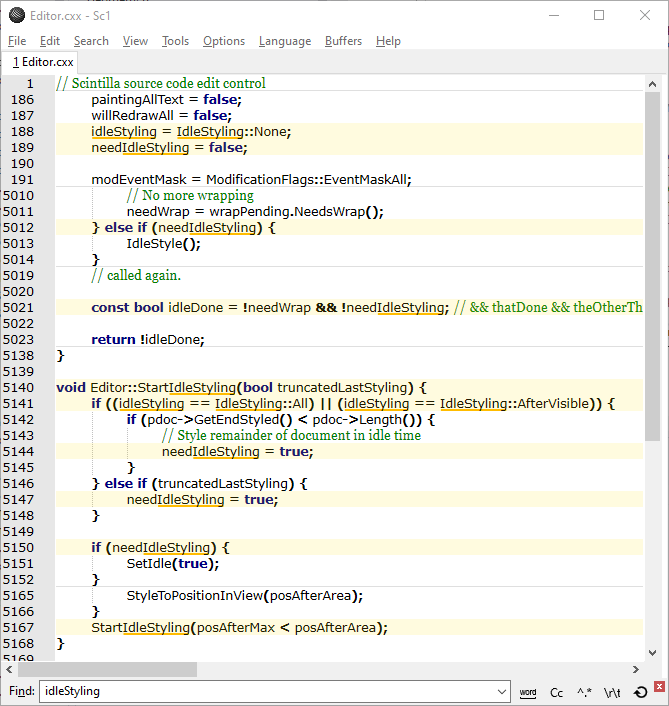
Experimenting some more with this and one feature I think is worth adding is match context. Make a few lines around each match visible but highlight the actual match lines. This would help most with the replace strip so the scope of the change can be more easily understood. Here is a screen shot of a partial implementation:
Some code:
Attached a patch that implements filtering and filtering with context for a new Filter strip and as an option for the Replace strip. Works, but likely incomplete and buggy, on Win32 and GTK.
Still uncertain whether incremental ('live') should be an option button.
Included in 5.1.2 release.