
Menu
▾
▴
2 Attachments
#2424 SciTE v5.4.0 - Only Sc1 has "Markdown" as a language
I tested SciTE v5.4.0 to see how far the markdown highlighting has come, and observed that only Sc1 ( https://www.scintilla.org/Sc540.exe ) had "Markdown" as an option for language, SciTE ( https://www.scintilla.org/wscite540.zip ) did not.
Screenshots attached.




This seems to be the case with v5.3.9 ( https://www.scintilla.org/wscite539.zip ) too, so not a recent regression.
While the unofficial Flathub version ( https://flathub.org/apps/org.scintilla.SciTE ) v5.3.9 on Pop!_OS has markdom as an option.
I don't see this myself with 5.4.0.
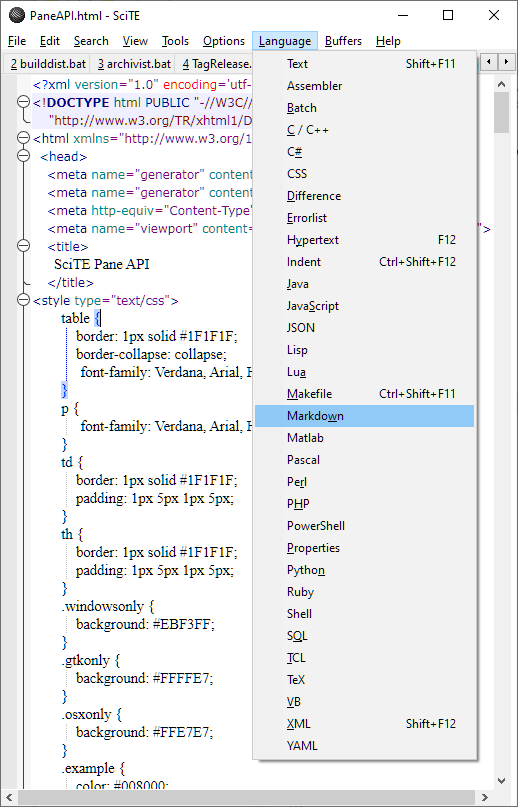
Its possible this is due to changing properties.
The set of properties files excluded is set with
imports.excludeso examine the value of this property by executing something likeecho $(imports.exclude)in the output pane. If this list includes "markdown" then that is the cause. "markdown" was removed from the distributedimports.exclude19 months ago. Check that yourSciTEGlobal.propertiesgets updated and that there is amarkdown.propertiesfile present in the same directoryThis list did not include markdown for me.
Is there an
Open markdown.propertiesentry in theOptionsmenu or amarkdown.propertiesfile in the same directory as global options?Neither actually. Just downloaded 5.4.1, same there.
Examining https://www.scintilla.org/wscite541.zip with the Windows built-in ZIP viewer or expanding it shows a
markdown.propertiesfor me.Yes, the
markdown.propertiesfile exists, butMarkdownis not an option in neither:I used "Process Monitor" from SysInternals and saw that when I launched SciTE from the newly extracted downloaded ZIP on my desktop, it loaded some data from
%ProgramData%\SciTE%, rather than from the same directory I ran SciTE from. Looks like some leftovers from previous testing, maybe with the unofficial SciTE MSI installer from ebswift.com. But it was years ago, I don't remember.After I deleted said directory, Markdown is now an option in SciTE.
Is this intended behavior?
Last edit: Olav R. Birkeland 2024-01-01
The behaviour of the ebswift.com installer is defined by them. It may produce an environment with directory overrides for SciTE in the registry. Its difficult-to-diagnose behaviour like this that discourages me from developing an installer.
@Olav,
I hope you actually uninstalled. As the uninstaller does remove some entries of concern that may cause future problems.
The installer sets both
SciTE_USERHOMEandSciTE_HOMEin the environment. The uninstaller removes these entries. If they are still there, then I doubt you uninstalled from years ago. These Environmental Variables may affect SciTE.exe located anywhere on the system as being set in the registry. As the installer adds a contextmenu handler and such, I will not give any advice less then to uninstall it properly.You can check the environment of SciTE in Windows by typing
setinto the output pane and press return key to check if the namesSciTE_USERHOMEorSciTE_HOMEexist.As for scite-5.4.1x64.msi from ebswift.com that I tested, it is missing
markdown.properties, so it seems the install script is old and may not include the latest of files added to SciTE. It is also missingraku.propertiesas just checked with a SciTE local repo. So the author of the msi can do some updating with their install script. The permissions of%ProgramData%\SciTEis granted to the user and denied for admin which is not normal inheritance so gives the user the ability todeletemodify the installed folders contents, a concerning thought with the initial quote.Last edit: Michael Heath 2024-01-02
Yeah, you're right. Wrongful assumption on my part, as I also found a directory inside
%appdata%that said it was from 2019.I uninstalled it, yes. Delete got blocked. So there were some env vars that redirected, got it. Will use the official version instead then.
Last edit: Olav R. Birkeland 2024-01-02