Menu
▾
▴
#2161 Ansi color codes support
Pleasea add ansi color codes support.
More info at: https://github.com/notepad-plus-plus/notepad-plus-plus/issues/8078




The errorlist lexer gained support for ANSI colour codes with change set [c9e390] which was released with 3.6.1 in 2015.
Related
Commit: [c9e390]
Closing this issue is a pure ignorance.
I closed this issue as invalid because Scintilla supports ANSI colour escape sequences.
Ascii color codes are not displayed correctly for log.log (github.com)


I was expecting something like in console:
But this is shown:
Last edit: Alex 2020-05-03
Like the output pane in SciTE?

Escape sequences are enabled with the
lexer.errorlist.escape.sequencesproperty.I set
lexer.errorlist.escape.sequences=1in global properties and the file still contains escape sequences.Sc1 Version 4.3.3
Because Scintilla doesn't properly support ANSI colors, Notepad++ that is based on Scintilla, cannot display ANSI colors.
Since Notepad++ is the de facto best text editor around, and since many text files are also Linux log files, that contain ANSI escape codes for coloring, Notepad++ then cannot properly display such log files.
I really urge you to implement a full support for ANSI colors. Since linux shell is able to do this for more than 20 years, it shouldn't be that hard for Scintilla.
As demonstrated above, Scintilla supports ANSI colour escape sequences.
Only in the output panel. The main editor panel still shows escape sequences.
When editing files it's very hard to view the text polluted with escape characters that should be invisible. And it's counter intuitive to use two panels for the same text.
Ideally, there should be a toggle option to show/hide invisible characters.
When invisible characters are shown, text is displayed without coloring, with escape chars. When invisible characters are not shown, text is displayed like output panel.
Last edit: Alex 2021-01-27
No, its in the main panel as well.

You can achieve this by toggling lexer.errorlist.escape.sequences when you want such as in a show invisibles menu command.
In my case, setting
lexer.errorlist.escape.sequences=1still shows escape chars.Sc1 4.3.3
Then you need to change the language for *.log files or choose the Errorlist language.
But how SciTE chooses modes is an irrelevant tangent to this issue as Notepad++ will use different techniques. You need to examine this from a programming perspective, not a user perspective.
Indeed, I confirm that changing the file language to Errorlist resolved this issue.
Last edit: Alex 2021-01-29
I'm in windows 11, with Scite 5.3.5 but not works :(
when I execute in cmd: echo ^[[32m hi ^[[0m (with Ctrl {) I can see in colors
but in output Scite I can't see in color.
I downloaded another clean instance of Scite,
set this in Global:
lexer.errorlist.escape.sequences=1
and in autoload.lua:
fg = {
red='\27[31m',
redbold='\27[31;1m',
green='\27[32m',
greenbold='\27[32;1m',
yellow='\27[33m',
yellowbold='\27[33;1m',
blue='\27[34m',
bluebold='\27[34;1m',
pink='\27[35m',
pinkbold='\27[35;1m',
cyan='\27[36m',
cyanbold='\27[36;1m',
white='\27[37m',
whitebold='\27[37;1m',
def='\27[0m'}
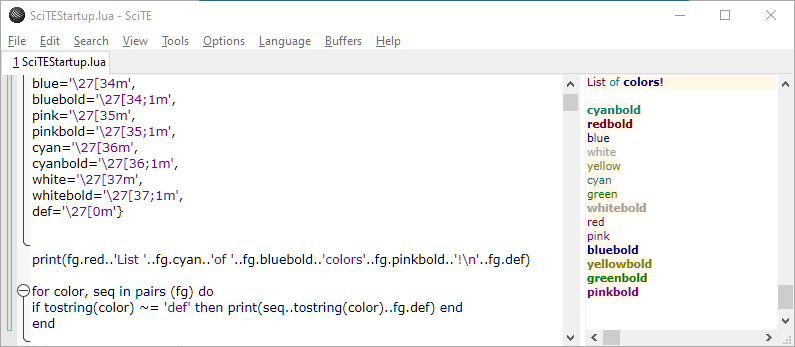
print(fg.red..'List '..fg.cyan..'of '..fg.bluebold..'colors'..fg.pinkbold..'!\n'..fg.def)
for color, seq in pairs (fg) do
if tostring(color) ~= 'def' then print(seq..tostring(color)..fg.def) end
end
I only see this:
ESC[31mList ESC[36mof ESC[34;1mcolorsESC[35;1m!
ESC[0m
ESC[32mgreenESC[0m
ESC[35mpinkESC[0m
ESC[34;1mblueboldESC[0m
ESC[34mblueESC[0m
ESC[31mredESC[0m
ESC[37;1mwhiteboldESC[0m
ESC[36;1mcyanboldESC[0m
ESC[33;1myellowboldESC[0m
ESC[37mwhiteESC[0m
ESC[36mcyanESC[0m
ESC[35;1mpinkboldESC[0m
ESC[32;1mgreenboldESC[0m
ESC[31;1mredboldESC[0m
ESC[33myellowESC[0m
I see this: