Open Source Mirrors Gearlynx
Brought to you by:
johngrimmreaper

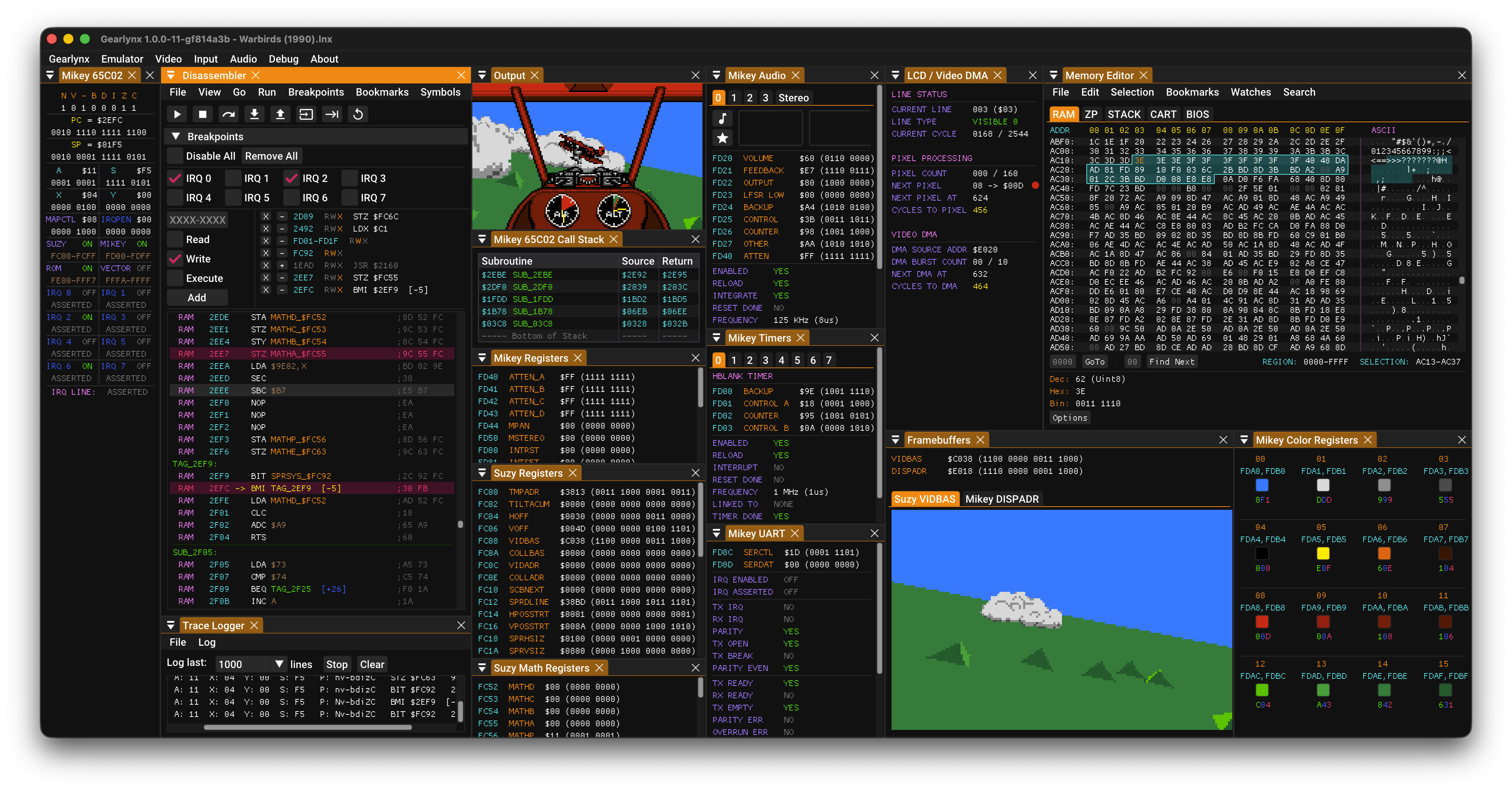
Gearlynx is a very accurate, cross-platform Atari Lynx emulator written in C++ that runs on Windows, macOS, Linux, BSD and RetroArch, with an embedded MCP server for AI debugging and development.
This is an open source project with its ongoing development made possible thanks to the support by these awesome backers. If you find it useful, please consider sponsoring.
Don't hesitate to report bugs or ask for new features by opening an issue.
| Platform | Architecture | Download Link |
|---|---|---|
| Windows | Desktop x64 | Gearlynx-1.2.31-desktop-windows-x64.zip (github.com) |
| Desktop ARM64 | Gearlynx-1.2.31-desktop-windows-arm64.zip (github.com) | |
| macOS | Homebrew | brew install --cask drhelius/geardome/gearlynx |
| Desktop Apple Silicon | Gearlynx-1.2.31-desktop-macos-arm64.zip (github.com) | |
| Desktop Intel | Gearlynx-1.2.31-desktop-macos-intel.zip (github.com) | |
| Linux | Ubuntu PPA | drhelius/ppa-geardome |
| Fedora RPM | drhelius/rpm-geardome | |
| Desktop Ubuntu 24.04 x64 | Gearlynx-1.2.31-desktop-ubuntu24.04-x64.zip (github.com) | |
| Desktop Ubuntu 22.04 x64 | Gearlynx-1.2.31-desktop-ubuntu22.04-x64.zip (github.com) | |
| Desktop Ubuntu 24.04 ARM64 | Gearlynx-1.2.31-desktop-ubuntu24.04-arm64.zip (github.com) | |
| MCPB | All platforms | MCP Readme |
| RetroArch | All platforms | Libretro core documentation |
| Dev Builds | All platforms | GitHub Actions |
Notes:
brew trust --tap drhelius/geardomelibsdl3Auto options are selected.fcd403db69f54290b51035d82f835e7b is recommended.--portable, or create an empty file named portable.ini in the same directory as the application binary. On macOS, place the file next to the .app bundle.Emulator menu. When enabled, opening a ROM while another instance is running will send the ROM to the running instance instead of starting a new one.path_to_rom_file.rom it tries to load path_to_rom_file.sym, path_to_rom_file.elf, the loaded-file sidecar path_to_rom_file.rom.elf, path_to_rom_file.lbl and path_to_rom_file.noi. You can also load symbol files using the GUI or the CLI. It supports cc65 (VICE label file), lyxass (EQU), mads (lab and hea), llvm-nm, llvm-mos ELF and vicelbl label formats.SPRCOLL bit 7 ($80) set. Real Lynx hardware ignores this bit, but production builds should clear it.$FDC0–$FDC4. Enable Debug Output in the Trace Logger Settings menu and make sure the Debug Messages filter is active. See the register protocol below.| Register | Write |
|---|---|
$FDC0 |
Send buffer to Trace Logger (write any non-zero value) |
$FDC1 |
Append byte as ASCII character |
$FDC2 |
Append byte as two hex digits |
$FDC3 |
Set string pointer low byte |
$FDC4 |
Set string pointer high byte (writing this triggers the copy) |
gearlynx [options] [game_file] [symbol_file]

Arguments:
  [game_file]                 Game file: accepts ROMs (.lyx, .lnx, .o) or ZIP (.zip)
  [symbol_file]               Optional symbol file for debugging

Options:
  -f, --fullscreen            Start in fullscreen mode
  -w, --windowed              Start in windowed mode with menu visible
      --mcp-stdio             Auto-start MCP server with stdio transport
      --mcp-http              Auto-start MCP server with HTTP transport
      --mcp-router            Enable compact MCP tool routing
      --mcp-http-address A    HTTP bind address (default: 127.0.0.1)
      --mcp-http-port N       HTTP port for MCP server (default: 7777)
      --debug-monitor         Start debug monitor TCP server (default port: 6502)
      --debug-monitor-port N  Debug monitor port, 1-65534 (default: 6502)
      --comlynx-join N        Join local ComLynx shared session 1-255
      --headless              Run without GUI (requires MCP, debug monitor, or ComLynx)
      --portable              Store configuration and user data beside the application
  -v, --version               Display version information
  -h, --help                  Display this help message
Gearlynx includes a Model Context Protocol (MCP) server that enables AI-assisted debugging through AI agents like GitHub Copilot, Claude, Codex and similar. The server provides tools for execution control, memory inspection, breakpoints, disassembly, hardware status, rewind and more. STDIO and HTTP transports are supported, with STDIO preferred.
For complete setup instructions and tool documentation, see MCP_README.md.
Choose the same session number in the ComLynx menu on every instance and select Connect, or start each process with --comlynx-join N. Sessions use local shared memory and support up to eight peers on one computer. Independent instances should use separate application copies or --portable data directories so configuration, saves, and single-instance handling do not conflict.
A source-level debugger for VS Code lives in its own repository:
BrianPeek/gearlynx-vscode. It drives
Gearlynx over the debug-monitor protocol (--debug-monitor). The wire contract is
documented in VSCODE_PROTOCOL_README.md.
Gearlynx provides Agent Skills that teach AI assistants how to effectively use the emulator for specific tasks:
Install with npx skills add drhelius/gearlynx. See the skills README for details.
Gearlynx passes all tests from Atari Lynx Hardware Test ROMs.
SDL3-devel-x.y.z-VC.zip).SDL3-x.y.z) to SDL3.SDL3 folder inside platforms/windows/dependencies/ so that the include path is platforms/windows/dependencies/SDL3/include/SDL3/.platforms/windows/Gearlynx.sln and build.xcode-select --install in the terminal for the compiler to be available on the command line.brew install sdl3
cd platforms/macos
make dist
If you are using Ubuntu 25.04 or later, you can install SDL3 directly. Use the following commands to build:
sudo apt install build-essential libsdl3-dev
cd platforms/linux
make
For older Ubuntu versions (22.04, 24.04), you need to build SDL3 from source first. Use the following commands to build both SDL3 and Gearlynx:
sudo apt install build-essential cmake git curl jq pkg-config \
  libx11-dev libxext-dev libxrandr-dev libxcursor-dev libxfixes-dev \
  libxi-dev libxss-dev libxkbcommon-dev libwayland-dev libdecor-0-dev \
  libdrm-dev libgbm-dev libgl1-mesa-dev libegl1-mesa-dev libdbus-1-dev libudev-dev libxtst-dev
SDL3_TAG=$(curl -s https://api.github.com/repos/libsdl-org/SDL/releases/latest | jq -r '.tag_name')
git clone --depth 1 --branch "$SDL3_TAG" https://github.com/libsdl-org/SDL.git /tmp/SDL3
cmake -S /tmp/SDL3 -B /tmp/SDL3/build -DCMAKE_INSTALL_PREFIX=/usr -DSDL_TESTS=OFF -DSDL_EXAMPLES=OFF
cmake --build /tmp/SDL3/build -j$(nproc)
sudo cmake --install /tmp/SDL3/build
cd platforms/linux
make
sudo dnf install @development-tools gcc-c++ SDL3-devel
cd platforms/linux
make
sudo pacman -S base-devel sdl3
cd platforms/linux
make
su root -c "pkg install -y git gmake pkgconf sdl3"
cd platforms/bsd
USE_CLANG=1 gmake
su root -c "pkgin install gmake pkgconf SDL3"
cd platforms/bsd
gmake
doas pkg_add gmake sdl3
cd platforms/bsd
LDFLAGS=-L/usr/X11R6/lib/ USE_CLANG=1 gmake
sudo apt install build-essential
cd platforms/libretro
make
sudo dnf install @development-tools gcc-c++
cd platforms/libretro
make
Thank you to all the people who have already contributed to Gearlynx!
Gearlynx is licensed under the GNU General Public License v3.0 License, see LICENSE for more information.

 Ignacio Sanchez Gines
![dependabot[bot]](https://secure.gravatar.com/avatar/48ea49be76d0c68403a7f3df87e3487d?size=16&r=pg&d=https%3A%2F%2Fa.fsdn.com%2Fcon%2Fimages%2Fsandiego%2Ficons%2Fdefault-avatar.png "dependabot[bot]") dependabot[bot]
dependabot[bot]
 Craig Carnell





