When I try to boot Ubuntu desktop 25.10 on my 16 GB RAM system I get an error indicating I'm out of memory. Granted Ubuntu ISO is large, 4.3GB but I have 16GB!
menuentry " Ubuntu ISO 25.10" --class ubuntu --class icon-ubuntu {
 set iso=/ISOs/ubuntu-25.10-desktop-amd64.iso
 set bootparms=`boot=casper iso-scan/filename=$iso quiet splash `

 search -f $iso --set=root
 echo root=$root
 loopback loop $iso
 linux (loop)/casper/vmlinuz $bootparms
 initrd (loop)/casper/initrd
 }
Hey Ed,
I downloaded the same ISO and booted it via loopback just as you did.
It worked for fine me, but I have 64 GB ram on my machine. What issues your out of memory message? GNU Grub or Ubuntu?
Still, I don't think Ubuntu should require that much memory. You might want to check out Ubuntu support to research.
Dave
This is what I see:
I've added these commands to the menu:
search -f $iso --set=root
 echo root=$root
 ls ($root)
 ls ($root)/ISOs/ubuntu*
 loopback loop $iso
A menu that works for me.
 set iso="/ISOs/ubuntu-25.10-desktop-amd64.iso"
 set bootparms="boot=casper iso-scan/filename=$iso nomodeset  --- quiet splash "
# search -f $iso --set=root set root='(hd0,gpt4)' insmod part_gpt # echo root=$root # ls ($root) # ls ($root)/ISOs/ubuntu* loopback loop $iso echo Booting $iso linux (loop)/casper/vmlinuz $bootparms initrd (loop)/casper/initrd }
Log in to post a comment.



When I try to boot Ubuntu desktop 25.10 on my 16 GB RAM system I get an error indicating I'm out of memory. Granted Ubuntu ISO is large, 4.3GB but I have 16GB!
menuentry " Ubuntu ISO 25.10" --class ubuntu --class icon-ubuntu {
Hey Ed,
I downloaded the same ISO and booted it via loopback just as you did.
It worked for fine me, but I have 64 GB ram on my machine.
What issues your out of memory message? GNU Grub or Ubuntu?
Still, I don't think Ubuntu should require that much memory.
You might want to check out Ubuntu support to research.
Dave
This is what I see:
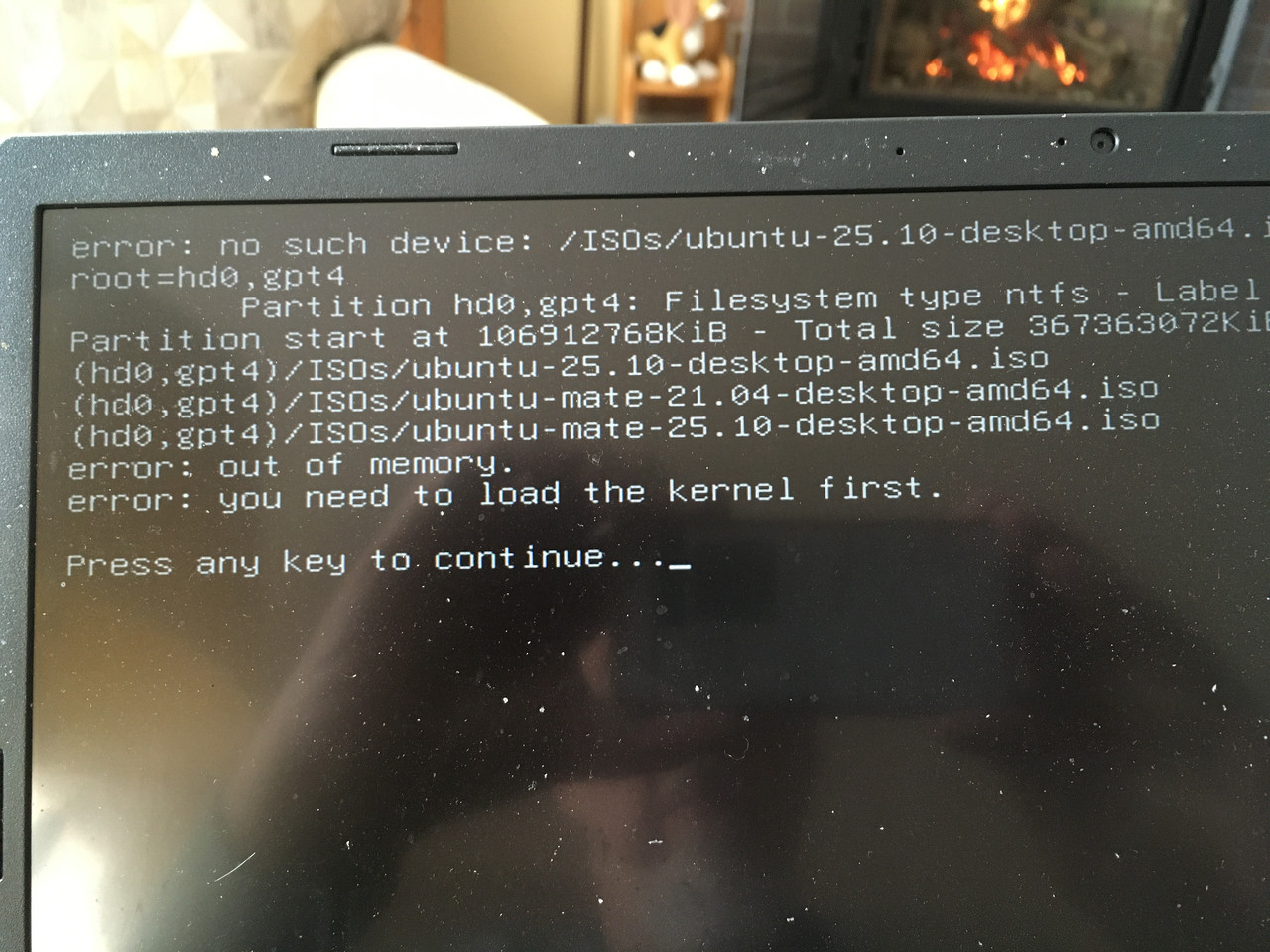
I've added these commands to the menu:
Last edit: Ed P 2026-02-05
A menu that works for me.
menuentry " Ubuntu ISO 25.10" --class ubuntu --class icon-ubuntu {
# search -f $iso --set=root
set root='(hd0,gpt4)'
insmod part_gpt
# echo root=$root
# ls ($root)
# ls ($root)/ISOs/ubuntu*
loopback loop $iso
echo Booting $iso
linux (loop)/casper/vmlinuz $bootparms
initrd (loop)/casper/initrd
}
Last edit: Ed P 2026-02-17