Menu
▾
▴
Re: [Foxgui-users] Faded displayed (not pure)colours in OpenGL
|
From: Pof <jd3...@gm...> - 2023-07-31 05:06:34
|
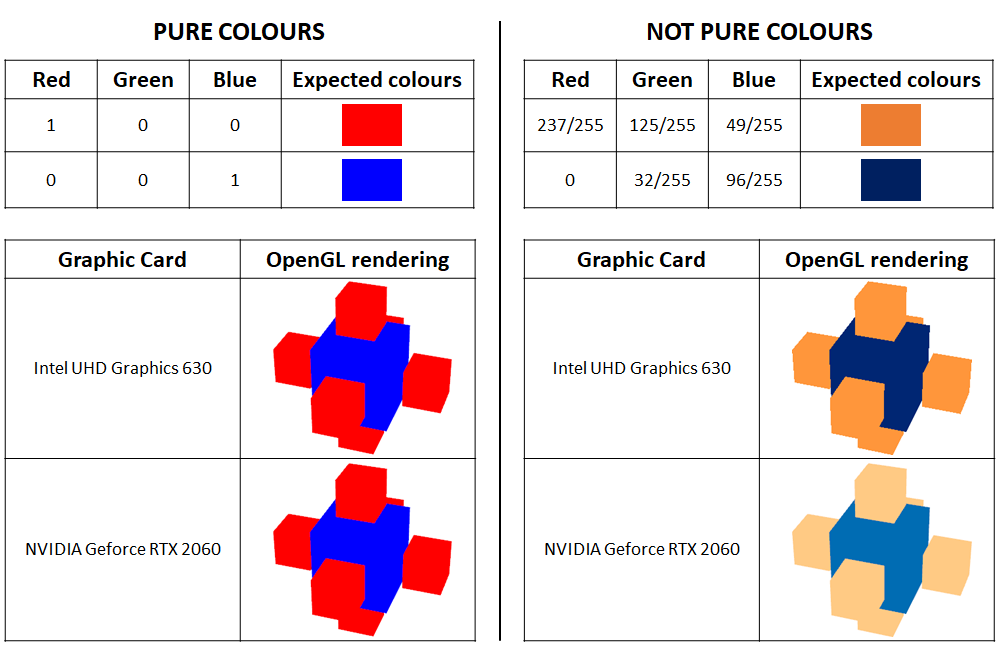
Dear John, Thanks for answering. I also have a normal behaviour on Windows with Intel built-in Graphics (test rather many over the years). On Windows, would you have the opportunity to test with a dedicated Graphics card (NVIDIA, ATI...) if you have any such hardware? Regards, Pof Le 31/07/2023 à 03:38, John Selverian a écrit : > I'm doing something similar but haven't seen any problems, but on Windows I'm using Intel UHD Graphics 630, it also looks fine on my Mac. > > > -----Original Message----- > From: Pof <jd3...@gm...> > Sent: Sunday, July 30, 2023 5:42 PM > To: fox...@li... > Subject: [Foxgui-users] Faded displayed (not pure)colours in OpenGL > > Dear all, > > I have developed a Windows application based on the FoxToolkit, with 3D rendering based on FXGLVisual and FXCanvas, and for a long time I have had a nasty colour issue in the 3D rendering. > In short: > - pure colours (i.e. pure red, pure green and pure blue) are displayed correctly, > - non-pure colours (i.e. with some colour channels between 0 and 1) appear quite washed out, which in my case is very annoying as I have to rely on the colour scale to interpret the data. > > I managed to reproduce the behaviour from the simple Fox example "gltest.cpp", with very slight modifications to the > GLTestWindow::drawScene() member (see the end of this email). As an image is worth a thousand words, the following image > https://i.postimg.cc/kDrcvMpb/Open-GL-Faded-Not-Pure-Colours.png > visually sums up the issue for non-pure colours: > - if the built-in graphic chipset is used, the colours look fine, > - when the NVIDIA graphics card is used, the colours appear very faded. > > Additional comments: > - this issue only occurs when using the NVIDIA graphics card (it does not occur when using the built-in Intel graphics chipset), > - my NVIDIA driver is up to date, > - I don't blame my graphics card, as I don't have this issue with popular applications that use OpenGL (e.g. > https://www.cloudcompare.org/), and also because this issue exists on all computers on which this was tested (I'd say at least 100), > - it occurs with Fox 1.7.xx versions (currently using 1.7.81, with > VC++2017 under Win11, but I had this issue for many years, so much older > Fox releases), I could not say anything about Fox 1.6.x. > > Has anyone experienced this problem? > I would be very much interested to get some hints on how to solve this, > or at least to have an idea where to start to solve it. > > Thanks in advance, > Pof > > ---------------------------------------------------------------- > // code modification (lines 724 to 727 of gltest.cpp) > const GLfloat lightAmbient[]={1.f,1.f,1.f,1.}; //{.1f,.1f,.1f,1.}; > const GLfloat lightDiffuse[]={0.,0.,0.,1.}; //{.9f,.9f,.9f,1.}; > const GLfloat redMaterial[]={237./255.,125./255.,49./255.,1.}; > //{1.,0.,0.,1.}; > const GLfloat blueMaterial[]={0.,32./255.,96./ 255.,1.}; //{0.,0.,1.,1.}; > ... > > > > _______________________________________________ > Foxgui-users mailing list > Fox...@li... > https://lists.sourceforge.net/lists/listinfo/foxgui-users > |