Menu
▾
▴
[Foxgui-users] Faded displayed (not pure)colours in OpenGL
|
From: Pof <jd3...@gm...> - 2023-07-30 21:41:54
|
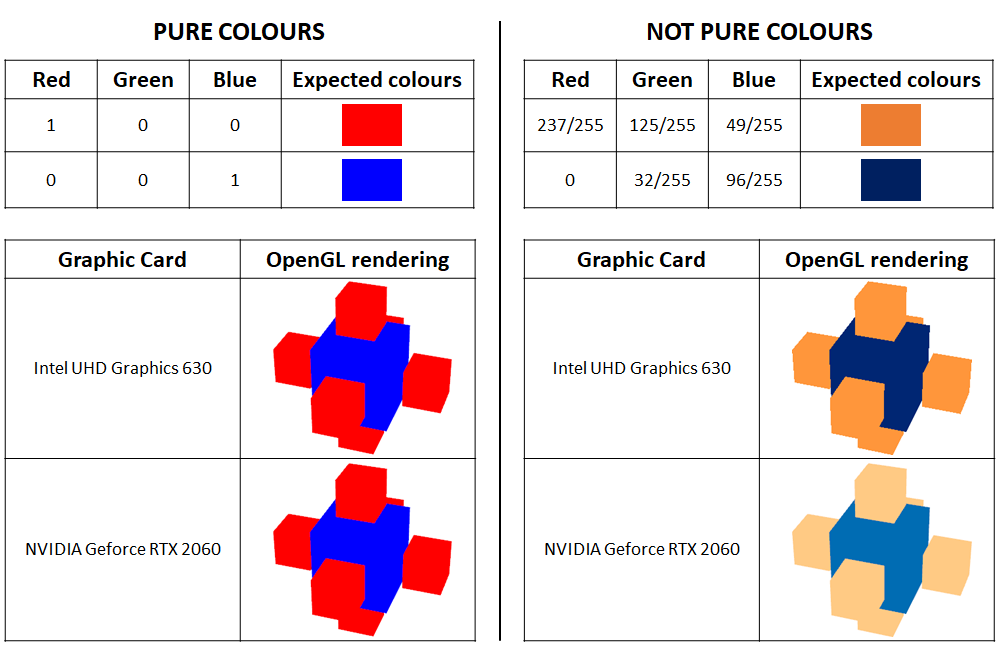
Dear all, I have developed a Windows application based on the FoxToolkit, with 3D rendering based on FXGLVisual and FXCanvas, and for a long time I have had a nasty colour issue in the 3D rendering. In short: - pure colours (i.e. pure red, pure green and pure blue) are displayed correctly, - non-pure colours (i.e. with some colour channels between 0 and 1) appear quite washed out, which in my case is very annoying as I have to rely on the colour scale to interpret the data. I managed to reproduce the behaviour from the simple Fox example "gltest.cpp", with very slight modifications to the GLTestWindow::drawScene() member (see the end of this email). As an image is worth a thousand words, the following image https://i.postimg.cc/kDrcvMpb/Open-GL-Faded-Not-Pure-Colours.png visually sums up the issue for non-pure colours: - if the built-in graphic chipset is used, the colours look fine, - when the NVIDIA graphics card is used, the colours appear very faded. Additional comments: - this issue only occurs when using the NVIDIA graphics card (it does not occur when using the built-in Intel graphics chipset), - my NVIDIA driver is up to date, - I don't blame my graphics card, as I don't have this issue with popular applications that use OpenGL (e.g. https://www.cloudcompare.org/), and also because this issue exists on all computers on which this was tested (I'd say at least 100), - it occurs with Fox 1.7.xx versions (currently using 1.7.81, with VC++2017 under Win11, but I had this issue for many years, so much older Fox releases), I could not say anything about Fox 1.6.x. Has anyone experienced this problem? I would be very much interested to get some hints on how to solve this, or at least to have an idea where to start to solve it. Thanks in advance, Pof ---------------------------------------------------------------- // code modification (lines 724 to 727 of gltest.cpp) const GLfloat lightAmbient[]={1.f,1.f,1.f,1.}; //{.1f,.1f,.1f,1.}; const GLfloat lightDiffuse[]={0.,0.,0.,1.}; //{.9f,.9f,.9f,1.}; const GLfloat redMaterial[]={237./255.,125./255.,49./255.,1.}; //{1.,0.,0.,1.}; const GLfloat blueMaterial[]={0.,32./255.,96./ 255.,1.}; //{0.,0.,1.,1.}; ... |