
Menu
▾
▴
#2022 Altitude gap between fg2017.3 and 2018.2 or 2018.3
Hi,
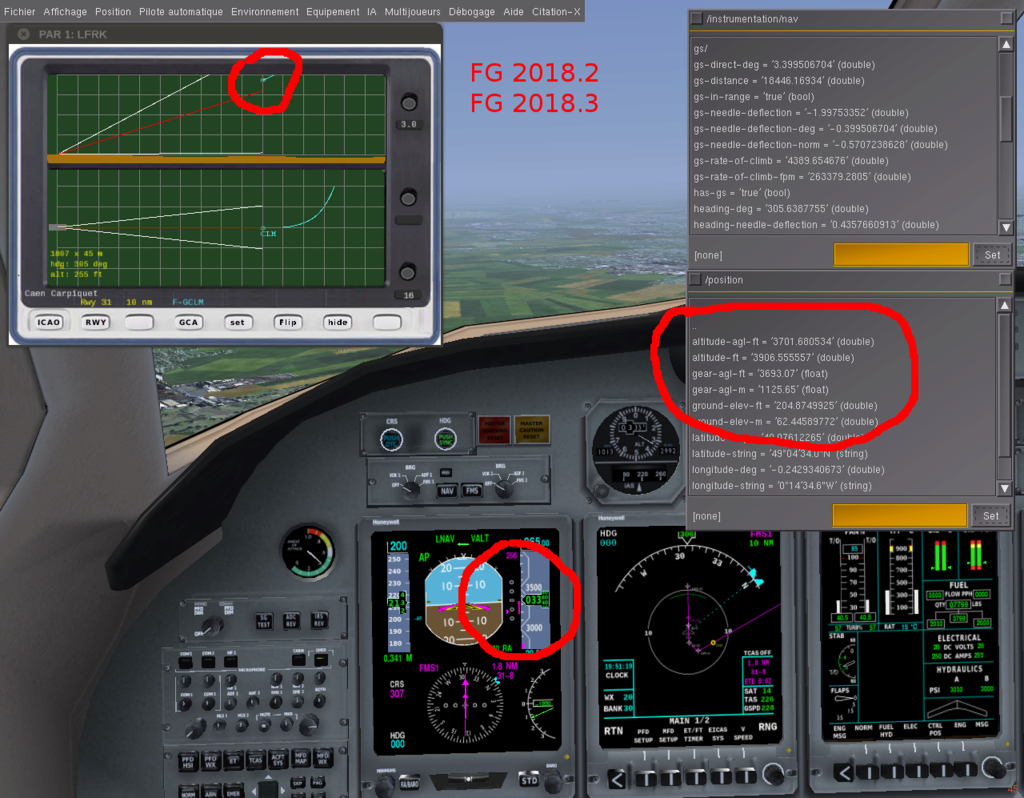
With exactly the same conditions (altitude,distance ...), there is an altitude gap of 500ft between the two versions of Fg for the same indicated altitude.
fg2017.3 :
Indicated altitude : 3350 ft
Altitude-agl-ft : 3229 ft
Altitude-ft : 3432 ft
fg2018.2 & 3
Indicated altitude : 3350 ft
Altitude-agl-ft : 3701 ft
Altitude-ft : 3906 ft
So, with the last fg versions, the aircraft position is higher the ILS slope with a standard approach in the flightplan while it's correct with the 2017.3 version, as you can see on these screenshots.

Related


The weather conditions and barometric pressure were exactly the same in the two versions :
Detailed weather - fair weather and barometric pressure = 29.92.
I think it's not a problem of "indicated altitude" but a more complex one because the same flightplan approach doesn't give the same "position/altitude-agl-ft" in exactly the same conditions and distance. It's visible on the two PAR screen.
Can you reporduce this with the UFO, or is it specific to some aircraft?
With the UFO:
Fg2017-3 - On ground :
"/instrumentation/altimeter"
indicated-altitude-ft = 250.95
mode-c-alt-ft = 300
pressure-alt-ft = 252.14
"/position"
altitude-agl-ft = 0.101
altitude-ft = 294.17
Fg2018-2 & 3 - On ground :
"/instrumentation/altimeter"
indicated-altitude-ft = -266.68 (it's negative !)
mode-c-alt-ft = -300
pressure-alt-ft = -265.48
"/position"
altitude-agl-ft = 0.0998
altitude-ft = 294.17
Fg2017-3 - 2500 ft
"/instrumentation/altimeter"
indicated-altitude-ft = 2500.31
mode-c-alt-ft = 2500
pressure-alt-ft = 2501.51
"/position"
altitude-agl-ft = 2281.19
altitude-ft = 2582.80
Fg2018-2 & 3 - 2500 ft
"/instrumentation/altimeter"
indicated-altitude-ft = 2500.11
mode-c-alt-ft = 2500
pressure-alt-ft = 2501.30
"/position"
altitude-agl-ft = 3089.34
altitude-ft = 3089.33
For all :
setting-hpa = 1013
setting-inhg = 299.92
Repeating what I've already mentioned on the mailing list:
AFAIKS as long as the altimeter setting matches the environment/pressure-sea-level-inhg value the indicated altitude is correct.
However, I noticed that Detailed weather on first run sets some random sea level pressure that doesn't match the one in Environment->Weather->METAR Data .
This happens regardless if Detailed weather is enabled via the launcher (thus auto-run) or enabled later via the Environment->Weather dialog.
Further resets of Detailed weather apply the same sea level pressure as in the METAR string.
Please show some screenshots showing the following properties:
NOTE: you can put the property on-screen by shift-clicking it in the property tree
IIRC prior to 2018.x, Detailed weather could only be started from the in-sim dialog, so this behaviour was not so visible, or maybe even not triggered.
Last edit: i4dnf 2018-06-19
2017.3 Detailled weather loaded at startup :

2017.3 Same values when changing to Basic weather
2017.3 Changing Basic weather to Detailled weather:

2018.3 Detailled weather loaded at startup :

2018.3 Changing to Basic weather :

2018.3 Changing back to Detailled weather :

This isn't FDM related.
It's weather engine related.
(It's a [user] failure to set the barometer setting to the correct value (most likely due to discrepancies between METAR reported value and weather engine actual value))
Last edit: i4dnf 2018-09-26
This also occurs on 2020.4 (currently next); see Ticket: #2842
Just again tested at East Midlands / EGNX / RWY 27 threshold:
Calibrated altimeter to 29.32 gives reading of ~265 ft
=> That looked good and not off.
Looks like its not always off...
Last edit: Benedikt Hallinger 2024-01-21
Retested with "fair weather" with startup (same position at at EGNX / RWY27 Threshold):
/position/altitude-ft = 282 (same position as before!!)
Calibrated altimeter to 29.97 gives reading of -180ft (~460ft off!)
Changing to "Basic Weather" fixed the altimeter reading without further action
--prop:/local-weather/tmp/tile-management=METARin my launcher instantly worked without further intervention (Altimeter calibrated to 29.97 showed the expected 280 ft).So my reasoning would be at this point, that the weather presets initialization need to be revisited when not using live weather.
Last edit: Benedikt Hallinger 2024-01-21
I think I found the problem. In Nasal/local_weather/local_weather.nas we have:
However, in Environment/environment.xml the local weather tile type for the "Fair weather" scenario is set to "High-pressure-core" instead of "Fair weather":
This effectively loads the High pressure core scenario (1028 hPa), which explains why the pressure is way of from the shown METAR (1015 hPa).
Unfortunately, changing the tile type to "Fair weather" gives a
Nasal runtime error: No such member: set_fair_weather_tileerror, becauseweather_tiles.set_fair_weather_tile()does not exist!@trenk, is there a reason for not having a fair weather tile type in local weather? According to your comment in https://forum.flightgear.org/viewtopic.php?p=285024#p285024 it is on purpose. I understand that, as long as the tile mode is not set to METAR we'll get an approximation, since AW adds some randomization to the pressure (up to 6 or 10 hPa, depending on the scenario). However, for all the other scenarios this is still relatively close to the METAR pressure, with a maximum difference of 0.09 - 0.15 inHg, because they have a properly defined local weather tile type. It's only for fair weather and thunderstorms that there is a considerably larger difference of up to 0.44-0.47 inHg (see attached graph).
I think we need to do two things, to ensure that basic and advanced weather use identical scenario presets that more or less match the shown METAR:
I've pushed the aforementioned fixes per [a9bce8] and [096aad]. It was easiest to set the fair weather scenario to METAR mode, rather than crafting a dedicated fair weather tile type.
Related
Commit: [096aad]
Commit: [a9bce8]
Thanks to Benedikt for bringing this old topic back to light and thanks to Gijs for resolving it.
Thank you very much :)