
Menu
▾
▴
#1723 Clouds - Clouds are semi-transparent when they should be opaque
Example (the flight gear 3.4 release announcement pic. I'm new to FG):
http://www.flightgear.org/wp-content/uploads/2015/02/av9DBjV.png
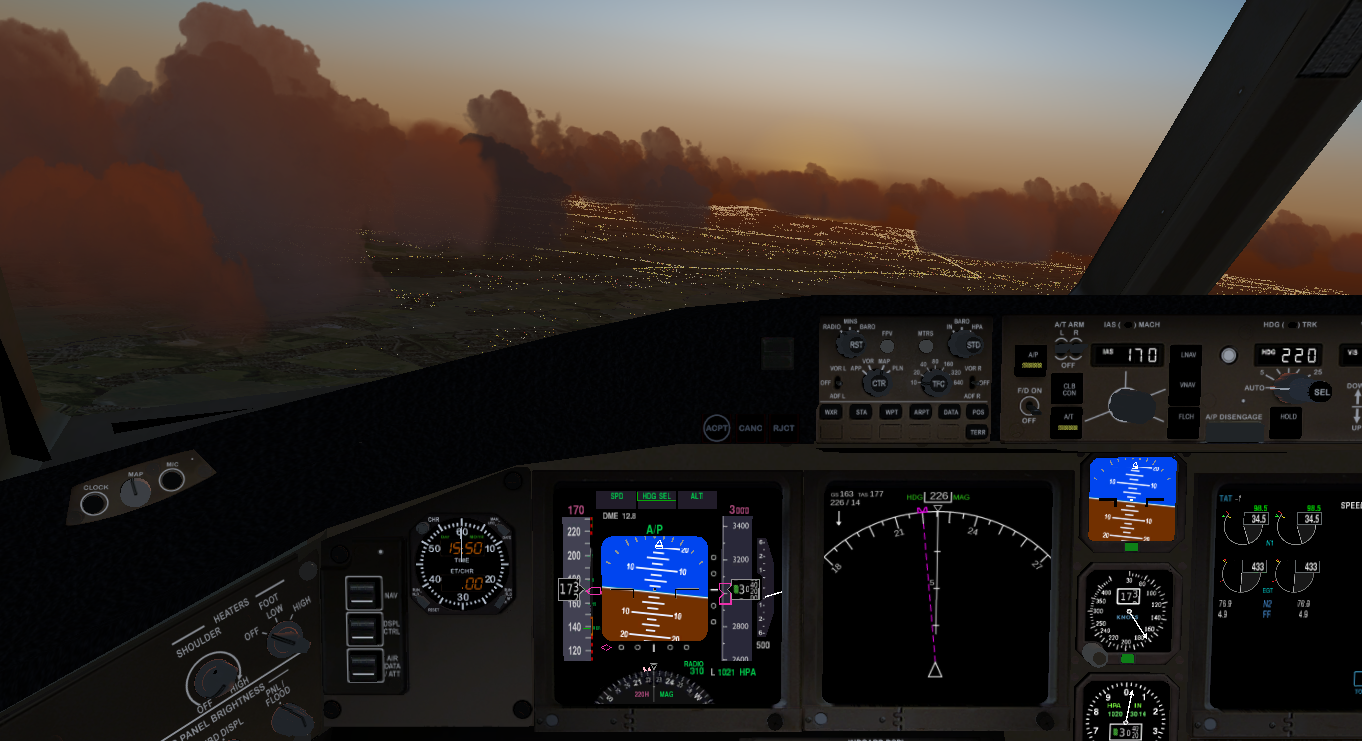
The ground lights are visible through dark clouds when they should not be. Dark parts of clouds are dark because light coming from the other side is reflected or otherwise outscattered. This is an issue for strongly white clouds.
This is quite noticeable as the eye is used to clouds. It was something that stood out immediately in that picture - that something wasn't quite right.
Since FG appears to stack multiple cloud quads to get varied thickness I'm not sure if there's an easy shader tweak based solution. I believe rendering the clouds to a texture and then blending into the scene via a shader might allow alpha to be set to opaque if the cloud colour is sufficiently dark or sufficiently bright. But this is a lot of work, and this issue might be not be reasonably practicably solvable.


The issue seen in the picture really depends on multiple issues:
1) the clouds in questions are chiefly fairly developed Cu clouds which in reality are very opaque - many other cloud types would have somewhat transparent tops in reality (so any solution would have to be very specific on cloud type).
2) the cloud density setting (=number of sprites used per cloud) seem to be low
3) to be further reduced by the default cloud LOD settings
which in the end often cause the cloud tops to be represented by a single sprite.
I personally run a higher density setting and less restrictive LOD settings, causing a certain framerate drain but making the transparency issue (largely) absent. I don't thin this qualifies as a bug, it's more of a tweak to existing settings which are a tradeoff situation between quality and performance.
The FG code already allows to pass a per-cloud alpha value to the shader, but single opaque quads are also undesirable for Cu clouds - I think the proper solution really is to use more quads (see the clouds density setting in the rendering dialog /sim/rendering/clouds3d-density and the LOD settings /sim/rendering/clouds3d-lod1-range, /sim/rendering/clouds3d-lod2-range and /sim/rendering/clouds3d-detail-range.
According to Thorsten's comment this can be fixed by the user by adjusting the cloud density in the rendering settings.