I'm trying to create a full-disk image with Clonezilla alternative stable - 20221103-kinetic (Ubuntu-based) of my Dell XPS 15 7590. The notebook has only Ubuntu 22.04, standard partitioning.
The disk of the PC is full-disk encrypted via the standard Ubuntu setup procedure (LUKS on LVM). Just to make sure that we are on the same page: THE WHOLE DISK is encrypted, so I'm asked for the password as soon as I turn on the PC, even before the boot starts.
Since the disk has a capacity of 512 GB but just about 114 GB are in use, I've chosen the "open it" option, so I can prevent the sector-by-sector approach and prevent the image from being 512 GB
Later on, I'm asked for the disk encryption password. If I provide a wrong password, the error is detected and I'm asked to retry. So I'm sure the encryption password I provided is correct.
Then the procedure starts. The disk size shown is the expected one (114 GB over 512 GB capacity) and everything seems to proceed
But after the operation is completed, I get this error: LUKS header file not found
I already tried twice, with the same result. What am I doing wrong?
If you would like to refer to this comment somewhere else in this project, copy and paste the following link:
There are some bugs about LUKS I believe.
Recently we have improved that in Clonezilla live >= 3.0.3-20 or 20230127-*: https://clonezilla.org/downloads.php
Could you please give it a try and let us know the results?
Thanks.
Steven
If you would like to refer to this comment somewhere else in this project, copy and paste the following link:
I had a similar error when wanting to clone a LUKS encrypted HDD to an SSD of the same size with "clonezilla-live-3.0.2-21-amd64.iso". The cloned disk was not usable. I did it again with just "dd if=/path/to/input of=/path/to/output status=progress". This worked flawlessly.
If you would like to refer to this comment somewhere else in this project, copy and paste the following link:
Please give testing Clonezilla live >= 3.0.3-22 or 20230212-* a try: https://clonezilla.org/downloads.php
We have improved LUKS support recently.
Please let us know the results. Thanks.
Steven
If you would like to refer to this comment somewhere else in this project, copy and paste the following link:
The unsuccessfull run was a data migration from my productive LUKS encrypted 2 TB HDD to a new productive 2TB SSD taking several hours. Both disks with exactly the same reported size, namely 2000398934016 bytes.
I would love to do that again. Unfortunately, I cannot repeat the run. As I do not have a spare 2 TB SSD.
A few days earlier, I migrated a LUKS encrypted 250 GB SSD to a 480 GB SSD with "clonezilla-live-3.0.2-21-amd64.iso". That run was successfull.
If you would like to refer to this comment somewhere else in this project, copy and paste the following link:
Please describe how to reproduce this issue using 3.1.0-22 in detail.
Let's us know every step you have done when saving and restoring so that we can try to reproduce it. Once it's reproducible, we will do our best to fix it.
Thanks.
Steven
If you would like to refer to this comment somewhere else in this project, copy and paste the following link:
Is there any update on this issue? I am still having this problem with 3.1.2-22; and it's as Steven noted where if I'm backing up to a SMB share, it will fail with the error that it can't find the LUKS header file (same as all above screenshots). However, if I backup to another attached disk, it will work without issue.
I set it up to open the LUKS container, encrypt the clone, and save to the SMB share and it fails every time.
If you would like to refer to this comment somewhere else in this project, copy and paste the following link:
Yes, I tried with 3.1.3-11 and still had the same issue.
I was going to grab a log file, but I couldn't find the log that had this line in it. It wasn't in the /var/log/clonezilla.log
You can see the point of failure between the two screenshots. When saving to a local disk, you can see right after I enter my password for the existing LUKS volume, it says it's saving the LUKS header and then has no error message.
However, when I'm saving to an SMB share, after I enter the password and it runs the command to save the LUKS header, it throws an error that it couldn't save the header file - but it doesn't provide any reason why it failed and the rest of the process just continues anyway (until it gets to the verify stage where it will fail for not finding that file).
One thing I noticed is permissions do seem to be different. I can "ctrl+alt+F2" to switch to the second TTY. From there, when I have a "local disk" mounted, I can go to the "/home/partimag" path and create files as the "normal user" (whoever it logs in by default). However, if I have the "SMB Share" mounted, then it seems only root (or sudo) can create files in "/home/partimag"
I'm wondering if potentially the command to save the LUKS header is not running as root or otherwise doesn't have the permissions - or if the SMB share is being mounted with the wrong permissions. That may be what's causing the failure to create the file.
Edit:
I'm at a loss. As a test, I tried adding the "noperm" option to the OCS function for the SMB/cifs mount command. This "solved" the issue of requiring root to write to /home/partimag or the "/tmp/ecryptfs_mnt.XXXXXX" path. However, the command to save the header file would still fail. So, it wasn't the root cause.
I believe the root cause is potentially a bug in ecryptfs related to an SMB mount. If I manually ran the "cryptsetup" command to save the header file to the "/tmp/ecryptfs_mnt.XXXXXX" path, it would error out with that same error that it couldn't create the file. However, if I ran the command and substituted the "/home/partimag" path, then it would be able to write to the SMB share just fine (of course, by bypassing the ecryptfs mount, the file didn't write with encryption).
What perplexes me is the rest of the tools, like partclone, and everything else, are able to write to the/tmp/ecryptfs_mnt mount point without error. It just seems to be the cryptsetup command that fails to write to the ecryrptfs mount point when it's encrypting an SMB share path.
I guess potentially there may be a "workaround" to just have the cryptsetup command write the header to a "temp" file (RAM), and then separate copy it to the ecryptfs mount point. However, that seems a bit convoluted and I don't know enough to say whether that poses any security risk of that header file ever being in an unencrypted state when the user specifically asked to encrypt the clone. (It would end up encrypted after copying, but I don't know if there's a risk of it being temporarily exposed in RAM).
I assume smarter minds than my own could find the correct solution.
Thanks for your feedback.
Somehow here I just can not reproduce this issue. I used Clonezilla live 3.1.3-11 amd64 release, and saved Ubuntu Jammy which has 1 LUKS partition. It ran smoothly here.
The image repository I had:
root@debian:~# findmnt /home/partimag/
TARGET SOURCE FSTYPE OPTIONS
/home/partimag
//192.168.120.8/smb
cifs rw,relatime,vers=3.1.1,cache=strict,username=bryan,uid=0,noforceuid,gid=0,noforcegid,addr=192.168.120.8,file_mode=0755,dir_mode=0755,so
When it saved an image, in the step you mentioned, it ran like: ********.
Found LUKS device: nvme0n1p3
We have to open LUKS device now. You will be prompted to enter passphrase for each one of them.
Extracting initramfs: /tmp/ird_mnt.gpU/initrd.img-5.15.0-56-generic... done.
Found LUKS crypttab file in /tmp/ird_mnt.gpU/initrd.img-5.15.0-56-generic. Appending it to /home/partimag/luks-2024-07-10-05-img/luks-crypttab-from-OS.info... *******.
Now open the LUKS device: /dev/nvme0n1p3
Running: cryptsetup open --type luks /dev/nvme0n1p3 sda3_crypt
Enter passphrase for /dev/nvme0n1p3:
Running: cryptsetup luksHeaderBackup --header-backup-file /home/partimag/luks-2024-07-10-05-img/nvme0n1p3-luksHeader.bin /dev/nvme0n1p3 **********.
Thanks for your feedback.
Please give testing Clonezilla live >= 3.1.3-15 or 20240711-* a try: https://clonezilla.org/downloads.php
This issue should have been fixed.
Please let us know the results.
Thanks.
Steven
If you would like to refer to this comment somewhere else in this project, copy and paste the following link:
I apologize for the delay, it took me some time to get to a position to test this again. By the time I tested, I saw 3.1.3-16 was already available as 'stable'. I tried with that version and no longer have this issue. It seems to be resolved now. Thanks!
👍
1
If you would like to refer to this comment somewhere else in this project, copy and paste the following link:



I'm trying to create a full-disk image with Clonezilla alternative stable - 20221103-kinetic (Ubuntu-based) of my Dell XPS 15 7590. The notebook has only Ubuntu 22.04, standard partitioning.
The disk of the PC is full-disk encrypted via the standard Ubuntu setup procedure (LUKS on LVM). Just to make sure that we are on the same page: THE WHOLE DISK is encrypted, so I'm asked for the password as soon as I turn on the PC, even before the boot starts.
Since the disk has a capacity of 512 GB but just about 114 GB are in use, I've chosen the "open it" option, so I can prevent the sector-by-sector approach and prevent the image from being 512 GB
Later on, I'm asked for the disk encryption password. If I provide a wrong password, the error is detected and I'm asked to retry. So I'm sure the encryption password I provided is correct.
Then the procedure starts. The disk size shown is the expected one (114 GB over 512 GB capacity) and everything seems to proceed
But after the operation is completed, I get this error: LUKS header file not found
I already tried twice, with the same result. What am I doing wrong?
There are some bugs about LUKS I believe.
Recently we have improved that in Clonezilla live >= 3.0.3-20 or 20230127-*:
https://clonezilla.org/downloads.php
Could you please give it a try and let us know the results?
Thanks.
Steven
I had a similar error when wanting to clone a LUKS encrypted HDD to an SSD of the same size with "clonezilla-live-3.0.2-21-amd64.iso". The cloned disk was not usable. I did it again with just "dd if=/path/to/input of=/path/to/output status=progress". This worked flawlessly.
Last edit: x48x4b 2023-02-13
Please give testing Clonezilla live >= 3.0.3-22 or 20230212-* a try:
https://clonezilla.org/downloads.php
We have improved LUKS support recently.
Please let us know the results. Thanks.
Steven
The unsuccessfull run was a data migration from my productive LUKS encrypted 2 TB HDD to a new productive 2TB SSD taking several hours. Both disks with exactly the same reported size, namely 2000398934016 bytes.
I would love to do that again. Unfortunately, I cannot repeat the run. As I do not have a spare 2 TB SSD.
A few days earlier, I migrated a LUKS encrypted 250 GB SSD to a 480 GB SSD with "clonezilla-live-3.0.2-21-amd64.iso". That run was successfull.
OK, thanks for your feedback. If the issue is reproducible in the future with newer Clonezilla live (>=3.0.3-22), please let us know.
Steven
I am having this issue on 3.0.3-22. I get "LUKS header file not found". It also occurred with the Ubuntu stable and testing version.
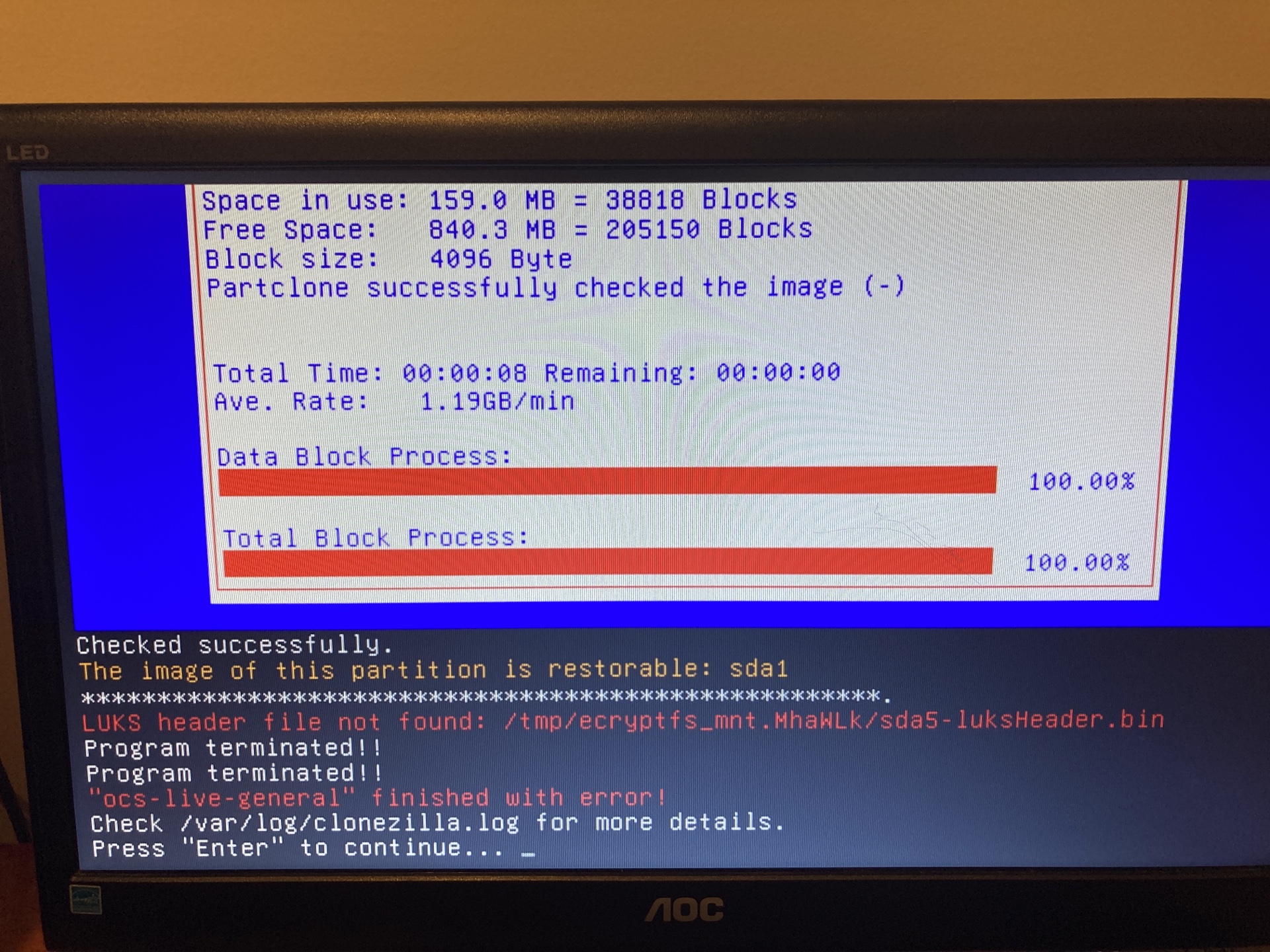
here's clonezilla.log https://pastebin.com/AckGTzg1
further, I noticed this in the end of dmesg https://pastebin.com/mQDk3fN7
Last edit: nwb99 2023-02-25
Unfortunately, the problem still exists under version 3.1.0-22
Please describe how to reproduce this issue using 3.1.0-22 in detail.
Let's us know every step you have done when saving and restoring so that we can try to reproduce it. Once it's reproducible, we will do our best to fix it.
Thanks.
Steven
I just tested a bit, I'll see that I document it in more detail on the weekend.
What I have found out
I will try it again this weekend and document it in detail.
Is there any update on this issue? I am still having this problem with 3.1.2-22; and it's as Steven noted where if I'm backing up to a SMB share, it will fail with the error that it can't find the LUKS header file (same as all above screenshots). However, if I backup to another attached disk, it will work without issue.
I set it up to open the LUKS container, encrypt the clone, and save to the SMB share and it fails every time.
Is this issue reproducible with testing Clonezilla live, i.e., >=3.1.3-11 or 20240630-*:
https://clonezilla.org/downloads.php
Steven
Yes, I tried with 3.1.3-11 and still had the same issue.
I was going to grab a log file, but I couldn't find the log that had this line in it. It wasn't in the /var/log/clonezilla.log
You can see the point of failure between the two screenshots. When saving to a local disk, you can see right after I enter my password for the existing LUKS volume, it says it's saving the LUKS header and then has no error message.
However, when I'm saving to an SMB share, after I enter the password and it runs the command to save the LUKS header, it throws an error that it couldn't save the header file - but it doesn't provide any reason why it failed and the rest of the process just continues anyway (until it gets to the verify stage where it will fail for not finding that file).
One thing I noticed is permissions do seem to be different. I can "ctrl+alt+F2" to switch to the second TTY. From there, when I have a "local disk" mounted, I can go to the "/home/partimag" path and create files as the "normal user" (whoever it logs in by default). However, if I have the "SMB Share" mounted, then it seems only root (or sudo) can create files in "/home/partimag"
I'm wondering if potentially the command to save the LUKS header is not running as root or otherwise doesn't have the permissions - or if the SMB share is being mounted with the wrong permissions. That may be what's causing the failure to create the file.
Edit:
I'm at a loss. As a test, I tried adding the "noperm" option to the OCS function for the SMB/cifs mount command. This "solved" the issue of requiring root to write to /home/partimag or the "/tmp/ecryptfs_mnt.XXXXXX" path. However, the command to save the header file would still fail. So, it wasn't the root cause.
I believe the root cause is potentially a bug in ecryptfs related to an SMB mount. If I manually ran the "cryptsetup" command to save the header file to the "/tmp/ecryptfs_mnt.XXXXXX" path, it would error out with that same error that it couldn't create the file. However, if I ran the command and substituted the "/home/partimag" path, then it would be able to write to the SMB share just fine (of course, by bypassing the ecryptfs mount, the file didn't write with encryption).
What perplexes me is the rest of the tools, like partclone, and everything else, are able to write to the/tmp/ecryptfs_mnt mount point without error. It just seems to be the cryptsetup command that fails to write to the ecryrptfs mount point when it's encrypting an SMB share path.
I guess potentially there may be a "workaround" to just have the cryptsetup command write the header to a "temp" file (RAM), and then separate copy it to the ecryptfs mount point. However, that seems a bit convoluted and I don't know enough to say whether that poses any security risk of that header file ever being in an unencrypted state when the user specifically asked to encrypt the clone. (It would end up encrypted after copying, but I don't know if there's a risk of it being temporarily exposed in RAM).
I assume smarter minds than my own could find the correct solution.
Last edit: Russ Kubes 2024-07-08
Thanks for your feedback.
Somehow here I just can not reproduce this issue. I used Clonezilla live 3.1.3-11 amd64 release, and saved Ubuntu Jammy which has 1 LUKS partition. It ran smoothly here.
The image repository I had:
root@debian:~# findmnt /home/partimag/
TARGET SOURCE FSTYPE OPTIONS
/home/partimag
//192.168.120.8/smb
cifs rw,relatime,vers=3.1.1,cache=strict,username=bryan,uid=0,noforceuid,gid=0,noforcegid,addr=192.168.120.8,file_mode=0755,dir_mode=0755,so
When it saved an image, in the step you mentioned, it ran like:
********.
Found LUKS device: nvme0n1p3
We have to open LUKS device now. You will be prompted to enter passphrase for each one of them.
Extracting initramfs: /tmp/ird_mnt.gpU/initrd.img-5.15.0-56-generic... done.
Found LUKS crypttab file in /tmp/ird_mnt.gpU/initrd.img-5.15.0-56-generic. Appending it to /home/partimag/luks-2024-07-10-05-img/luks-crypttab-from-OS.info...
*******.
Now open the LUKS device: /dev/nvme0n1p3
Running: cryptsetup open --type luks /dev/nvme0n1p3 sda3_crypt
Enter passphrase for /dev/nvme0n1p3:
Running: cryptsetup luksHeaderBackup --header-backup-file /home/partimag/luks-2024-07-10-05-img/nvme0n1p3-luksHeader.bin /dev/nvme0n1p3
**********.
You can check the attached file for more details.
Steven
Did you choose to encrypt the saved image?
It's the combination of the source disk being LUKS, the destination being SMB share, and choosing to encrypt the saved image.
Thanks for your feedback.
Please give testing Clonezilla live >= 3.1.3-15 or 20240711-* a try:
https://clonezilla.org/downloads.php
This issue should have been fixed.
Please let us know the results.
Thanks.
Steven
I apologize for the delay, it took me some time to get to a position to test this again. By the time I tested, I saw 3.1.3-16 was already available as 'stable'. I tried with that version and no longer have this issue. It seems to be resolved now. Thanks!
Cool. Thanks for confirming that.
Steven