Home

Welcome, this wiki is for documentation of adx.
You can find here information how adx works, tips and tricks, etc.
Table of contents:
- What is adx?
- Getting started with adx
- Import contacts
- Export contacts
- Tested web browser
- Web browser search in your adx contacts
- Settings
- Securing your data in adx
What is adx?
adx (addressbook.xml) is a simple but massively web enabled address book in your web browser (no server components needed).
Supported web accounts: Skype, LinkedIn, Facebook, Xing, ebay, Flickr, Picasa, YouTube, MySpace, Twitter, Soup, ICQ, AIM, YIM, MSNIM, Jabber, Picasa, Google, Spin.de, last.fm, SourceForge, DeviantArt, identi.ca, bebo, studiVZ, qype.com, brightkite.com, hi5.com, quarterlife.com, amiestreet.com, hellotxt, etc. See [Accounts] for full list
Supported Microformats:
- hCard 1.0
- XFN (Xhtml Friends Network)
How it works: addressbook.xml + XSLT = HTML in your web browser
Getting started with adx
- Download and unzip latest adx zip file from SourceForge
- Load addressbook.xml in a web browser
- Click on the entries to expand details
- Most entries in contact details are clickable (e.g. direct calling phone numbers via Skype, address lookup in Google Maps, etc.)
To add contacts just edit addressbook.xml in a text editor of your choice
Import contacts
Importing contacts
- Online importer for Open Contacts (a freeware address book tool for Windows)
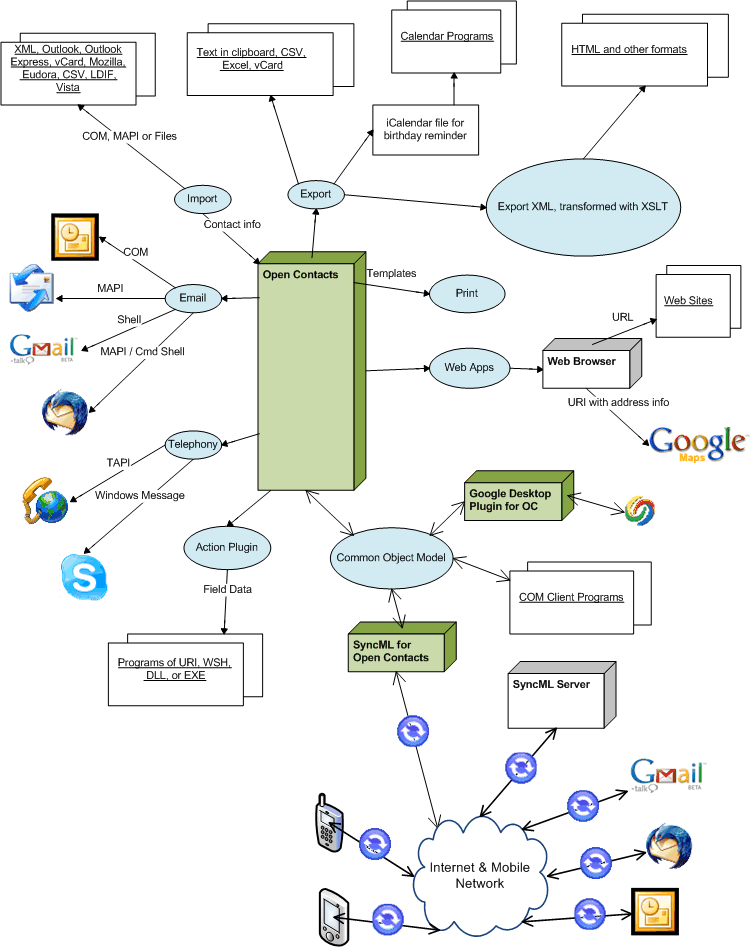
- Opent Contacts has itself various import possibilities which can be used as intermediate step before importing to adx. Supported import formats are Outlook, vCard, Mozilla, Eudora, CSV, LDIF and more.
- You can create your own XSLT transformator to import any XML based format to adx (e.g. based on the XSLT file from Open Contacts to adx)
Otherwise add your contacts manually to [addressbook.xml] with a text editor of your choice.
Export contacts
Export contacts to vCard (vcf file)
Native vCard export via adx:
- All contacts in one vcf file: in adx menu => Export => All
- One contact per vcf file: in adx menu => Export => One (formerly known as "Specific") enables for each contact a link vCard to download a vcf file
- Note: On native exporting the contacts are completely processed in the web browser. So, your contact data is not leaving your web browsor and therefore not uploaded to any server. Privacy matters!
Or export via Firefox browser plugins like Operator or Tails Export
How to use the vCard files:
-
Android phones can import easily vCard contacts (Android >= 2.1). Go to contacts in your phone and press 'menu' where you can find an import functionality from your SDCard (e.g. in 'options').
-
Thunderbird (version 16 as of now) has several issues on importing vCard data. The Thunderbird extension MoreFunctionsForAddressBook imports vCards much better.
-
Evolution Email solution can also import vCard files.
- As vCard is the standard format for contact interchange there are many tools which support vCards.
Export contacts via QR Code (vCard)
A QR code is a two-dimensional barcode which can contain vCard data. Following example contains a full contact:

A QR code can be optical read out e.g. by any device with a camera and an app (Recommendation for Android: Barcode Scanner)
adx uses a open source QR code generator library to generate the QR code completely offline. So, your contact data is not leaving your web browsor and therefore not uploaded to any server.
Export contacts to whatever format you want
You can also create a XSLT document to export the contacts to the format of your choice.
Tested web browser
- Firefox: Recommended (fastest browser for adx; works out of the box for online and
offline/local usage)- Since Firefox version 68 adx can not be used adx offline out of the box any more. See Workaround
- Microsoft Edge
- Microsoft IE (Internet Explorer version 11 should work fine, older versions limited)
- Chromium based browsers (e.g. Google Chrome, Opera, Vivaldi and probably Safari): need a workaround if you want to use adx locally
Workaround for Firefox 68 and newer for offline/local usage ("file://...")
Since Mozilla Firefox version 68 offline/local usage (if you use "file://..." to access adx) is not supported any more due to security reasons.
Workaround:
In order to be still able to run adx offline/locally ("file://...") you can apply a workaround by changing internal Firefox config:
1. Enter abount:config as URL in Firefox
2. Set security.fileuri.strict_origin_policy to false
Note: Disabling this security setting is at your own risk.
Workaround for Chromium based browsers for offline/local usage ("file://...")
All Chromium based browsers need a workaround if you want to use adx offline/locally (if you use "file://..." to access adx):
- Google Chrome: workaround needed
- Opera: workaround needed
- Vivaldi: workaround needed
- Brave: workaround needed
- Safari and other Chromium based browsers: not yet tested if workaround needed
Reason: Chromium's more restrictive security model for local access starting with version 5. See here for more info.
Workaround: Start browser with command line param "--allow-file-access-from-files"
In following you see two How Tos which should be similar on any other OS.
Workaround for Chrome under Windows
- Search for your shortcut icon for starting Chrome on your Windows desktop.
- Right-click on the Chrome shortcut and select "Properties"
- Append in field "Target":
--allow-file-access-from-files

Notes:
- It's important that the very first instance of Chrome was started with parameter
--allow-file-access-from-files. You can check this in Chrome by entering URLchrome://version(see screenshot below). - As Chrome/Chomium uses background tasks even if it's closed a restart of the whole OS is the safest way to ensure that the additional paramter is applied.
- It might be necessary to apply this on every shortcut you use. E.g. in start menu, on desktop, etc.
- You can not access properties of a pinned Chrome icon to the task bar. Try unpin Chrome shortcut. Start Chrome with an adjusted Chrome shortcut (with --allow-file-access-from-files) and pin again.
Workaround for Chromium under Ubuntu
Following was tested with Ubuntu 11.10 - 18.04 under Gnome 3. Add needed command line parameter in file /usr/share/applications/chromium-browser.desktop:
- Load file in browser. E.g. open a terminal window and enter
sudo gedit /usr/share/applications/chromium-browser.desktop - Replace in text editor
Exec=/usr/bin/chromium-browser %UwithExec=/usr/bin/chromium-browser --allow-file-access-from-files %U - As Chrome/Chomium uses background tasks even if it's closed a reboot is the safest way to ensure that the additional paramter is applied.
If it's still not working you can doublecheck with URL chrome://version if the parameter --allow-file-access-from-files is listed:

Attention: This option is applied to all chromium instances started inside Gnome desktop. If you have security concerns you should start chromium directly from terminal with command line parameter chromium-browser --allow-file-access-from-files.
Note: This change gets overwritten on each update of the browser and must be repeated. An automated way to check and update the desktop file is therefore recommended.
Workaround for other Chromium based browsers like Chrome, Opera, Vivaldi, Brave, etc under Ubuntu
Workaround should be similar as described above for Chromium.
Default filenames of the different browsers in /usr/share/applications/:
- Opera: opera.desktop
- Vivaldi (stable): vivaldi-stable.desktop
- Brave: brave-browser.desktop
- Google Chrome: ???
- ...
Web browser search in your adx contacts
You can register adx as browser search engine. Add a url template like following consisting of your addressbook.xml (works online and offline). "%s" will be replaced by your search term.
Examples:
- file:///home/username/addressbook.xml?searchfilter=%s
- http://myhost.com/addressbook.xml?searchfilter=%s
You need to replace the path to your addressbook.xml (works online and offline).
Integrate adx in browser search: Chrome/Chromium
In Chrome this can be added very easy in Preferences -> Manage Search Engines.
Integrate adx in browser search: Firefox
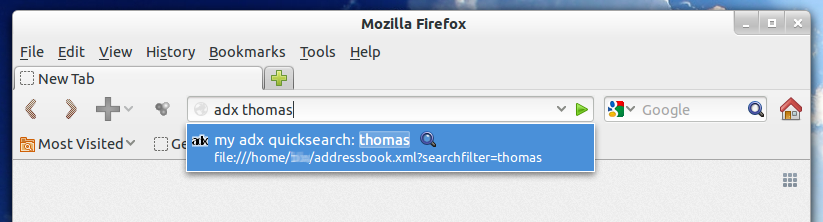
Firefox integration can be done via a bookmark with above url pattern. Important is to apply a keyword for the bookmark (e.g. "adx") in order to call it from the url bar:
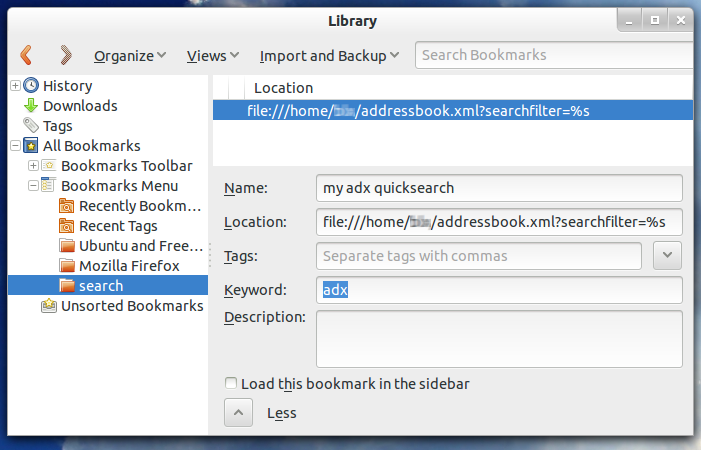
Once added as bookmark (here with keyword "adx") you can search from the address bar:
Settings
There are two types of settings:
- permanent settings in XSL File (adx2html_phonelist.xsl)
- URL parameters
For details see below.
Cookies or similar technology is not used at all.
Settings in XSL File (adx2html_phonelist.xsl)
Search for "User settings" in adx2html_phonelist.xsl. There's a list with settings you can adjust:
- headline_show_default
- details_show_default
- exports_show_default
- photo_show_default
- headline_text
- menu_opacity
- menu_shadow
- phone_showIcons
- phone_internationalAreaCode_default
- phone_protocol: Can be adjusted in order to execute the phone program of your choice like Skype. Example value "tel:" or "callto:"
- phone_skype_show: adds skype as direct call to right side of a contact (below the normal phone numbers)
accountIcons_colorStyle: possible values are "grey" or "color"removed in version 1.12- accountIcons_saturation_basic: sets saturation of account icons (color) when mouse is NOT over the contact, e.g. "20%" results in quite greyed out icon colors
- accountIcons_saturation_groupHover: sets saturation of account icons (color) when mouse is over the contact, e.g. "50%" result in medium greyed out icon colors. Note: When mouse is over the account icon itself the saturation is always set to "100%" (full color, not greyed out at all)
- birthday_highlightUpcoming_default
- birthday_outputFormat
- folksonomy_href
- tag_adxFrequency_Show: defines which frequency levels are shown by default (e.g. "high,medium")
- map_href: Defines URL for map application, e.g. "http://www.bing.com/maps/default.aspx?q=" for Bing Maps or "http://maps.google.com/maps?q=" for Google Maps
- map_geo_href: Defines URL for geo information (based on latitude and longitude)
- logo_href: Own logo can be configured as URL or Data URI in variables
- logo_href_protectionzone: Own logo can be configured as URL or Data URI in variables (logo with protection zone is used for resolutions > 32x32 pixels)
- debugMode: can be enabled for developing/debugging purposes
URL parameters
URL parameters cover most settings you can directly adjust on your adx web site. Example in order to show contact details by default: http://elektronengehirn.net/addressbook/addressbook.xml?showdetails=1
This is handy in order to bookmark adx with your needed settings:
- Adjust settings in your adx web site
- Clicking on "Save" in your adx web site results in a reload with all URL parameters
- Now you can bookmark adx with your settings in URL parameters
Example with all URL parameters: http://elektronengehirn.net/addressbook/addressbook.xml?showdetails=1&showheader=1&showexport=1&tagfilter=Musician&searchfilter=Raph&frequencyhigh=1&frequencymedium=1&frequencylow=1&fontsize=1.1em
Securing your data in adx
Basic access authentication over HTTPS
Provides an easy way to encrypt your data and set user/password, e.g. if you want to publish your adx on the internet.
Two independent techniques are combined:
- Basic access authentication Wikipedia for user credentials (user/password)
- HTTPS Wikipedia for encryption of transport (avoid sniffing your adx data)
Protection:
- What is protected: all files (including addressbook.xml with your sensitive contact data) are encryped while transport from server to browser via HTTPS-protocol
- Who can access: Everybody who has the credentials (user/password)
Security notes:
- See article on StackOverflow about security issues
- Warning: If you forget the "s" in https your password (from Basic Authentication) will be sent unecnrypted and can be easily sniffed (see next item)
- Do NOT use Basic access authentication alone because the password is only BASE64-encoded. This is no encryptioin and can be sniffed in clear text when the browser sends it to the server.
How to setup:
- Create a directory on your web server. e.g. "demo-https-basicauth"
- Enable Basic authentication for the new directory and define user and password to access it (for more details check your hoster's documentation)
- Enable HTTPS on your web server (for more details check your hoster's documentation)
- Upload your adx files to the new directory on your web server (e.g. addressbook.xml, adx2html_phonelist.xsl, qrcodeUTF8.min.js)
Now you should be able to access your adx accordingly.
Demo: https://elektronengehirn.net/addressbook/demo-https-basicauth/addressbook.xml (user: "demo", password: "httpsBasicAuth")
Others ways to secure adx
Basically every possibility to encrypt or protect you data on the web. E.g. OAuth, ...