
 Download Latest Version
phpMan.php.gz (34.3 kB)
Download Latest Version
phpMan.php.gz (34.3 kB)

Get an email when there's a new version of phpMan
| Name | Modified | Size | Downloads / Week |
|---|---|---|---|
| README.md | 2026-05-31 | 18.6 kB | |
| phpMan.php.gz | 2026-05-31 | 34.3 kB | |
| Totals: 2 Items | 52.9 kB | 0 |
phpMan — Unix Man Page / Perldoc / Info Page Web Interface & MCP Server
A single-file PHP web interface and Model Context Protocol (MCP) server for Unix man, perldoc, info, and apropos commands.
For AI Agents: Query Unix documentation via MCP protocol or REST API. Get structured man pages with parsed flags, examples, and cross-references.
Quick Start for Agents
MCP Integration (Recommended)
Add to your MCP client configuration:
mcpServers:
  phpman:
    url: "https://www.chedong.com/phpMan.php/mcp"
REST API (Fallback)
# Get structured man page as JSON
curl "https://www.chedong.com/phpMan.php/man/ls/1/json"

# Get MCP-wrapped output
curl "https://www.chedong.com/phpMan.php/man/ls/1/mcp"
Project Home
- SourceForge: https://sourceforge.net/projects/phpunixman
- Live Demo: https://www.chedong.com/phpMan.php
- Static Site: https://phpunixman.sourceforge.io/
⚠️ SourceForge no longer supports PHP (since 2025-05-20). The dynamic demo runs on
chedong.com.
Screenshot
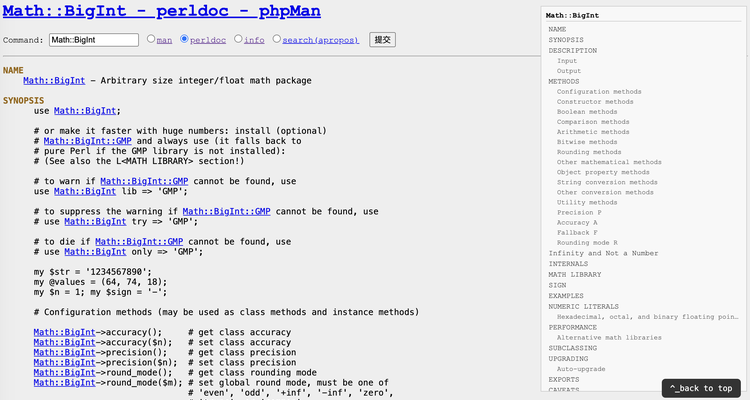
MCP Server Protocol
phpMan implements the Model Context Protocol (MCP) specification version 2024-11-05 via Streamable HTTP transport.
Endpoint
POST https://www.chedong.com/phpMan.php/mcp
Content-Type: application/json
Available Tools
1. cli_help — Get Command Documentation
Returns structured documentation for any Unix command, Perl module, or GNU info page.
Input Schema:
{
  "command": "string (required) — Command name (e.g. 'ls', 'git', 'File::Basename')",
  "section": "string (optional) — Manual section (e.g. '1', '3pm'). Omit for best-match."
}
Returns:
content[0].text— Full JSON response as string (for LLM parsing)structuredContent— Programmatic access to flags, examples, synopsis, and cross-references
Example:
curl -X POST "https://www.chedong.com/phpMan.php/mcp" \
  -H "Content-Type: application/json" \
  -d '{
    "jsonrpc": "2.0",
    "id": 1,
    "method": "tools/call",
    "params": {
      "name": "cli_help",
      "arguments": {"command": "tar", "section": "1"}
    }
  }'
Auto-detection:
- Commands containing
::or section3pm/3perl→perldocmode - Other commands →
manmode
2. cli_search — Search Man Pages
Search across all man page names and descriptions using apropos.
Input Schema:
{
  "query": "string (required) — Search keyword (e.g. 'recursive delete', 'network', 'cron')",
  "section": "string (optional) — Restrict to manual section (e.g. '1', '8')"
}
Returns:
content[0].text— JSON with search resultsstructuredContent— Programmatic access to results array
Example:
curl -X POST "https://www.chedong.com/phpMan.php/mcp" \
  -H "Content-Type: application/json" \
  -d '{
    "jsonrpc": "2.0",
    "id": 2,
    "method": "tools/call",
    "params": {
      "name": "cli_search",
      "arguments": {"query": "cron"}
    }
  }'
MCP Protocol Flow
1. Initialize (handshake):
{"jsonrpc":"2.0", "id":1, "method":"initialize", "params":{"protocolVersion":"2024-11-05"}}
Response includes serverInfo.name = "phpMan", capabilities.tools.listChanged = false
2. List Tools:
{"jsonrpc":"2.0", "id":2, "method":"tools/list"}
Returns the two tools above with their inputSchema
3. Call Tool:
{"jsonrpc":"2.0", "id":3, "method":"tools/call", "params":{"name":"cli_help", "arguments":{...}}}
4. Notifications (optional):
{"jsonrpc":"2.0", "method":"notifications/initialized"}
Server returns HTTP 202 (no-op)
Error Handling
MCP errors follow JSON-RPC 2.0:
{
  "jsonrpc": "2.0",
  "id": 3,
  "error": {
    "code": -32603,
    "message": "Internal error: Unknown tool: nonexistent"
  }
}
Common error codes:
-32700— Parse error (invalid JSON)-32600— Invalid request (missing method)-32601— Method not found-32602— Invalid params-32603— Internal error (tool execution failed)
JSON Schema Reference
Both MCP structuredContent and REST /json endpoints return the same schema.
Man Page Response
{
  "mode": "man",
  "parameter": "tar",
  "section": "1",
  "url": "https://www.chedong.com/phpMan.php/man/tar/1/json",
  "generated": "2026-01-15T10:30:00Z",

  "synopsis": "tar [OPTION...] [FILE]...",
  "summary": "tar - An archiving utility",

  "sections": {
    "NAME": {
      "content": "tar - An archiving utility",
      "subsections": []
    },
    "SYNOPSIS": {
      "content": "tar [OPTION...] [FILE]...",
      "subsections": []
    },
    "DESCRIPTION": {
      "content": "The GNU tar program...",
      "subsections": []
    },
    "OPTIONS": {
      "content": "",
      "subsections": [
        {
          "name": "-c, --create",
          "content": "Create a new archive",
          "flag": "-c",
          "long": "--create",
          "arg": null
        },
        {
          "name": "-f, --file=ARCHIVE",
          "content": "Use archive file or device ARCHIVE",
          "flag": "-f",
          "long": "--file",
          "arg": "ARCHIVE"
        }
      ]
    },
    "EXAMPLES": {
      "content": "tar -cvf archive.tar file1 file2\ntar -xvf archive.tar",
      "subsections": []
    }
  },

  "flags": [
    {
      "flag": "-c",
      "long": "--create",
      "arg": null,
      "description": "Create a new archive"
    },
    {
      "flag": "-f",
      "long": "--file",
      "arg": "ARCHIVE",
      "description": "Use archive file or device ARCHIVE"
    }
  ],

  "examples": [
    "tar -cvf archive.tar file1 file2",
    "tar -xvf archive.tar"
  ],

  "see_also": [
    {
      "name": "gzip",
      "section": "1",
      "url": "https://www.chedong.com/phpMan.php/man/gzip/1/json"
    }
  ]
}
Field Descriptions
| Field | Type | Description |
|---|---|---|
mode |
string | "man", "perldoc", "info", or "search" |
parameter |
string | Command or module name |
section |
string | Manual section number (e.g. "1", "3pm") |
url |
string | Canonical JSON API URL for this page |
generated |
string | ISO 8601 timestamp (UTC) |
synopsis |
string | Command synopsis (extracted from SYNOPSIS section) |
summary |
string | One-line description (extracted from NAME section) |
sections |
object | Map of section names → section objects |
sections[name].content |
string | Section body text (newline-separated) |
sections[name].subsections |
array | Level-2 headings within section |
subsections[].name |
string | Subsection heading (e.g. "-c, --create") |
subsections[].content |
string | Subsection body text |
subsections[].flag |
string|null | Short flag (e.g. "-c") — only for option subsections |
subsections[].long |
string|null | Long flag (e.g. "--create") — only for option subsections |
subsections[].arg |
string|null | Argument placeholder (e.g. "ARCHIVE") — only for option subsections |
flags |
array | Extracted command-line flags with descriptions |
flags[].flag |
string | Short flag (e.g. "-c") |
flags[].long |
string|null | Long flag (e.g. "--create") |
flags[].arg |
string|null | Argument placeholder |
flags[].description |
string | Flag description (single line) |
examples |
array | Command usage examples (from EXAMPLES section) |
see_also |
array | Cross-references to related man pages |
see_also[].name |
string | Related command name |
see_also[].section |
string | Related command section |
see_also[].url |
string | JSON API URL for related command |
Search Response
{
  "mode": "search",
  "query": "cron",
  "count": 5,
  "results": [
    {
      "name": "cron",
      "section": "8",
      "description": "daemon to execute scheduled commands"
    },
    {
      "name": "crontab",
      "section": "1",
      "description": "maintain crontab files for individual users"
    }
  ]
}
MCP Wrapper Format
When using /mcp endpoint or MCP POST, the response is wrapped:
{
  "content": [
    {
      "type": "text",
      "text": "<full JSON response as string>"
    }
  ],
  "structuredContent": {
    "command": "tar",
    "section": "1",
    "mode": "man",
    "summary": "tar - An archiving utility",
    "synopsis": "tar [OPTION...] [FILE]...",
    "flags": [...],
    "examples": [...],
    "see_also": [...],
    "section_outline": [
      {
        "name": "NAME",
        "lines": 1,
        "subsections": []
      },
      {
        "name": "OPTIONS",
        "lines": 45,
        "subsections": [
          {"name": "-c, --create", "lines": 3, "flag": "-c", "long": "--create"},
          {"name": "-f, --file=ARCHIVE", "lines": 5, "flag": "-f", "long": "--file", "arg": "ARCHIVE"}
        ]
      }
    ]
  }
}
The content[0].text field contains the full JSON response as a string (for LLM consumption). The structuredContent field provides programmatic access to key metadata (for agent tooling).
REST API Endpoints
For clients that don't support MCP, phpMan exposes REST endpoints with identical structured output.
JSON API
Append /json to any detail page URL, or send Accept: application/json header:
# Man page with structured sections
curl "https://www.chedong.com/phpMan.php/man/ls/1/json"

# Apropos search results
curl "https://www.chedong.com/phpMan.php/search/git/json"

# Accept header (works on any URL)
curl -H "Accept: application/json" "https://www.chedong.com/phpMan.php/man/bash"
MCP Format (REST GET)
The /mcp format suffix wraps JSON output in MCP's content array — making REST GET and MCP POST responses identical:
# Same man page, same output format as MCP POST tools/call
curl "https://www.chedong.com/phpMan.php/man/ls/1/mcp"
# → {"content":[{"type":"text","text":"..."}],"structuredContent":{...}}

# Search with MCP format
curl "https://www.chedong.com/phpMan.php/search/cron/mcp"

# Perldoc with MCP format
curl "https://www.chedong.com/phpMan.php/perldoc/Digest::MD5/mcp"
This means any MCP client can GET /man/ls/1/mcp and parse the result identically to POST /mcp tools/call.
TLDR Endpoint
Generate cheatsheet-style summaries from man pages:
curl "https://www.chedong.com/phpMan.php/tldr/tar"
Returns Markdown with:
- Command summary
- 5-8 practical examples
- Common flags with descriptions
- Auto-generated
--helpand--versionexamples
What's New in v2.1
Cross-Platform Width Control
- perldoc: Uses
pod2text -w Npipeline for consistent output width on Linux and macOS - man (macOS/BSD):
MANWIDTHfallback whengroff -Tutf8is unavailable - man (Linux):
MANROFFOPT=-rLL=Nn+groff -Tutf8for precise width
Roadmap
See docs/PLAN.md for the full project plan:
- pydoc / ri — Python and Ruby documentation support (pydoc3 / ri)
- LLM-powered — AI translation (identifier-preserving), cheat sheets, example generation
- Search — Alphabetic sidebar navigation for large index pages (>150 entries)
- MCP — Streaming output, error standardization, dynamic tool discovery
- I18N — LANG-based locale support + AI fallback translation
Features
- Man Pages — Browse any Unix/Linux manual page with
-Tutf8output (SGR bold/underline support) - Perldoc — Read Perl module documentation in-browser
- Info Pages — View GNU info documentation
- Apropos Search — Full-text search across man page summaries
- TOC Sidebar — Two-level floating table of contents for navigation
- Markdown Output — Append
/markdownfor machine-readable format - JSON API — Append
/jsonfor structured JSON output with semantic fields - MCP Format — Append
/mcpfor MCP-compatible output - MCP Server — Model Context Protocol endpoint for AI agent integration
- TLDR Endpoint — Append
/tldrfor cheatsheet-style summaries - SEO Optimized — Canonical URLs, meta description, robots directives
- Clean URLs — PATH_INFO routing:
/man/ls/1
Comparison: man / Info / Perldoc Modes
phpMan supports three Unix documentation retrieval methods, each corresponding to different system commands, data sources, and documentation format specifications.
1. man Mode
| Item | Description |
|---|---|
| System Command | man -Tutf8 <argument> |
| Data Source | /usr/share/man/, /usr/local/share/man/ — files with .1.gz, .3pm.gz etc. |
| Source Format | troff / groff (AT&T typesetting language), original content contains overstrike sequences (e.g., W^HWA^HAR^HRN^H...) |
| Standard | man-pages(7) — 9 sections: 1=user commands, 2=system calls, 3=C library functions, 4=device files, 5=file formats, 6=games, 7=miscellaneous, 8=system administration, 9=kernel routines |
| Internal Structure | Flat document per page, fixed sections include NAME, SYNOPSIS, DESCRIPTION, OPTIONS, EXAMPLES, SEE ALSO, etc. |
| Subsections | Supports second-level subsections (.SS macro → bold/underline), fully displayed in TOC |
2. info Mode
| Item | Description |
|---|---|
| System Command | info <argument> |
| Data Source | /usr/share/info/ — files with .info.gz, .info |
| Source Format | Texinfo (GNU documentation format), original content includes typesetting markers (* Menu:, section numbers 4.1, cross-references (node)) |
| Standard | Texinfo → can generate PDF, HTML, and info. Node is the basic unit, with hypertext links via (node) forming a documentation tree |
| Internal Structure | Tree-like node structure, can contain submenu nodes, supports jump navigation |
| Subsections | Plain text output from info has only section numbers (3.1, 3.2) and indentation, no identifiable explicit heading macros, so TOC shows only first level |
3. perldoc Mode
| Item | Description |
|---|---|
| System Command | perldoc <module> → perldoc -f <function> → perldoc -q <regex> (three-level fallback) |
| Data Source | .pod files in Perl installation paths |
| Source Format | POD (Plain Old Documentation), Perl documentation format, uses =head1, =head2, =over, =item markers |
| Standard | perlpod(1) — =head1 for major sections, =head2 for subsections |
| Internal Structure | Flat document with clear =head1 → =head2 hierarchy |
| Subsections | Supports second-level subsections (=head2), fully displayed in TOC |
4. Cross-Comparison
| Dimension | man | info | perldoc |
|---|---|---|---|
| Ecosystem | BSD / Unix general | GNU project specific | Perl language specific |
| Source Format | troff / groff | Texinfo | POD |
| Overstrike Output | ✅ Yes | ❌ No | ❌ No (but has ANSI escapes) |
| Second-level Headings | .SS → bold/underline |
Section number + indent | =head2 → Title Case |
| TOC Depth | ✅ Full two levels | ❌ First level only | ✅ Full two levels |
| Linking Capability | Weak (cross-reference name(sec)) |
Strong (node tree (node) navigation) |
Weak (module reference Module::Name) |
| Typical Content | Command references, syscalls, config formats | GNU project complete manuals (tutorials, concepts) | Perl module API references |
ℹ️ About info Subsections: info mode currently cannot generate a second-level TOC because
infoplain text output only has section numbers (e.g.,3.1 Simple options), lacking explicit heading markers like man's.SSor perldoc's=head2. Support can be added by extending the heading recognition logic.
Check Out Source Code
HTTPS (read-only)
git clone https://git.code.sf.net/p/phpunixman/code phpman
SSH (developers)
git clone ssh://chedong@git.code.sf.net/p/phpunixman/code.git phpman
Quick Start
Deploy phpMan on any PHP 8.x server with a single file:
# Clone the repository
git clone https://git.code.sf.net/p/phpunixman/code phpman

# Copy to your web server's document root
cp phpman/phpMan.php /var/www/html/

# Access in browser
# https://your-server/phpMan.php
For Apache 2.x, ensure AcceptPathInfo On is configured to enable clean URL routing.
Publish Updates
The repository includes a generic Makefile for local checks, staging deployment,
production deployment, and release upload. Site-specific values are loaded from
.deploy.mk, which is intentionally ignored by git.
Create your local deployment config from the example:
cp .deploy.mk.example .deploy.mk
Then edit .deploy.mk for your server:
TEST_USER = your-user
TEST_HOST = example.com
TEST_PORT = 22
TEST_PATH = /home/your-user/example.com/test
TEST_URL  = https://example.com/test/phpMan.php

DEMO_USER = your-user
DEMO_HOST = example.com
DEMO_PORT = 22
DEMO_PATH = /home/your-user/example.com
DEMO_URL  = https://example.com/phpMan.php
1. Test Locally
make test
2. Commit and Push to SourceForge Git
git add phpMan.php README.md Makefile .deploy.mk.example .gitignore
git commit -m "description of changes"
git push origin master
3. Update Staging Demo
make deploy
This deploys only phpMan.php to the staging path configured by DEMO_TEST.
4. Update Production Demo
make release
make deploy-verify
⚠️ Do not overwrite
index.php— only updatephpMan.php.
5. Update Static Site (SourceForge project web)
scp index.html chedong@web.sourceforge.net:/home/project-web/phpunixman/htdocs/index.html
The index.html is a static project introduction page with screenshot and a demo link pointing to chedong.com/phpMan.php.
6. Upload Release
Upload the compressed archive and README to SourceForge File Release System:
make upload-release
README.md will be rendered below the file listing on the Files page. Or upload manually via: https://sourceforge.net/projects/phpunixman/files/
License
GNU General Public License v2.0 — see copyright page.
Author
Che Dong — https://www.chedong.com/